20
Setting Up Key Features
Customizing Receiver
S
ETTING UP KEY FEATURES
Locks
Locks allow you to block channels or programs by requiring a password to be
entered before they can be viewed.
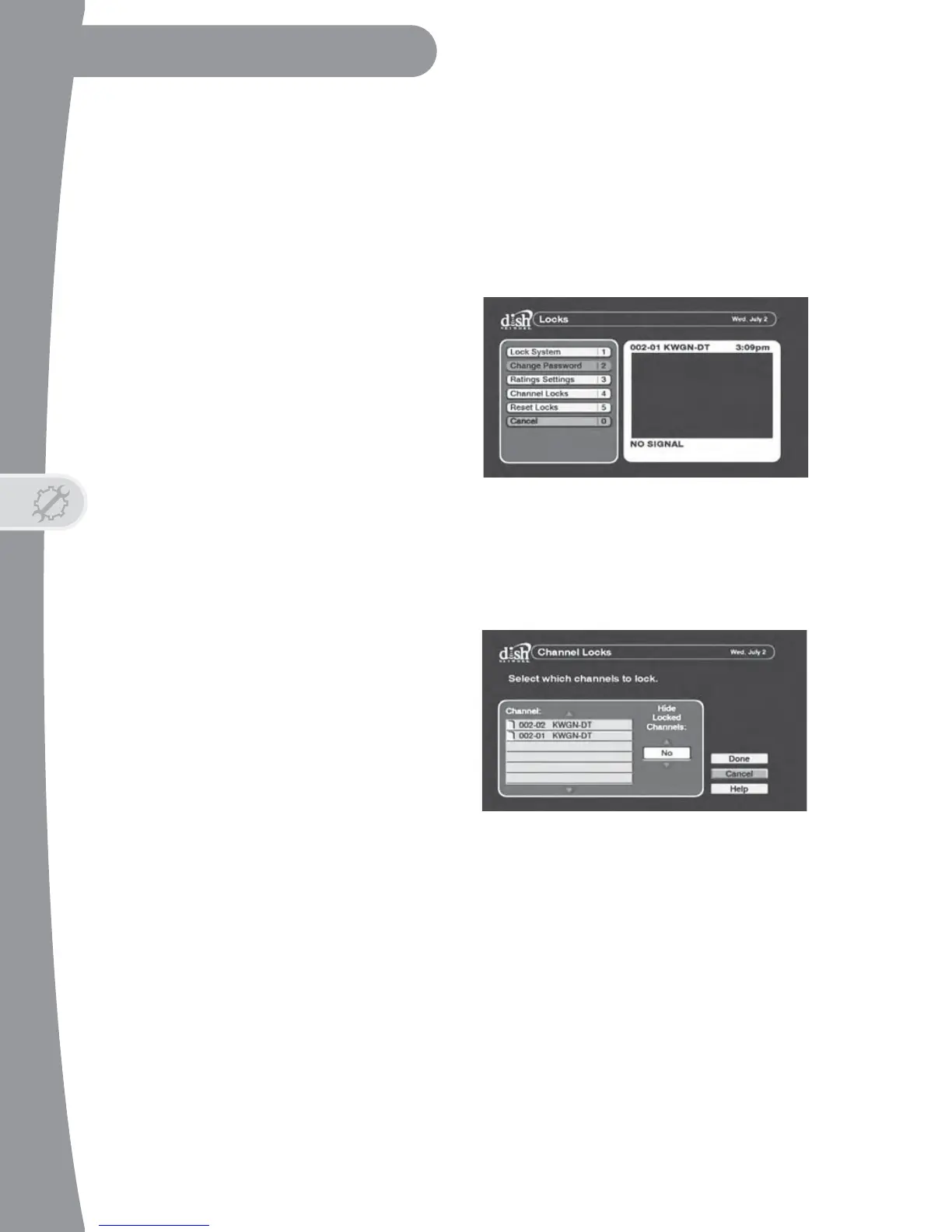
Access the Locks menu by pressing
MENU on the remote control,
selecting Setup, then selecting
Locks, then following the steps
below. If you previously set a
password, you’ll need to enter the
password to access the Locks
menu. After you choose your Locks
settings, you’ll need to create a
password and lock the system for
the Locks to take effect.
Locking specific channels
To require a password to be entered to view specific channels:
1. Select Channel Locks from
the Locks menu.
2. Use the UP and DOWN
ARROWS to find the
channels you want to block.
Press SELECT to include the
channel in the list of locked
channels. A channel is
selected when it has a filled-
in box next to it.
3. If you want to hide the selected channels from being displayed in the
Program Guide and other channel lists, select Yes under Hide Locked
Channels. Select Done to save your changes.
4. Follow the steps in Locking your DTVPal DVR to apply the channel
locks.
Locking programs based on ratings
Your DTVPal DVR supports a variety of ratings categories. These ratings
depend on information about the program included by the broadcaster.


 To Next Page