6
Getting Started
Watching TV
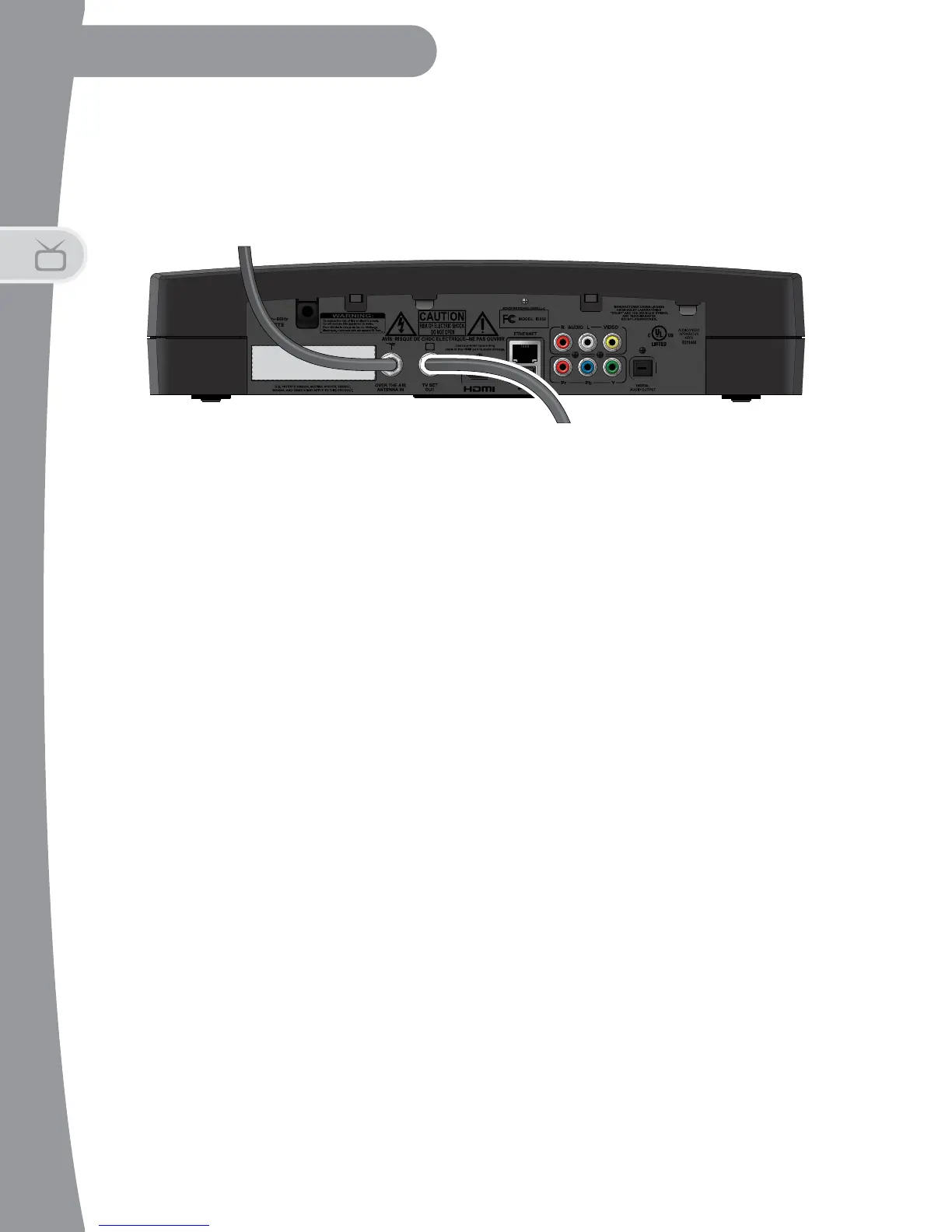
7. To connect your DTVPal DVR to your TV using a coaxial cable:
- Connect one end of coax to the TV’s A
NTENNA IN (or CABLE IN,
C
OAX IN or another name) connection.
- Connect the other end of the coax cable to the TV S
ET OUT
connection on your DTVPal DVR.
- Plug the power cord of the DTVPal DVR into an electrical outlet.
Make sure your TV also is plugged in to power and turned on.
- The DTVPal DVR first displays a startup screen.
- Confirm that you are getting a picture from the DTVPal DVR. You
may need to select a different channel or input source on your TV. If
you do not see the DTVPal DVR screen on the default output
channel, channel 3, try tuning your TV to channel 4. You can
change this default for DTVPal DVR in Setup Wizard, on page 8.
- Follow the instructions for Using the Setup Wizard on page 6 to
complete the initial setup of your DTVPal DVR. Tune to live TV.
- Turn up the volume on your TV and confirm you have sound. If you
do not have sound, check both ends of your coax connection.
Using the Setup Wizard
To finish installing your DTVPal DVR:
1. If you have not already done so, turn on your TV and change to the
correct channel or input to view your DTVPal DVR.
Coaxial Cable Connection
To Television
Connection
From Antenna


 To Next Page