10
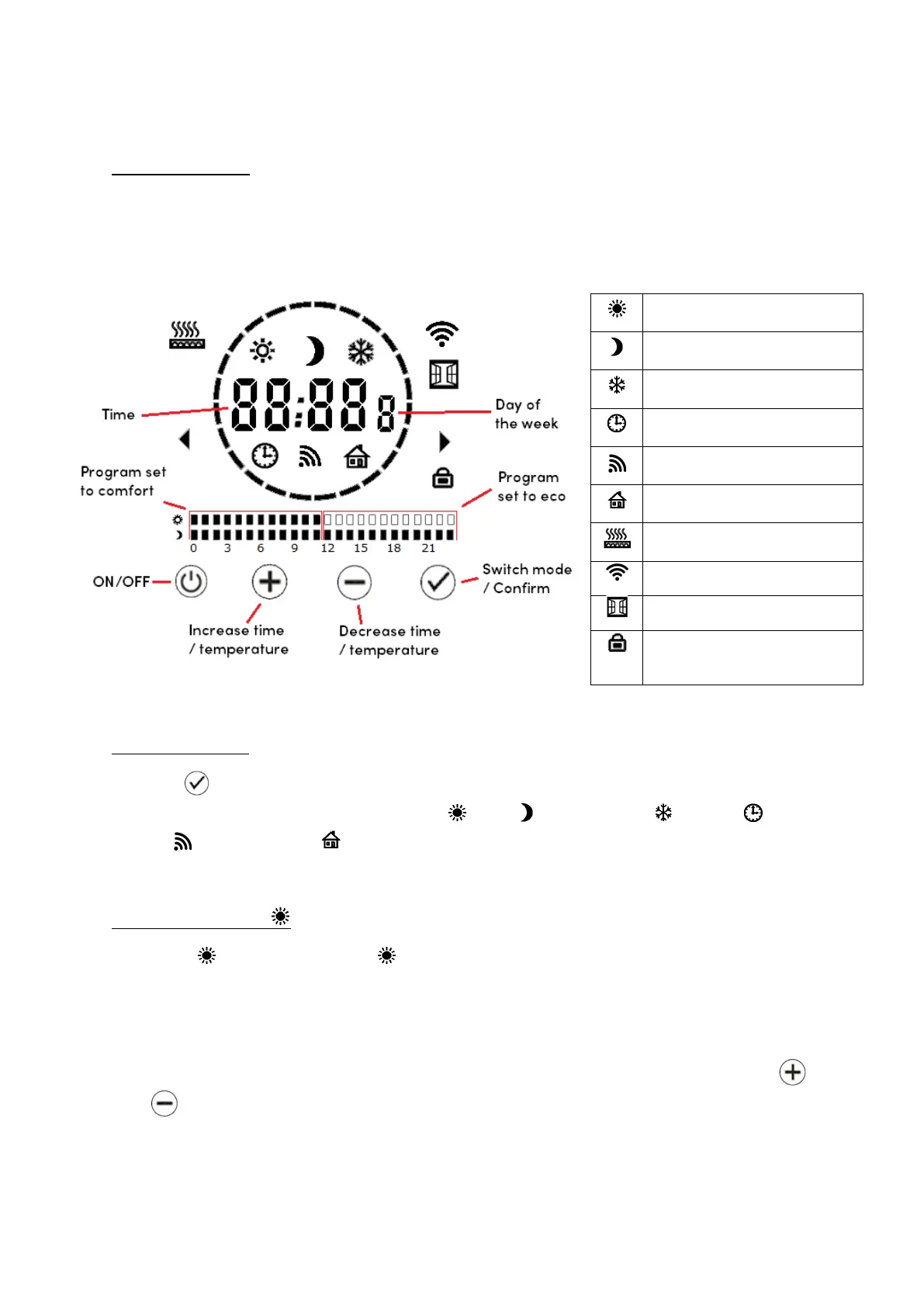
4 – 2 | Display
The touchscreen control panel includes a backlit LCD display. The backlight
switches on when the panel is in use and times out after a minute not in use.
4 – 3 | Modes
Tap the button to switch between modes. The icon on the display will change
accordingly, browsing through Comfort , Eco , Anti-Freeze , Timer ,
Sensor and Pilot Wire mode.
You can also switch back and forth between modes by swiping the touchscreen.
4 – 3 – 1 | Comfort
When the icon (and only the icon) displays on the screen, you are in comfort
mode. In this mode, the radiator heats to a constant set temperature. The
thermostat measures the room temperature and switches the heating elements on
and off accordingly.
The default set temperature is 19 °C. Set temperature can be adjusted using the
and buttons. Set temperature range is 7-30 °C.
The temperature set in comfort mode also applies to comfort intervals when they
occur in other modes, e.g. program mode and sensor mode (room occupied).
Comfort
Anti-freeze
Sensor mode
Pilot wire mode
Connected to WiFi
Open window detected
Keypad locked


 To Next Page