17
5. Press the SELECT (¡) button. If Recharge now is
selected, the display immediately goes to the
R
echarge status screen (See Figure 46). If Auto -
matic, Schedule, or Recharge off are selected, the
display goes back to the Main menu (Figure 44).
ECOWATER
S Y S T E M S
Filter Operation
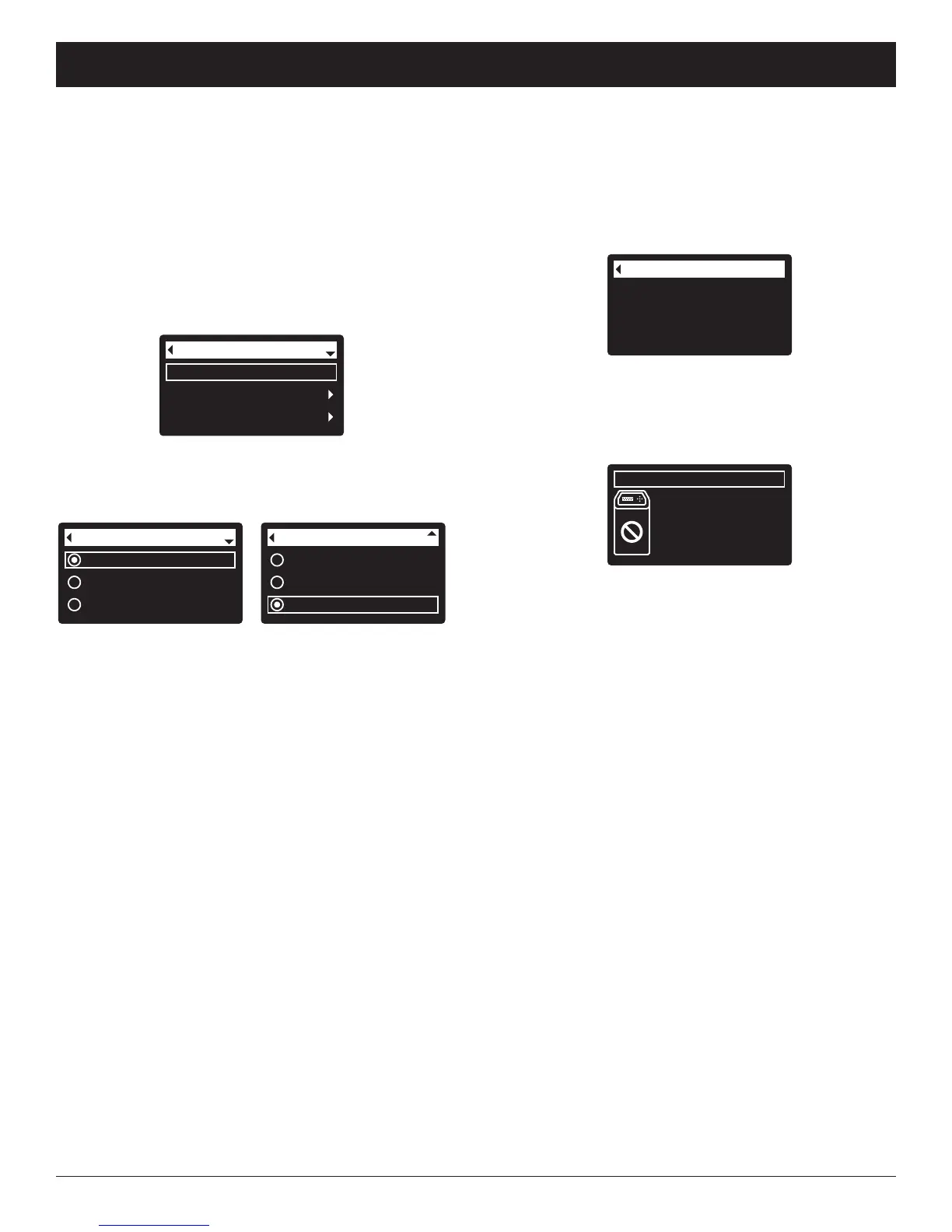
2. Make sure Recharge is highlighted (See Figure 44).
3. Press the SELECT (¡) button to display the
Recharge menu (See Figure 45).
R
echarge
Basic settings
User preferences
Main menu
FIG. 44
Recharge status
T
ime left: 1:58
Cycle: Backwash
(Right key press advances
cycle)
FIG. 46
6. Press the LEFT (3) button (twice from the Recharge
status screen) to return to the rolling status screens.
If Recharge off was selected, the normal sequence
of rolling screens will stop at the screen shown in
Figure 47.
RECHARGING THE FILTER
T
his feature may be used to assure an adequate supply
of conditioned water at times of unusually high water
use. For example, if you have guests you could
deplete conditioned water capacity before the next
automatic recharge. Initiating a manual recharge will
restore 100% conditioned water capacity after com-
plete.
1. From any of the rolling status screens, press the
SELECT (¡) button to display the Main menu.
4. If the desired option already has a dot next to it (See
Figure 45), go to Step 5. Otherwise, press the
DOWN (6) or UP (5) buttons to scroll to the desired
option, then press SELECT (¡) to choose it.
=Automatic cancels a manually scheduled recharge
(if it has not already begun) and lets the electronic
control determine when to recharge next.
=Recharge now begins a recharge immediately
after the SELECT (¡) button is pushed again in Step
5.
=Schedule sets a recharge to begin at the preset
recharge time (set according to the instructions on
Page 19).
=Recharge off puts the system into a “vacation
mode” where there will be no automatic recharges.
This can be used during any long absence when you
do not want the system using water. The recharge
status screen will display “No automatic recharges”.
When you return, be sure to cancel Recharge off by
setting recharge to Automatic or Schedule.
Initiating Recharge now does not cancel Recharge
off.
Recharge now
Schedule
Recharge off
Recharge
FIG. 45
Automatic
Recharge now
Schedule
Recharge
Recharge status
2:34 PM
Off - no automatic
recharges
FIG. 47



 To Next Page