B-2
Cables
B
Straight-Through Wiring
If the twisted-pair cable is to join two ports and only one of the ports has an internal
crossover (MDI-X), the two pairs of wires must be straight-through. (When
auto-negotiation is enabled for any RJ-45 port on these switches, you can use either
straight-through or crossover cable to connect to any device type.)
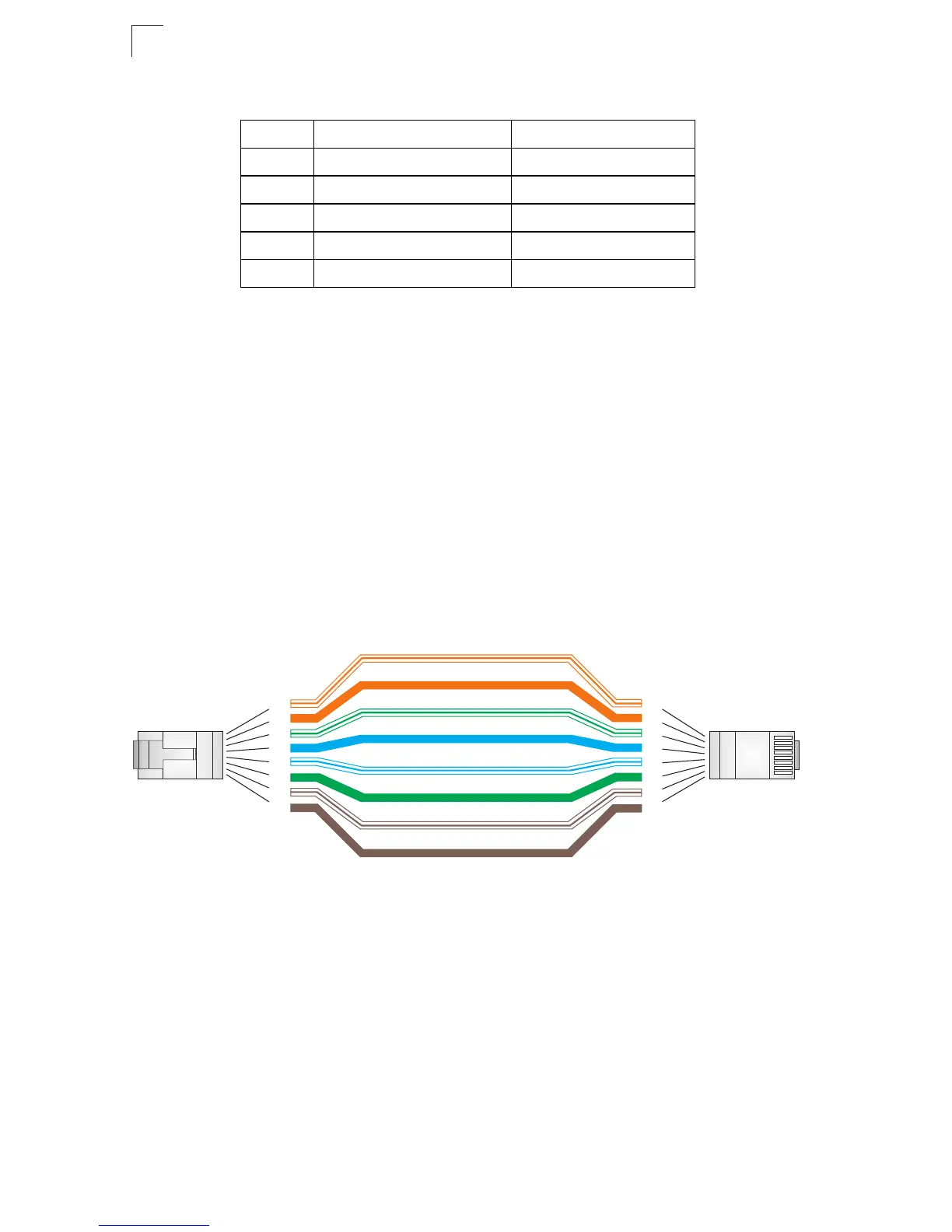
You must connect all four wire pairs as shown in the following diagram to support
Gigabit Ethernet connections.
Figure B-2 Straight-through Wiring
Crossover Wiring
If the twisted-pair cable is to join two ports and either both ports are labeled with an
“X” (MDI-X) or neither port is labeled with an “X” (MDI), a crossover must be
implemented in the wiring. (When auto-negotiation is enabled for any RJ-45 port on
these switches, you can use either straight-through or crossover cable to connect to
any device type.)
Table B-1 10/100BASE-TX MDI and MDI-X Port Pinouts
Pin MDI Signal Name MDI-X Signal Name
1 Transmit Data plus (TD+) Receive Data plus (RD+)
2 Transmit Data minus (TD-) Receive Data minus (RD-)
3
Receive Data plus (RD+) Transmit Data plus (TD+)
6
Receive Data minus (RD-) Transmit Data minus (TD-)
4,5,7,8
Not used Not used
Note: The “+” and “-” signs represent the polarity of the wires that make
up each wire pair.
White/Orange Stripe
Orange
White/Green Stripe
Green
1
2
3
4
5
6
7
8
1
2
3
4
5
6
7
8
EIA/TIA 568B RJ-45 Wiring Standard
10/100BASE-TX Straight-through Cable
End A
End B
Blue
White/Blue Stripe
Brown
White/Brown Stripe












 To Next Page