9
Cable Installation
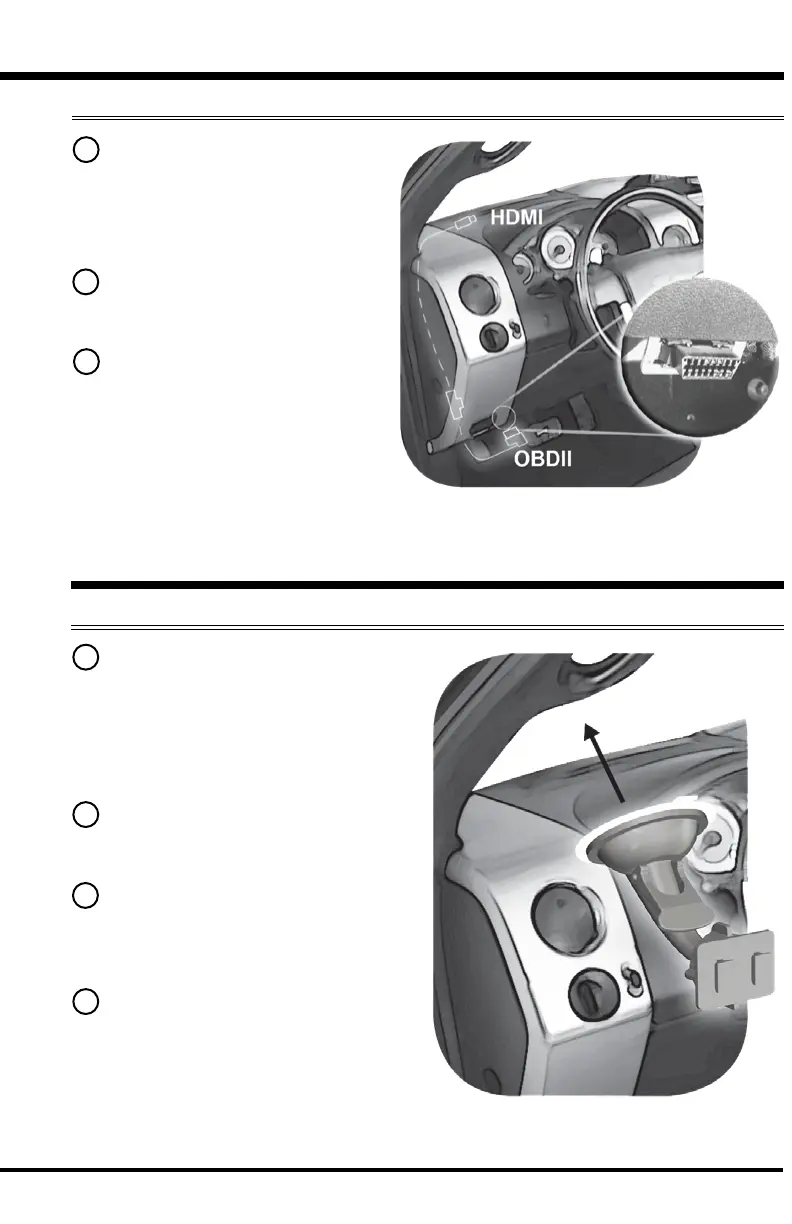
1 Locate the OBDII port. The
connector is typically found
directly below the driver side
dash console.
2 Plug the OBDII connector into
the vehicle port.
3 Route the HDMI connector
up the driver side dash. (On
most vehicles, the side panel
may be removed to expose the
underside of the dash for easier
routing. Leave panel open until
the display is installed.)
Windshield Mount Installation
1 Use the alcohol wipe to
clean the windshield in the area
you plan to place the suction
cup. Allow the glass to dry
completely.
2 Firmly press and hold the
suction mount against the glass.
3 Rotate the Cam Lever
towards the glass to create the
suction.
4 Plug the HDMI connector into
the back of the device and slide
the device onto the mount.


 To Next Page