16
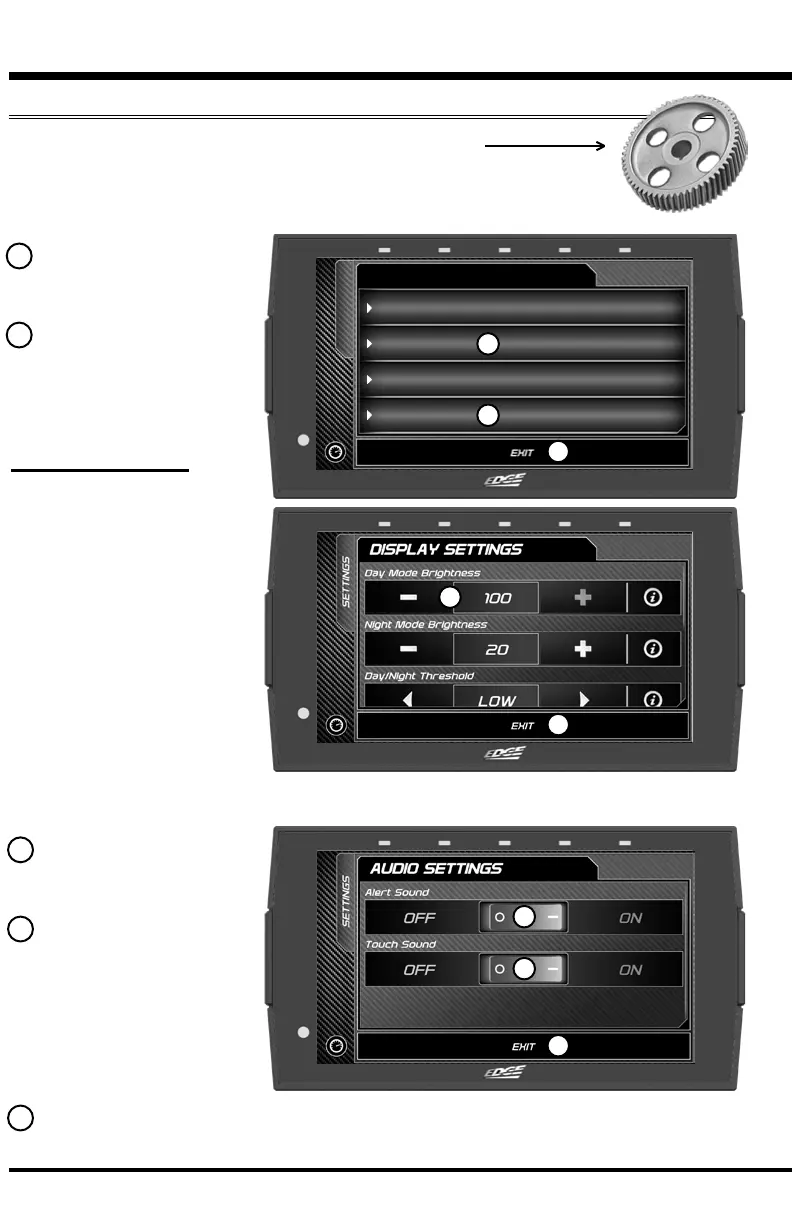
Display Settings:
Day Mode Brightness
Adjust the display
brightness for day-light
driving.
Night Mode Brightness
Adjust the display
brightness during night-
time or low-light driving.
Day/Night Threshold
Adjust the threshold of
when day mode turns to
night mode.
LED Brightness Adjust the brightness of the 5 device LEDs.
Help/Info
Display Settings
Device Colors
Audio Settings
SETTINGS
SETTINGS
Settings
While in the Main Menu, select the Settings icon.
A list of settings will appear. This section explains what these
settings are and how to use them.
1 Select the Display
Settings option.
2 Modify each setting
by adjusting it’s
corresponding setting
value.
Display & Audio Settings
1
2
3 Select the Audio
Settings option.
4 Turn On/O the
global Alert and Touch
sounds
Red = OFF
Green = ON
5
5
5
4
4
3
5 Press Exit to return to the main settings menu.


 To Next Page