37
“Continuous” – always connected.
“Connect on Demand” – connect when required.
“Manual” – connect and disconnect manually.
Idle Time Out For ”Connect on Demand” connection type, specify the
length of inactivity required to disconnect.
BEZEQ-ISRAEL Check this box to enable use with the BEZEQ network
in Israel.
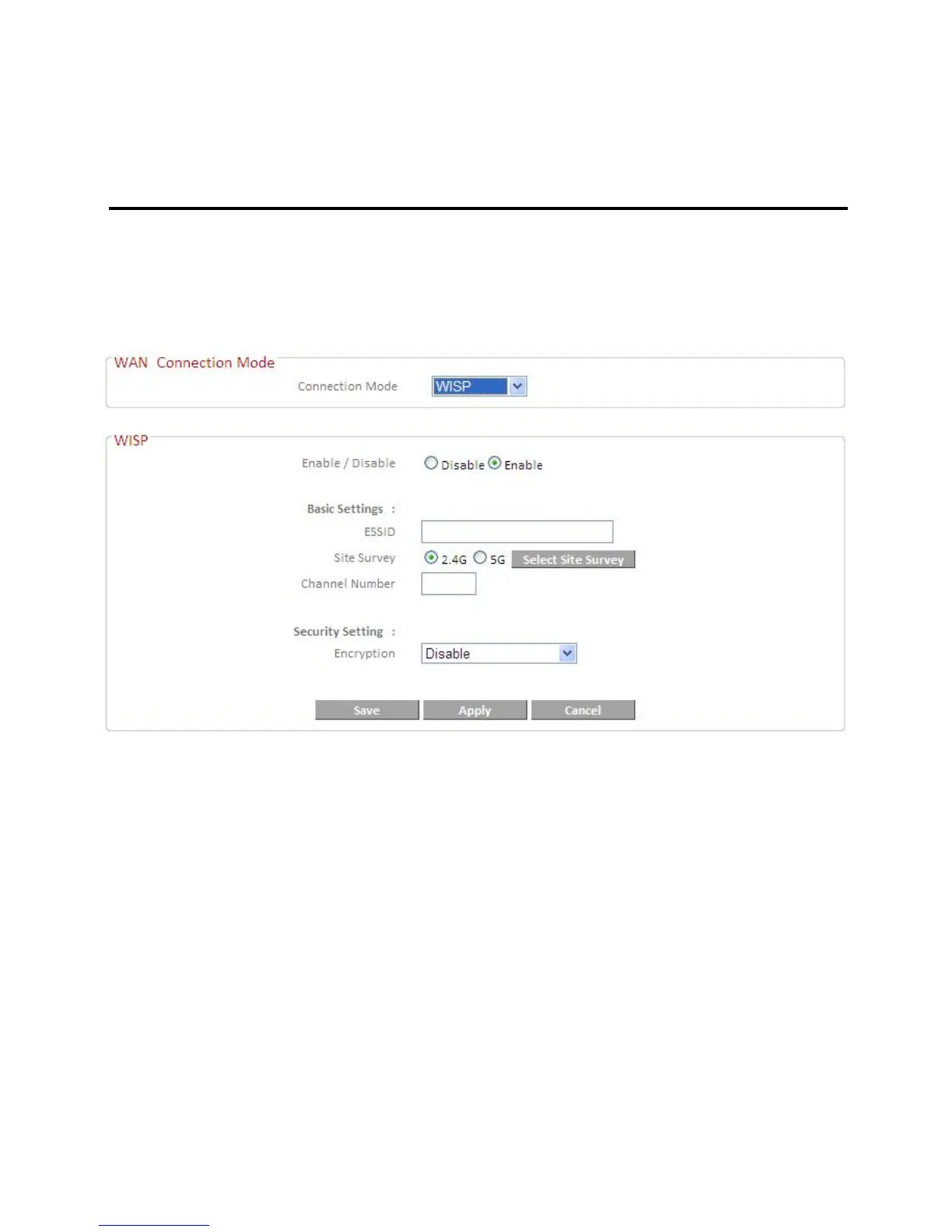
IV-3-1-5. WISP
Select “Enable” or “Disable” to enable/disable the WISP function accordingly.
ESSID Enter the ESSID of the WISP network, or click
“Select Site Survey” to view all available networks
and select the WISP network.
Site Survey Select “2.4G” or “5G” to specify the 2.4GHz or 5GHz
frequency band for the site survey.
Channel Number Enter the channel number of the WISP network.
Encryption If your WISP service uses encryption, select
“Enable” from the drop down menu and enter the
appropriate information.
IV-3-2. DDNS
Dynamic DNS (DDNS) is a service which provides a hostname-to-IP service for
dynamic IP users. The changing nature of dynamic IPs means that it can be













 To Next Page