17
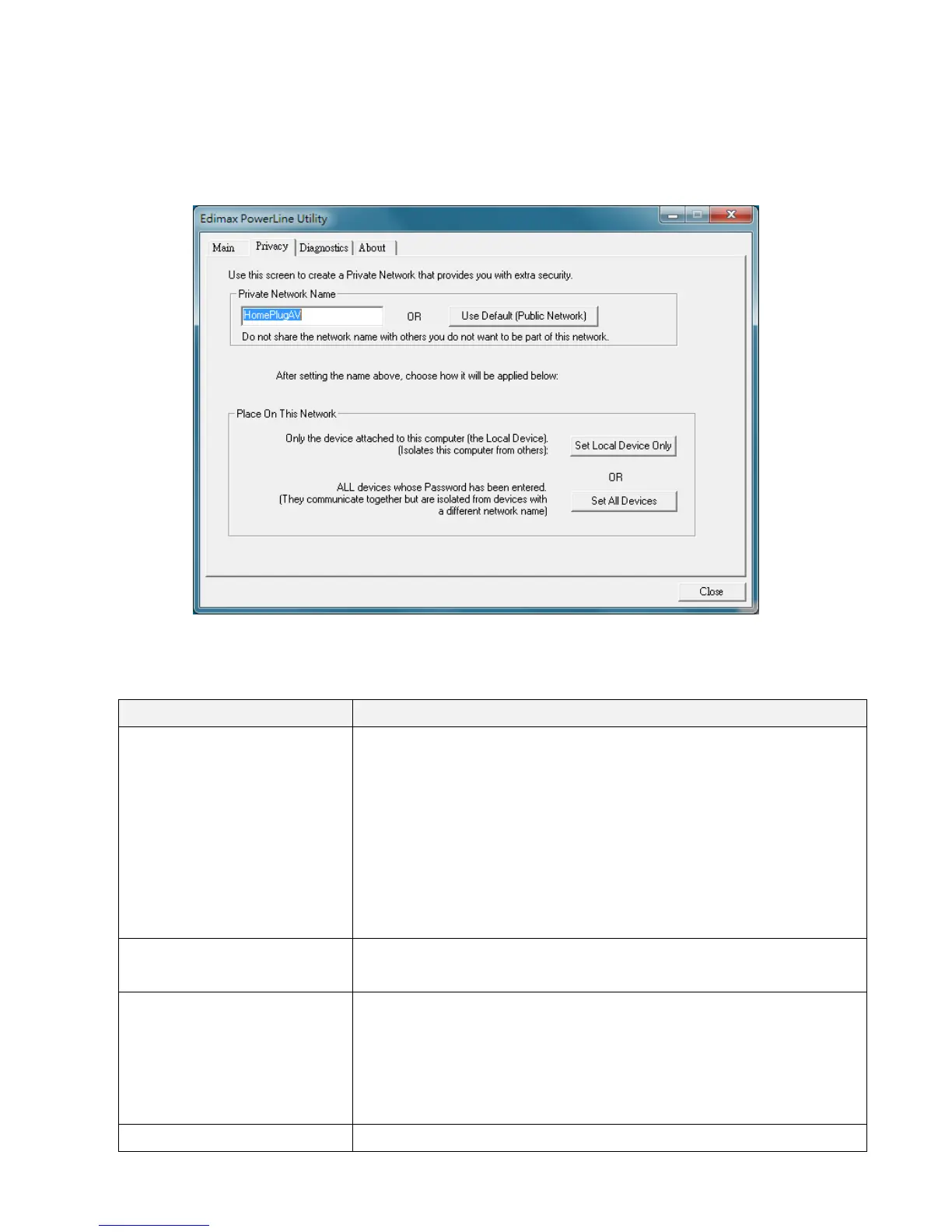
5.2PrivacyTab
Inthe“Privacy”tab,youcancreateaprivatenetworkbychangingthedefaultnetwork
name.
Thefollowingaredescriptionsofeverysetupitems:
Item Descriptions
PrivateNetworkName Almostallofthepowerlineadaptersshippedwiththesame
networkname“HomePlugAV”.Withthesamenetwork
name,allthepowerlineadapterscanbeconnected
directly.
Ifyouwanttocreateprivatenetwork,pleaseenterthenew
networknameandthenclick“SetLocalDeviceOnly”or
“Set
AllDevices”button.
UseDefault(Public
Network)
Clickthisbuttonandtheinthe“PrivateNetworkName”
columnwillbeshownthedefaultname“HomePlugAV”.
SetLocalDeviceOnly Thisbuttonisusedtochangethenetworknameofthe
localdeviceonly.Onceyouhav echangedthenetwork
nameofthelocaladapteronly,theadaptersseenonthe
“Main”tabpriortothiswillbenolongerpresentinthe
network.
SetAllDevices Thisbuttonisusedtochangethenetworknameofall


 To Next Page