EasyManua.ls Logo

Edimax IC-7110 - Space Alarm

Edimax IC-7110
172 pages
Print Icon
To Next Page IconTo Next Page
To Previous Page IconTo Previous Page
Loading...
87
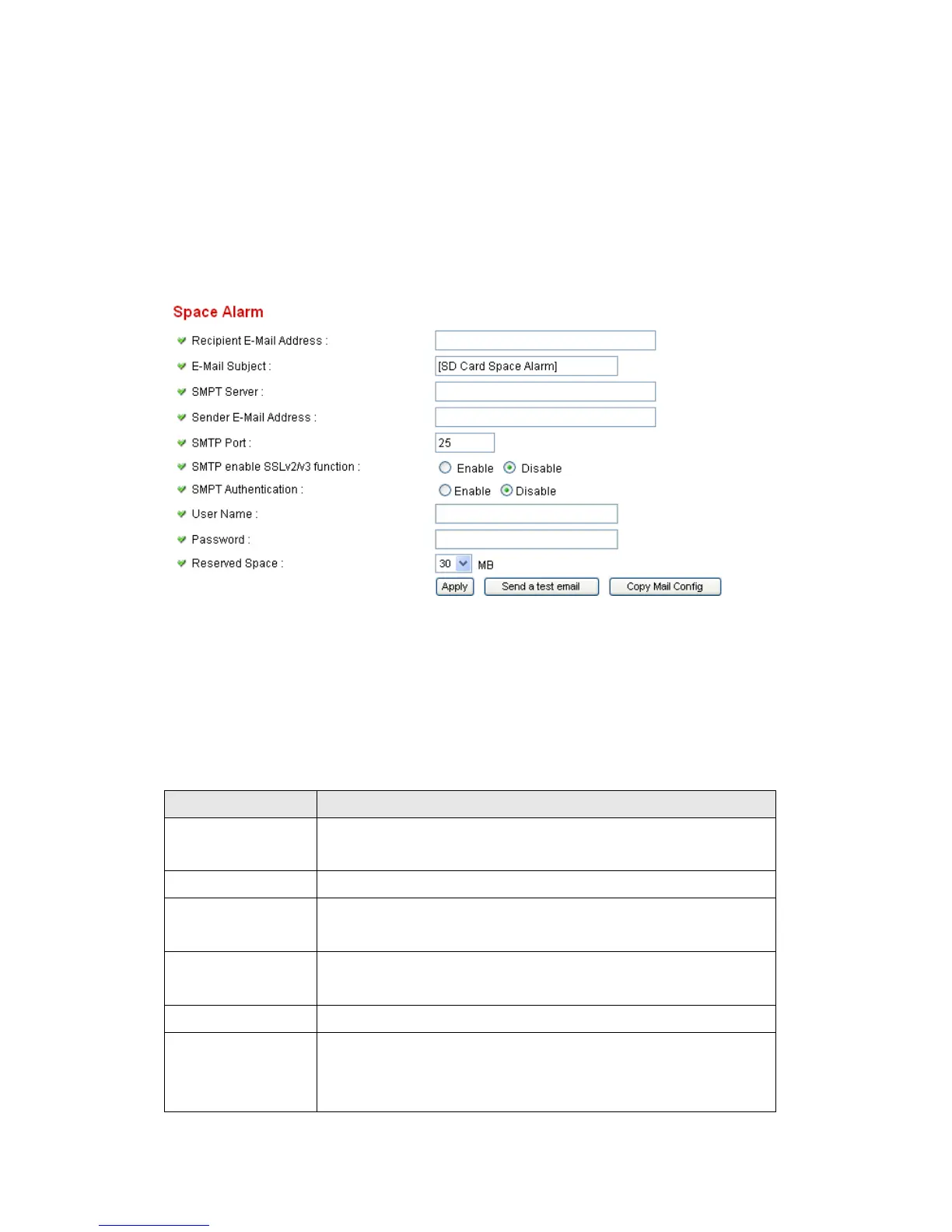
2.8.2 Space Alarm
When youre using SD card to store captured image and video clip, you can
have this camera to send an E-mail to you when theres only little remaining
space left on SD card.
Please note: If you have set E-mail settings in ‘Motion Picture function, you
can click Copy Mail Config button to use the same setting. However, you can
use a different setting here.
The descriptions of every setting in this menu will be given below:

Item
Description
Recipient E-Mail
Address
Input the E-mail address you wish to receive space
alarm.
E-Mail Subject
Input the title of space alarm E-mail.
SMTP Server
Input the SMTP server address you wish to use to send
E-mail.
Sender E-Mail
Address
Input the sender E-mail address of the space alarm
E-mail.
SMTP Port
You can set port number according to your mail server.
SMTP enable
SSLv2/v3
function
Select Enable if your SMTP server supports SSLv2/v3
such as gmail.

Related product manuals