88
Examples of using the V-4
Using BGV output with a musical performance (example
of using V-LINK)
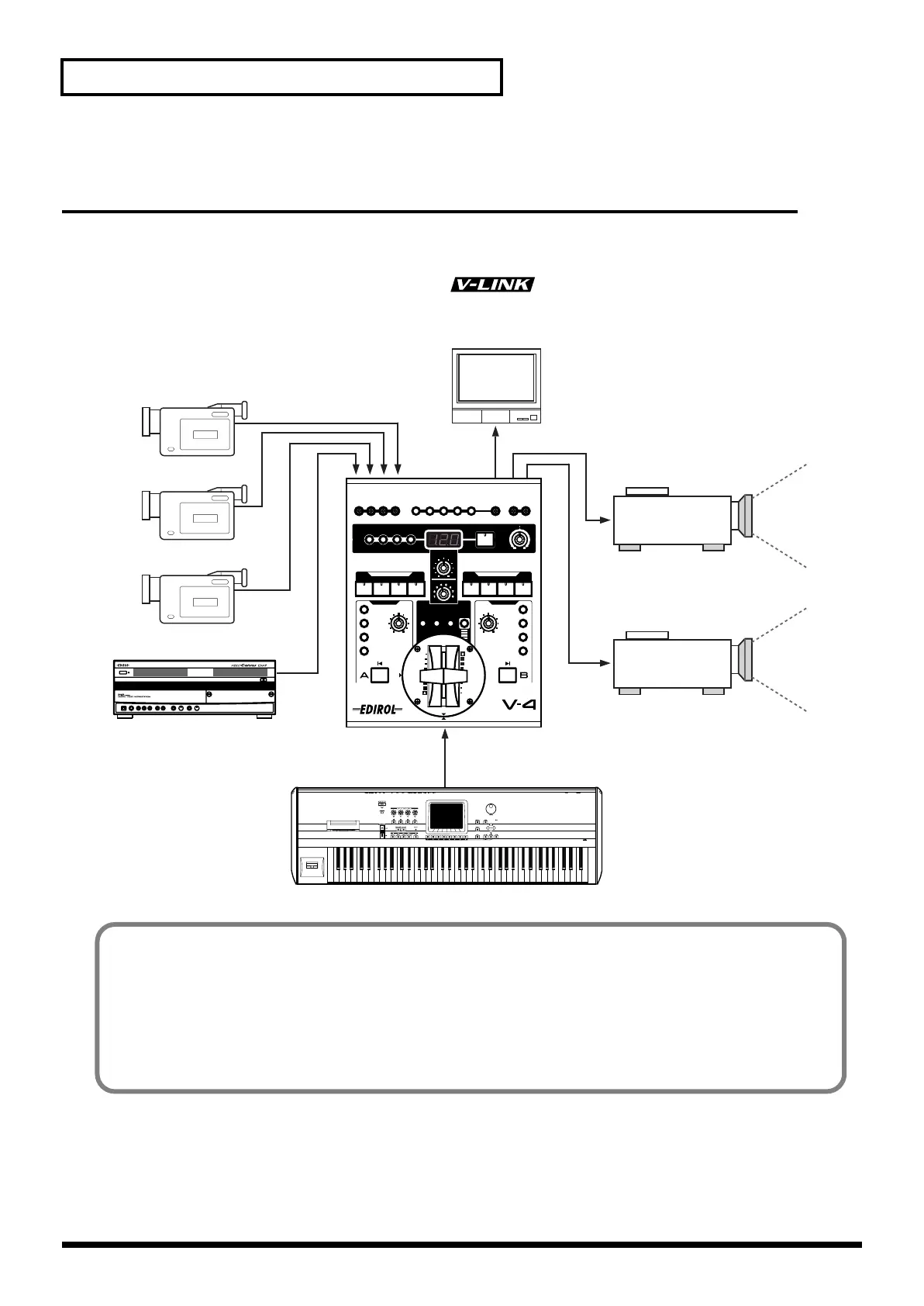
Background video (BGV) can be controlled while you play a musical instrument. You can control
images without affecting the normal capabilities of the instrument. In particular if you are using a
device that supports Roland/Edirol V-LINK ( ), you can press a single button to
quickly and easily make settings for controlling images.
Live source
DV-7PR
Video output
Preview
MIDI control
Projector (1)
Projector (2)
Advantages of using the V-4
• When used in conjunction with the DV-7PR, a single instrument can control the live video and the
video from the DV-7PR
• Video effects can be turned on/off from the musical instrument
• If you are using a V-LINK compatible device, MIDI settings can be made very simply
* For details on controlling the V-4 from an external device, refer to p. 57.
V-4_e.book 88 ページ 2010年3月11日 木曜日 午後1時51分


 To Next Page