Optimuss OS User’s Manual
List button to get back to the list of recordings.
Program Information (Infobar)
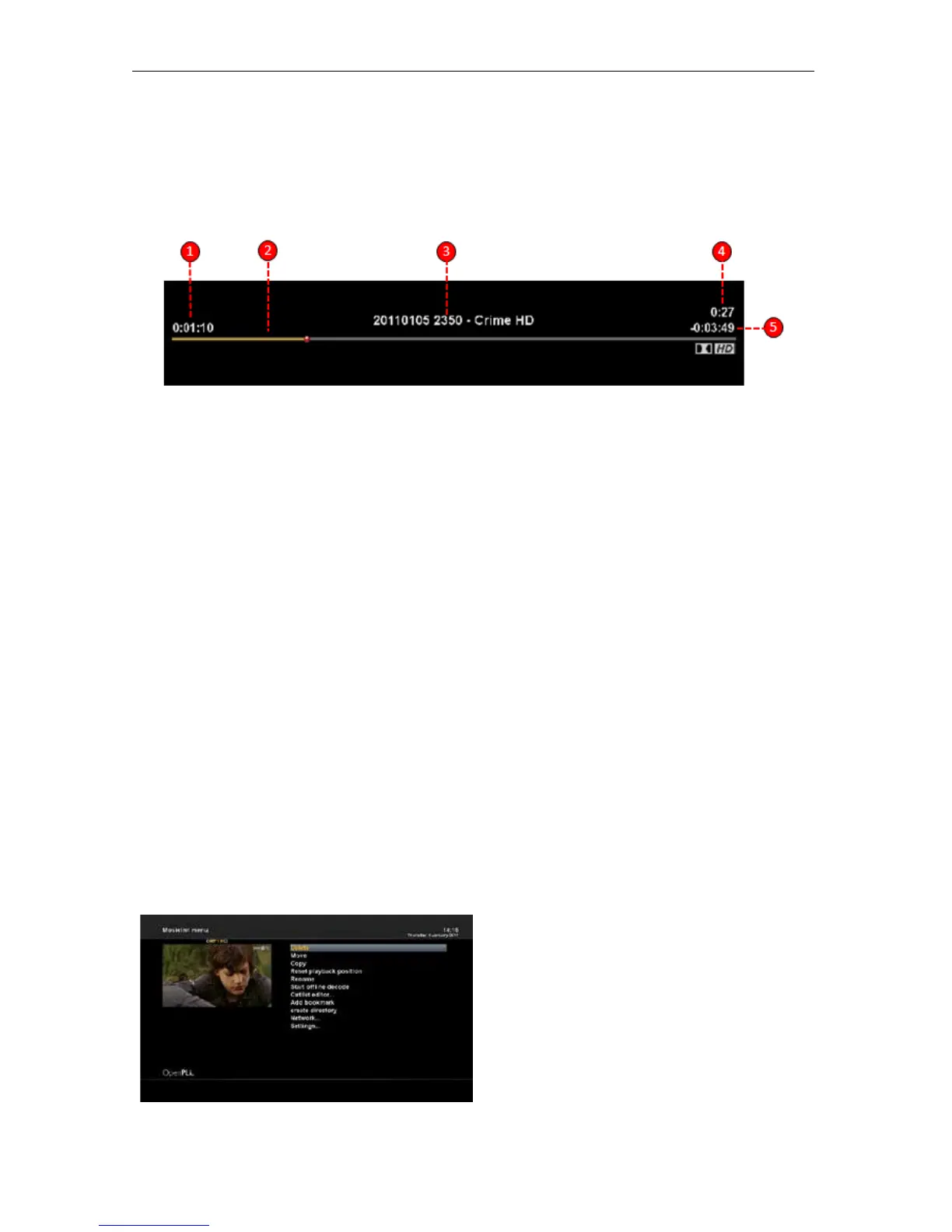
To see the detailed information about the currently played recording, press the OK button.
1. Elapsed time
2. Progressive bar
3. Title of the recording
4. Current time
5. Remaining time
15-2 To play in fast motion
With the FR / FF buttons you can activate fast forward or rewind playback mode during normal
playback.
• Forward (Fast Forward button): 2x,4x,8x,16x,32x,64x,128x
• Back (Rewind button): 2x,4x,8x,16x,32x,64x,128x
Every press on the button increases the speed by one step.
15-3 To play in pause motion
Press Timeshift(II) button to pause playback. To resume playback press Play button.
16. Managing Recording Files
If you want to delete a recording file, press MENU key while Recorded file menu is on.
Select “Delete” and confirm OK to delete.
Other than “delete”, in this menu, you have options in move, rename and copy of the recording files.
- Delete
- Move
- Copy
- Reset playback position
- Rename
- Start offline decode
- Cutlist editor
- Add Bookmark
- 36 -















 To Next Page