PD00E0XKNXFI00020100_HANDBOOK_EN.DOCX
PD00E0xKNX KNX PRESENCE DETECTORS RANGE Handbook
Eelectron SpA, Via Monteverdi 6,
I-20025 Legnano (MI), Italia
Tel: +39 0331.500802 Fax:+39 0331.564826
E-mail: info@eelectron.com Web:www.eelectron.com
C.F. e P.IVA 11666760159
Tribunale di Milano 359157-8760-07
CCIAA Milano 148549
"slave" it is possible to define whether presence is
detected with telegram "0" or "1".
As will be seen later, in the section relating to the
sensor channels, each channel can be a "master" of
all the defined slaves or only a part of them; this
allows to define complex behaviours.
For example: in an area covered by 5 sensors the
"master", to which 4 "slaves" are connected, is able
to regulate a group of lights which must be turned
on when at least one slave detects the presence
while other 5 groups of lights can be each
associated with a single sensor.
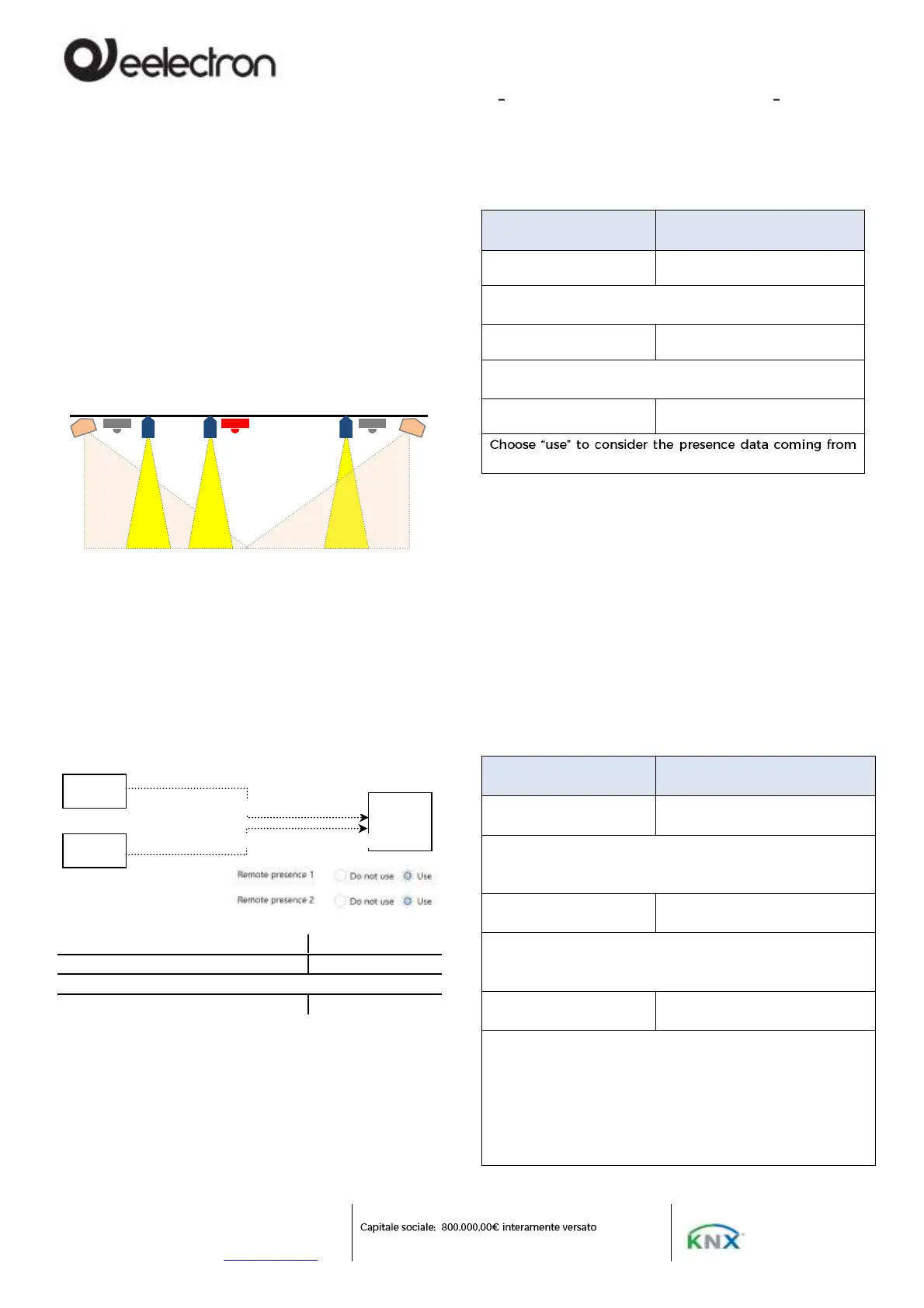
In figure 1 the sensors A, B, C regulate the lamps
1,2,3 respectively. A second channel of sensor A
regulates lamps 4 and 5, which must both remain
on as long as presence is detected by one of the 3
sensors (A or B or C). The second channel of sensor
A considers the telegrams of remote sensors B and
C.
9..12 | <Remote presence x> Input
Object to receive presence / absence from other sensors
9. Use of remote presence
To use the presence information from remote
sensors, the following parameters are available
within the configuration page of each channel; it is
necessary to have enabled and connected the
communication objects as described in the previous
chapter.
Choose yes to consider data from other sensors for this
channel
Choose "use" to use the information of the presence
channel of the device itself.
the remote sensor 1 (2,3,4)
10. Remote illuminance
The sensor can receive the illuminance value from
other sensors and use it to obtain a weighted
average. Each sensor channel has its own
parameters to select which external lighting values
to consider and with what weight.
It is possible to activate up to 4 remote brightness
channels, for each channel the following
parameters are available.
Remote illuminance
sensor
Activates the remote brightness channel, makes a
communication object visible and also the following
parameters.
Illuminance after
download [*10 Lux]
Defines the value that the communication object assumes
after downloading, ie before valid data is received from the
remote sensor.
Correction coefficient
[*0.1]
Set the factor to be multiplied, expressed in hundredths, by
the measured value, the value 10 is equivalent to not
applying any correction value; values greater than 100 cause
the received brightness value to increase (20 = double, 25 =
2.5 times; 30 = triple); values less than 100 cause the
measured brightness value to decrease (5 = half, 1 = one
tenth).
9 <Remote presence> Input
10 < Remote presence > Input


 To Next Page