USV MT3200 Instruction manual
MT Series
Page 14 of 36
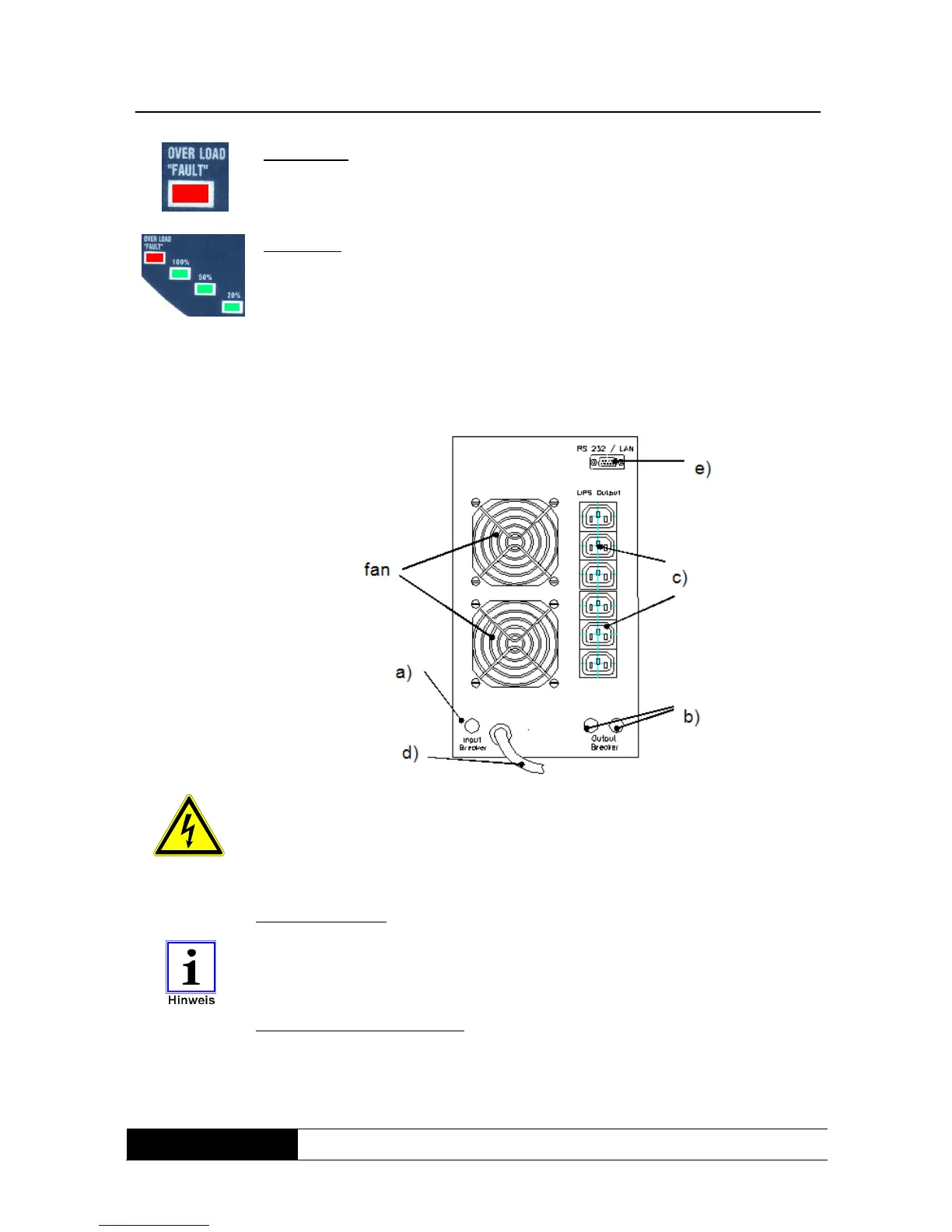
Fault mode:
Operating fault in the UPS.
The indicator light goes on if an operating fault exists in the UPS or if a short-
circuit develops at the UPS output.
Load level:
Load status of UPS.
The display bar indicates the loading at the UPS output. If no load exists, the
indicator bar goes out completely. As the load increases, the bar lights up
starting at the bottom and moving up in 20, 50, 100% steps. If the red
indicator light also comes on, then the UPS is overloaded (“OVERLOAD”).
6.2 Equipment elements on the rear panel
Fig. 4:
Rear-panel view
MT3200
All plug connections on the rear panel (with the exception of the communication
interface) are on the mains power potential when connected.
Even when disconnected, dangerously high voltages may be present at the
plug connections as a result of charged capacities inside the equipment.
Mains power input IEC 16A power plug for mains voltage.
The protective earth conductor must always be connected!
Please always observe the input voltage shown on the identification label or in
the technical data of this manual.
Safety cutout for mains input:
The safety cutout is triggered in the event of high overcurrents or an equipment
defect (e.g. internal short-circuit) and the device is immediately disconnected
from the connected mains power supply.
To simulate a power failure, simply pull out the power supply connector plug.



 To Next Page