1
Function Keys
Function Key Description
ESC Exit the setting/go back
Reserved Reserved
Reserved Reserved
Up Scroll to previous selection
Down Scroll to next selection
Enter To confirm/enter the selection in setting mode
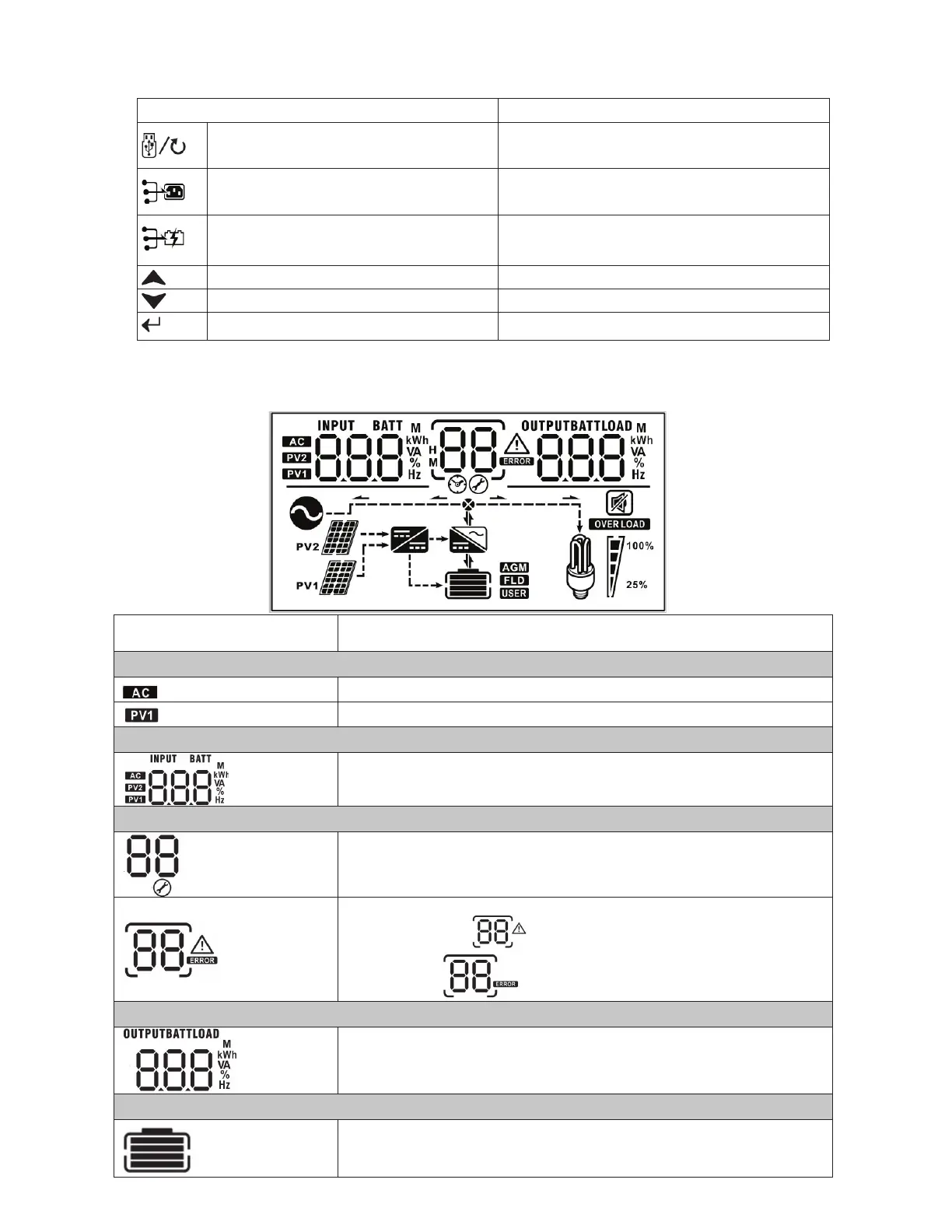
LCD Display Icons
Icon Function
Input source information
Indicates AC input information is being displayed
Indicates PV1 input information is being displayed (PV2 not used)
Left digital display information
Indicates input voltage, input frequency, battery voltage, PV
voltage, charger current
Middle digital display information
Indicates the setting when cycling through options.
Indicates the warning and fault codes.
Warning: Flashing
with warning code
Fault: display
with fault code
Right digital display information
Displays the output voltage, output frequency, load percent, load VA, load
W, PV charger power, DC discharging current based on current unit being
displayed and cycled through.
Battery information
Displays battery state of charge (SOC) by ranges from 0-24%, 25-49%,
50-74%, and 75-100% per bar, and charging status.



 To Next Page