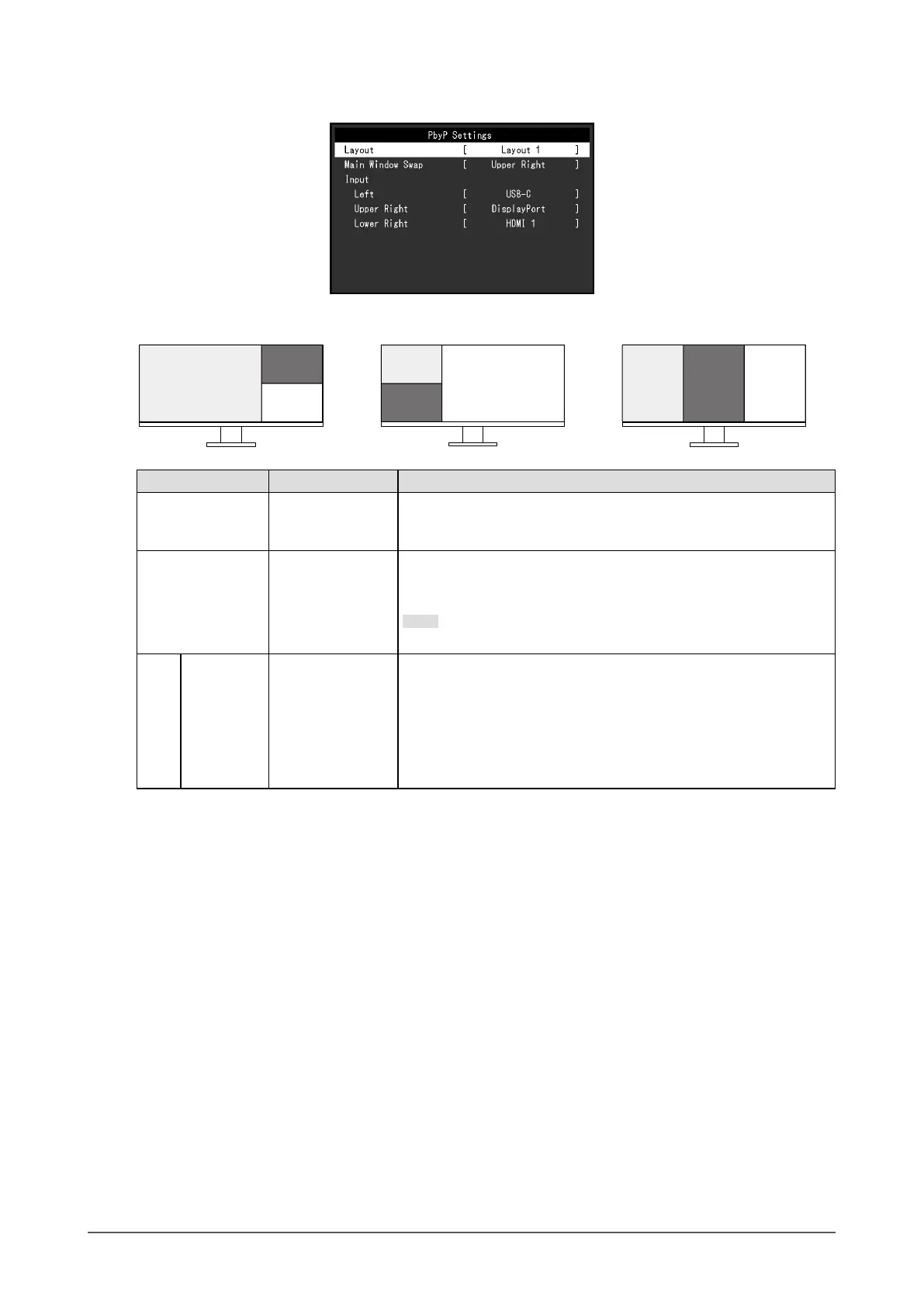
Three window display (3 PbyP)
Layout 1 Layout 2 Layout 3
Left
(Main window)
Lower Right
Upper Right
Right
(Main window)
Lower
Left
Upper Left
RightLeft Center
Function Setting Value Description
Layout Layout 1
Layout 2
Layout 3
Select a layout.
Main Window Swap Upper Left
Upper Right
Lower Left
Lower Right
*1
Select the window to use as the main window.
For details, refer to “Swapping the Main Window of Three Window
Display” (page 30).
Note
• This cannot be set for Layout 3.
Input Upper Left
Upper Right
Lower Left
Lower Right
Left
Right
Center
*1
USB-C
DisplayPort
HDMI 1
HDMI 2
Select an input signal for each window.
*1 The item names displayed depend on the layout
29
Chapter 4 Connecting Multiple PCs











 To Next Page