Chapter 8 Reference
8-1. Using the Docking Station Function
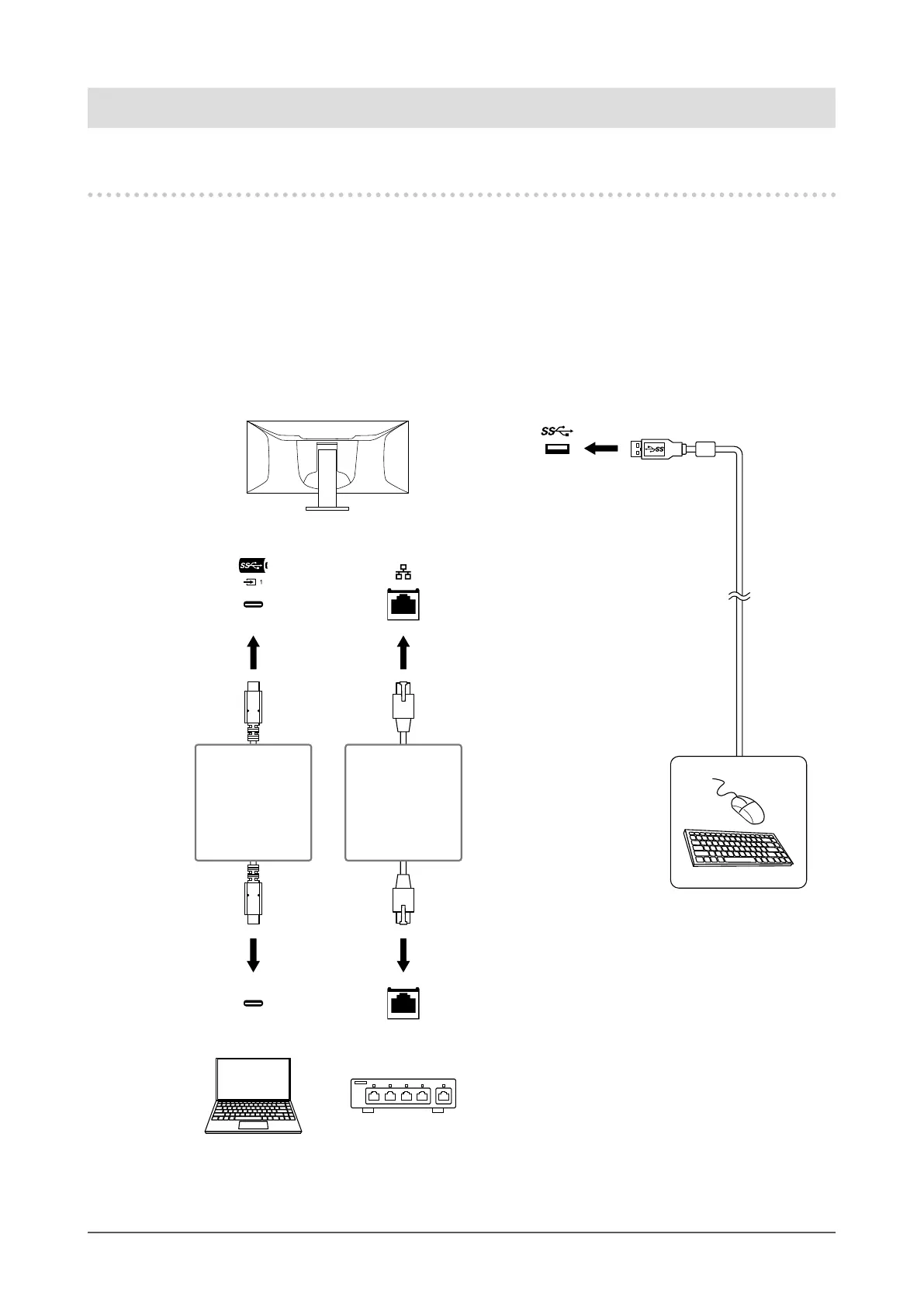
This product is equipped with a LAN port and USB hub so that it can be used as a docking station. By
connecting a USB-C cable, you can create a stable network environment even on notebook PCs or tablet
devices that are not equipped with LAN ports. You can also use USB-compatible peripheral devices and
charge smartphones.
●
Connection Procedure
1. Connect the USB-C cable (CC200SS-5A or CC200SSW-5A).
2. Connect a LAN cable to the LAN port of the monitor.
3. If necessary, connect a mouse, keyboard, or other device to the USB downstream port.
USB-C
CC200SS-5A
or
CC200SSW-5A
USB cable
(USB-C - USB-C)
(Included)
USB-A
Downstream
USB-C
LAN cable
(Commercially
available product)
LAN port
LAN port
44
Chapter 8 Reference











 To Next Page