●
Realizing More Convenient Operations Using Screen InStyle
The "Screen InStyle" monitor control utility enables you to use the monitor more conveniently.
• The monitor color mode can be switched automatically to suit the software to be used.
• You can switch input signals using the shortcut keys on the keyboard.
• When multiple monitors are installed, you can turn the power on and o or change the color mode
of all monitors at the same time.
Note
• Screen InStyle can be downloaded from our web site (www.eizoglobal.com).
• The Windows operating systems are only supported.
1-2. Controls and Functions
●
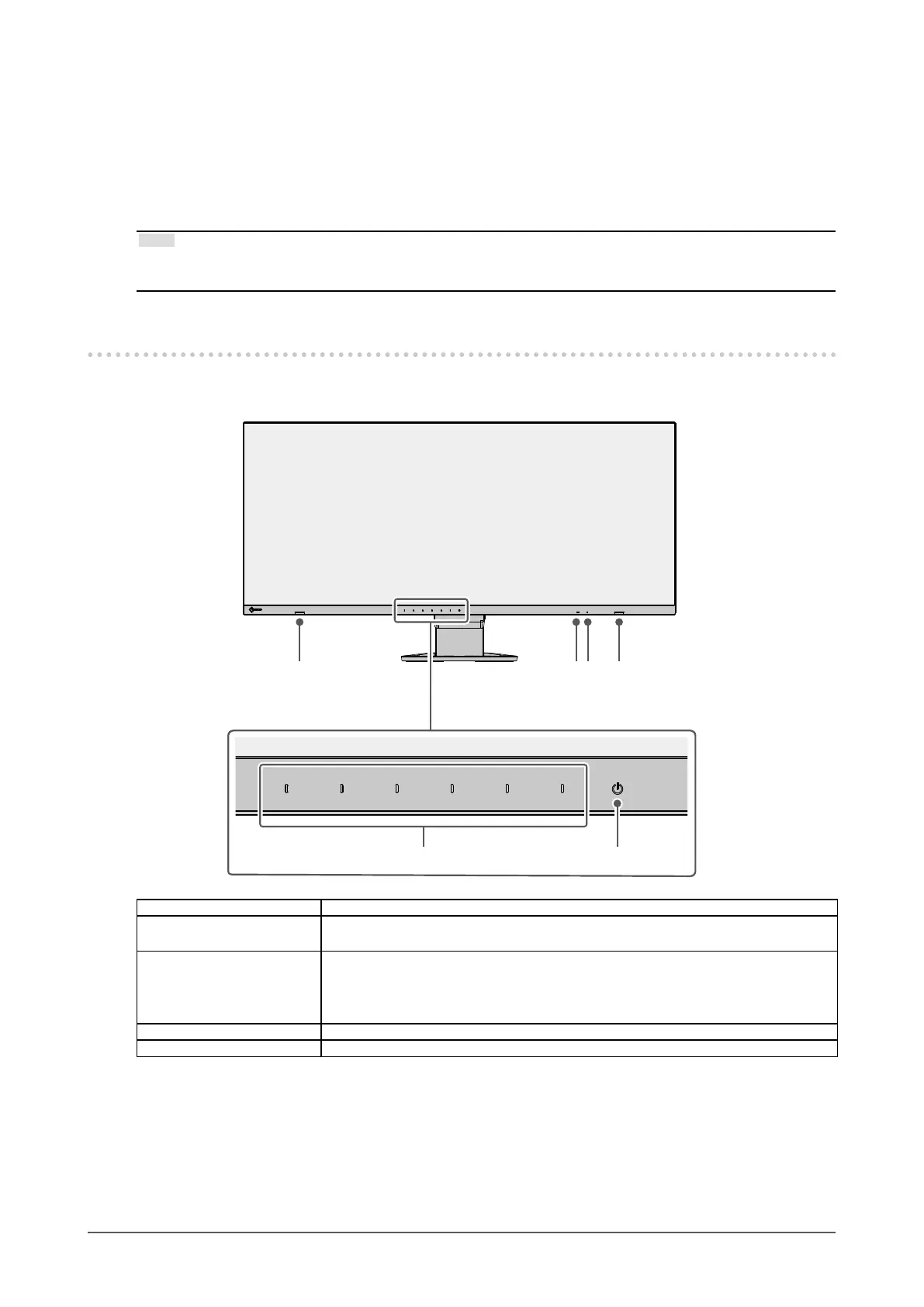
Front
1. Speakers Outputs audio.
2. Ambient light sensor Detects ambient brightness. If you use Auto EcoView, the screen brightness is
automatically adjusted according to the ambient brightness (page 25).
3. Power indicator Indicates the monitor’s operation status.
White: Normal operation mode
Orange: Power saving mode
OFF: Main power / power o
4. Operation switches Displays menus. Operate the switches according to the operation guide (page 17).
5. Power switch Turns the power on or o.
8
Chapter 1 Introduction












 To Next Page