ACOM516 User Manual
Shenzhen Ejoin Technology Co.,Ltd. 9
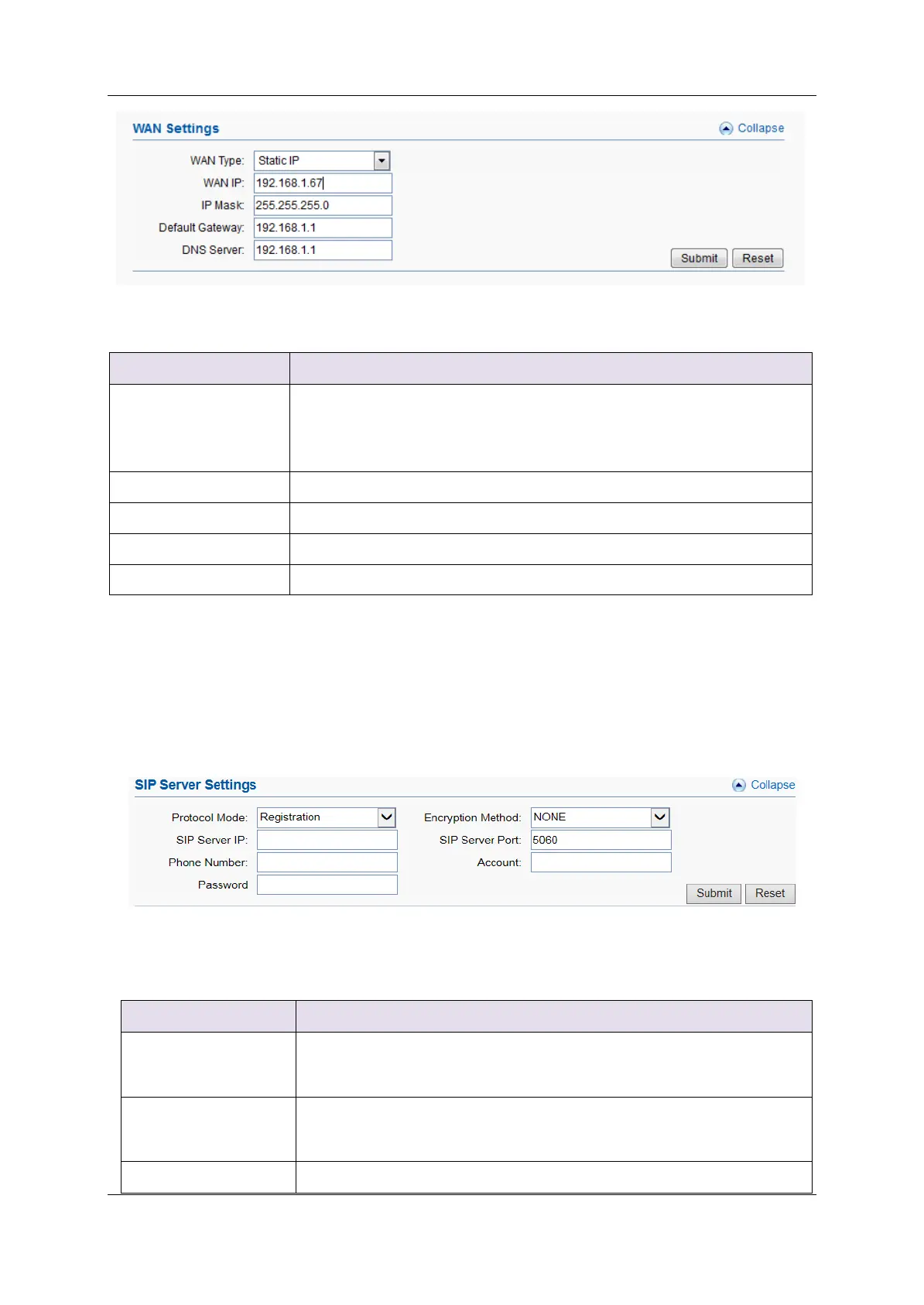
Figure 3.2-1 WAN Settings
Static IP: manually set up gateway IP.
Dynamic IP: automatically get IP from local network.
PPPoE: need ISP offer the account and password. Use this mode
when there is no router in the local network
The WAN IP address of gateway
The subnet mask of gateway
Default gateway IP address. Example: router IP.
Domain name server IP address. Example: 8.8.8.8.
Table 3.2-1
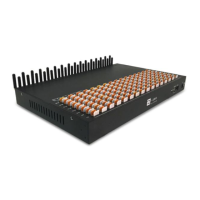
SIP Server Settings
This is the gateway settings for connecting with softswitch or server, such
as VOS, VPS, IPPBX and Asterisk.
Figure 3.2-2 SIP Server Settings
There are two protocol modes: registration and point to point.
Note: point to point can be used only when gateway and server in
the same LAN or both have public IP.
There are two encryption methods: EJOIN and VOS2000. (Note:
Choose “EJOIN” Encryption need to set proxy server and port
first.)
The IP or domain name of softswitch which will send traffic to the


 To Next Page