Home
Ejoin
Gateway
ACOM516
Page 64 (Chapter Ⅳ Typical Used Scenario)
Ejoin ACOM516 - Chapter Ⅳ Typical Used Scenario; Landing from IP Network to Mobile Network; Accessing from Mobile Network to IP Network
65 pages
Manual
Save Page as PDF
To Next Page
To Next Page
To Previous Page
To Previous Page
Loading...
ACOM516 User Manual
Shenzhen Ejoin Technology Co.,Ltd.
58
Chapter
Ⅳ
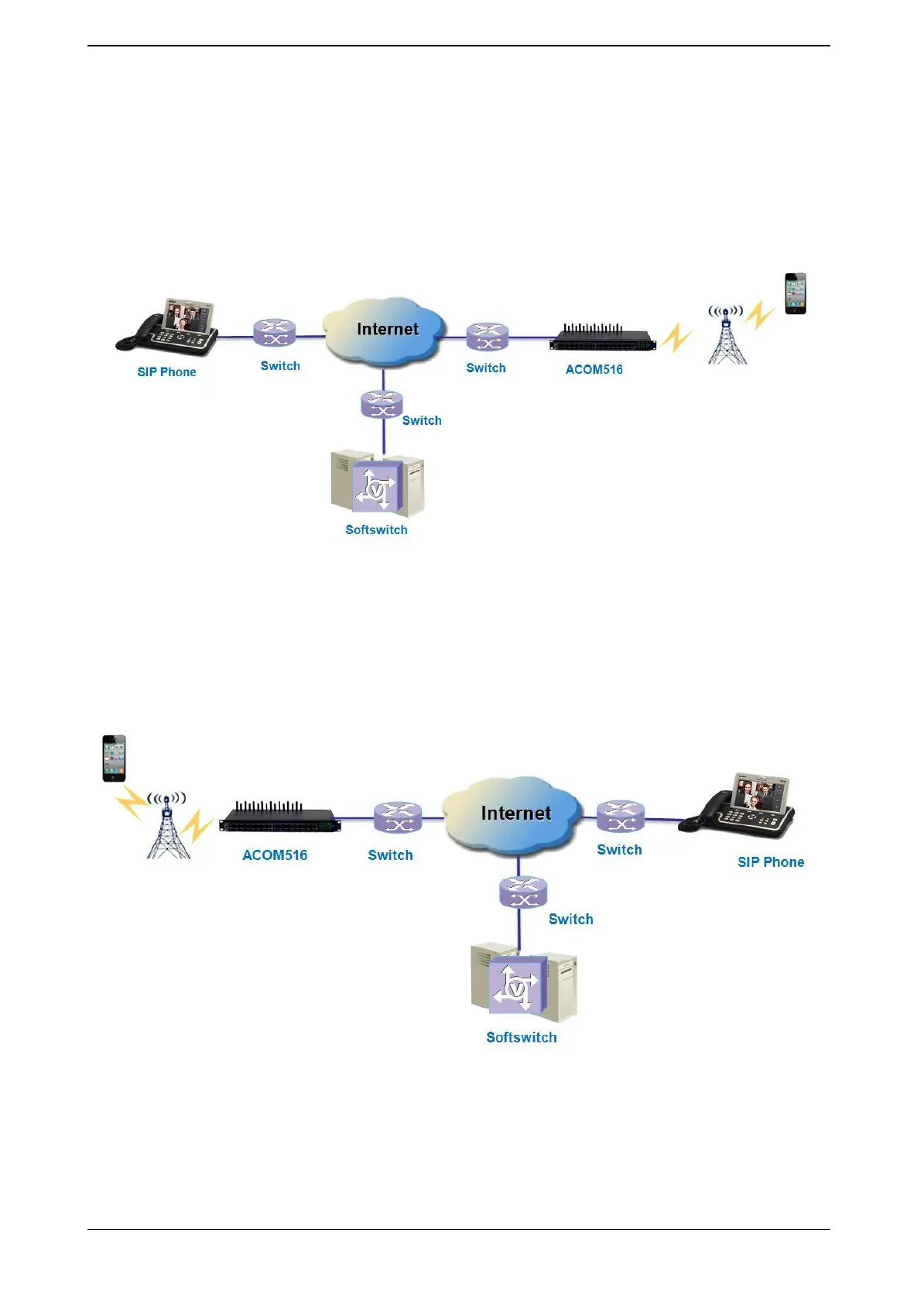
Typical Used Scenario
4.1 Landing fro
m IP netw
ork to Mobile netw
ork
Figure 4.1-1 I
P to Mobile
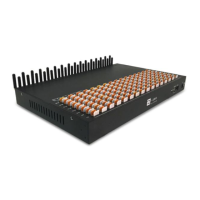
4.2 Access
ing
fro
m Mobile netwo
rk to IP netw
ork
Figure 4.2-2
Mobile
to
IP
63
65
Table of Contents
Main Page
Default Chapter
4
Table of Contents
4
Chapterⅰ Equipment Information
7
Product Brief
7
Product Application
7
Product Appearance
8
Special Features
9
Specification
9
Mobile Features
10
Chapter Ⅱ Equipment Installation
11
SIM Card Placement
11
Antenna Installation
11
Network Connection
12
Power Connection
12
Serial Connection
13
Chapter Ⅲ Web Settings
14
Login
14
Basic Settings
14
SIP Protocol
16
Goip Settings
19
Port Settings
19
Base Stations
21
IMEI Settings
23
PIN Settings
24
SMS Send
25
SMS Receive
27
Lock/Switch Card
28
Port Inter-Calling
30
SIM Num Settings
32
AT Command
33
USSD Command
34
Billing Settings
35
Call Dur. Control
38
Application Settings
40
Phone Book
40
Dial Plan
40
Number Translation
40
Incoming Translation
41
Incoming Black List
42
Incoming White List
42
SIM Pool Settings
43
Auto Recharge
44
State Notification
45
Advanced Setting
46
Network Settings
46
Port Settings
47
Voice and Codec
48
Callback Settings
49
Callwait Settings
50
Other Settings
50
System Settings
52
User Mgmt
52
Device Mgmt
52
File Management
53
Module Update
54
System Update
54
Debugging Tools
55
Test Network
55
Log System
56
Running Status
56
Port Status
56
Call Status
59
System Status
60
Call Statistics
61
SMS Statistics
62
Inter-Call Status
62
Save and Reboot
63
Chapter Ⅳ Typical Used Scenario
64
Landing from IP Network to Mobile Network
64
Accessing from Mobile Network to IP Network
64
Chapter Ⅴ Ejoin Cloud System
65
Related product manuals
Ejoin ACOM664
67 pages
Ejoin ACOM6 Series
67 pages


 To Next Page