- 12 -
INSTALLING THE MONOBLOCK
STEP 1
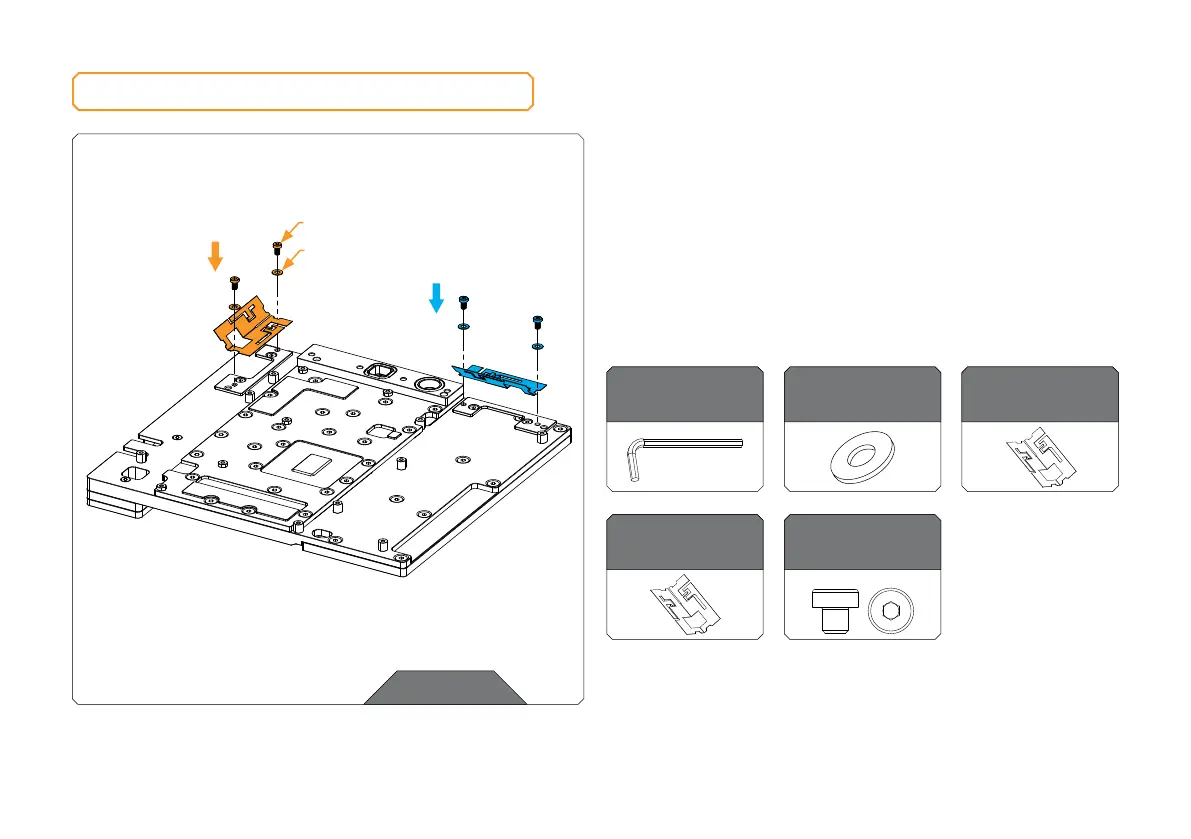
PLACING WIFI AND BLUETOOTH ANTENNAS
First place the Wi-Fi antennas to the holders. The antenna with
longer cables goes to position 1 and the antenna with short
cables goes to position 2 (marked in the picture).
Use four (4) M3 x 4 DIN7984 screws and M3 PVC washers. Tighten
the screws evenly using the enclosed 2.5 mm Allen Key.
STEP 1
For this step, you will need:
Allen Key 2.5 mm
M3 x 4 DIN 7984
Screw (4 pcs)
Bluetooth Antenna
(1 pc)
Wi-Fi Antenna
(1 pc)
M3 x 4 DIN7984
POSITION 1
POSITION 2
M3 PVC WASHER
M 3 PVC Washer
(4 pcs)



 To Next Page