- 19 -
STEP 2
Backplate
For this step, you will need:
STEP 2
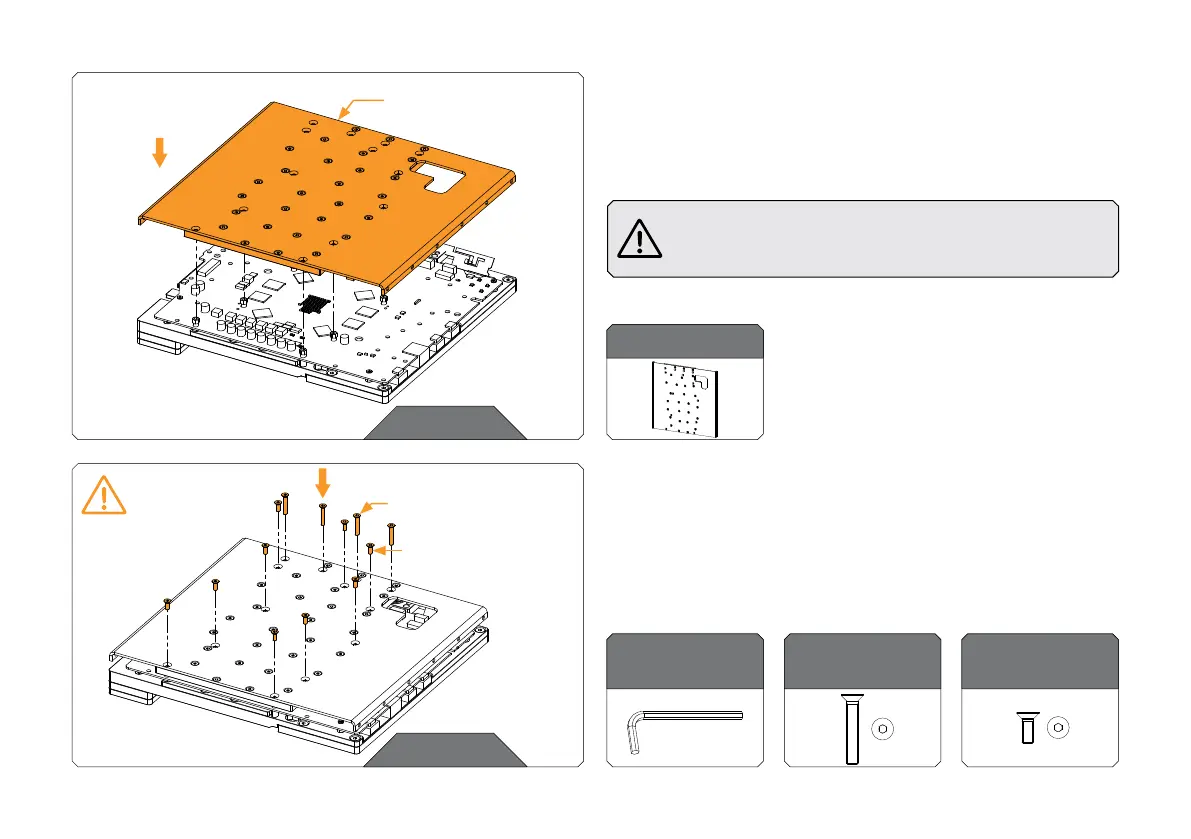
PLACING THE BACKPLATE
Carefully place the Backplate onto the PS5 PCB. In this step, make
sure that terminal with O-rings stays in the slots before attaching
the screws.
Make sure to align the holes on the PS5 PCB with the
backplate standoffs! Double-check the thermal pads
before placing the backplate!
STEP 3
STEP 3
ATTACHING THE BACKPLATE
Use nine (9) M3 x 8 DIN 7991 and four (4) M3 x 18 DIN 7991 to
tighten the backplate on the Monoblock. Tighten the screws
evenly using the Allen Key 2 mm.
For this step, you will need:
M3 x 18 DIN7991
Screw (4 pcs)
Allen Key 2 mm
M3 x 8 DIN7991
Screw (9 pcs)
MAX TORQUE:
0.6 Nm
M3 x 8 DIN7991
M3 x 18 DIN7991
BACKPL ATE



 To Next Page