- 18 -
For this step, you will need:
Scissors
STEP 1
INSTALLING THE BACKPLATE
STEP 1
CUTTING AND PLACING THERMAL PADS
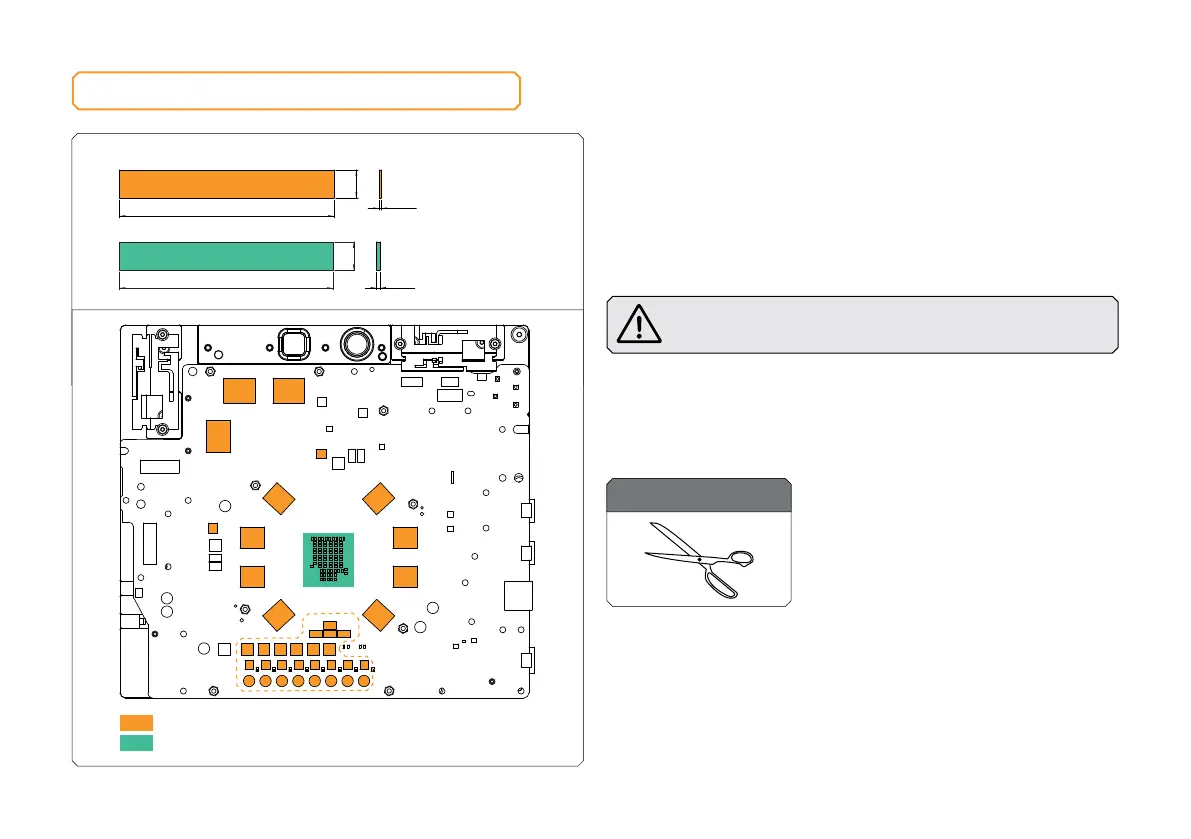
After attaching the PS5 PCB, a few additional thermal pads must
be placed in the places marked in the picture. EK made sure to
provide you with more than an adequate quantity of Thermal Pads
to complete this Step.
CAUTION: You must remove the protective foil from both
sides of the thermal pad before installation.
Replacement thermal pads:
Thermal Pad F 1.0 mm – (120 x 16 x 1 mm) EAN: 3830046996732
Thermal Pad F 2.0 mm – (120 x 16 x 2 mm) EAN: 3830046996756
Thermal Pad F – 1.0 mm (120 x 16 mm)
120 mm
16 mm
1 mm
Thermal Pad F – 2.0 mm (120 x 16 mm)
2 mm
120 mm
16 mm
Thermal Pad - 120 x 16 x 2.0 mm
F2
Thermal Pad - 120 x 16 x 1.0 mm
F1
F1 F1
F1
F1
F1
F1
F1
F1
F1
F1
F1F1
F1F1 F2



 To Next Page