- 22 -
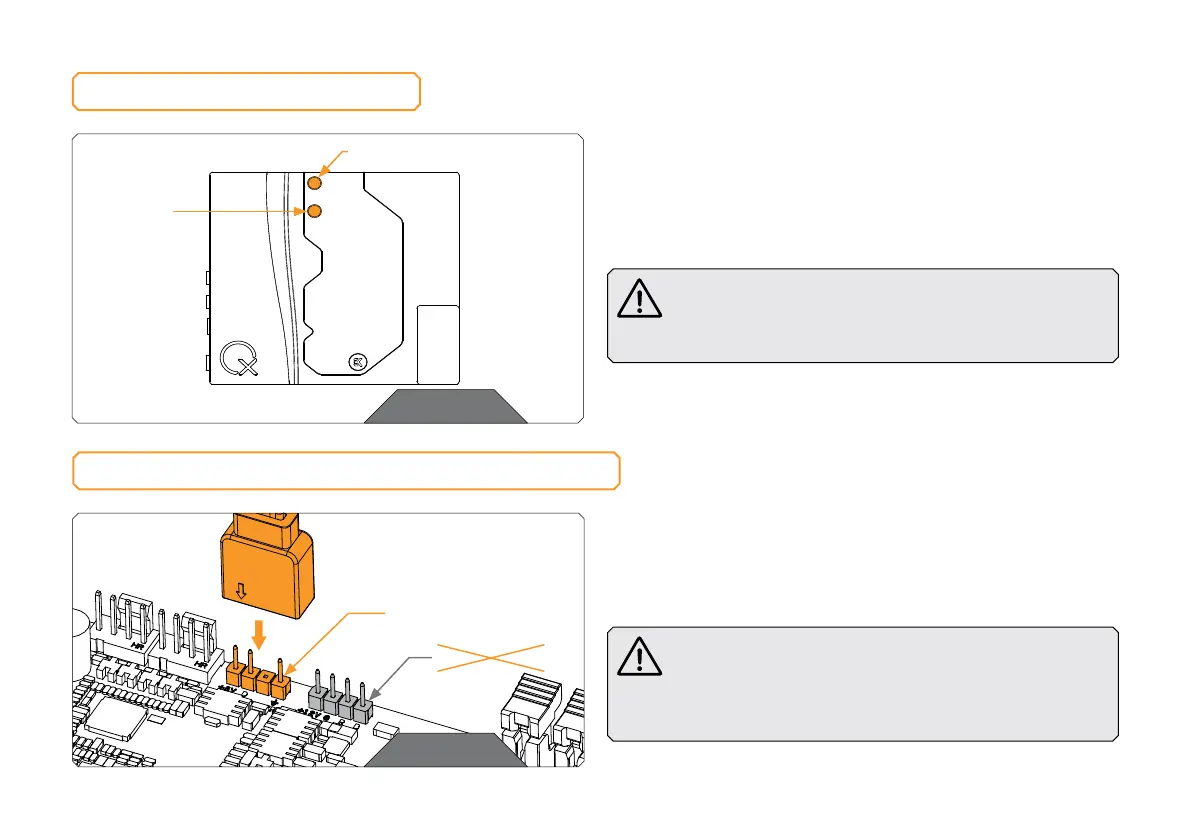
OUTLET
FITTINGS AND TUBING
STEP 1
Screw-in two (2) G1/4 threaded male fittings. Attach the
liquidcooling tubes and connect the water block to the cooling
loop. Tighten the fittings in a clockwise direction until the gasket
underneath is compressed. EK recommends using EK fittings with
all EK water blocks.
CAUTION: When using connectors other than EK fittings,
pay special attention to the length of the fittings’ male
G1/4” thread – 5 mm is the maximum G1/4” thread length
allowed!
INLET
CONNECTING THE D-RGB LED STRIP
STEP 1
Plug the 3-pin connector of the distribution plate D-RGB LED
light to the D-RGB HEADER on the motherboard. The LED will
work if the pin layout on the header is as follows: +5V, Digital,
Empty, Ground.
Please ensure that the arrow indicated on the connector
is plugged into the +5V line, as indicated on your
motherboard. IIf you put LED Diode to the 12V RGB
HEADER you can damage the LEDs. Failure to do so will
damage your motherboard or LED strip.
STEP 1
STEP 1
D-RGB HEADER
RGB HEADER



 To Next Page