8
Code setting
The rst time the Lactate Scout+ is used,
a two-digit code must be set. This code is
printed on the label of the sensor vial.
· Turn on the Lactate Scout+ device by
pressing the scroll wheel for two seconds.
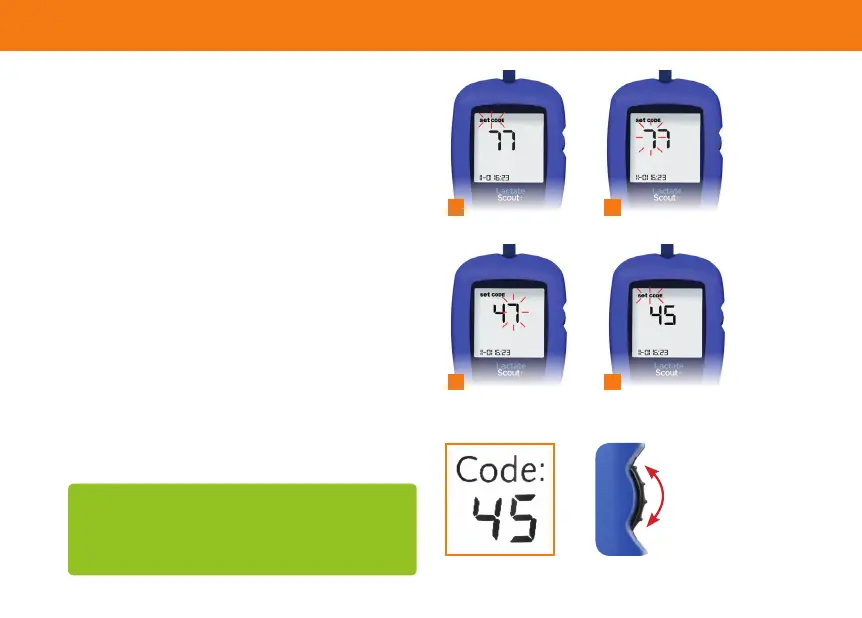
The request to set the code appears on the
display(blinking)“setCODE”(1).
· After pressing the scroll wheel again briey,
the code setting menu is activated and the
left code number will blink (2). Next, set the
left digit listed under “code” on the sensor
container by scrolling up or down and nally
conrm by briey pressing the scroll wheel.
· To enter the right code digit, which will now
be blinking (3), repeat this process. The
device is now coded (4).
The nalisation of coding is conrmed by a
signal tone. To complete the process, insert
a sensor or turn off the device.
1 2
3 4
Attention: Prior to using a new or other sensor
container, it is necessary to always check whether the
code on the label corresponds to the current code in
the device. If necessary, the latter must be reset.
Getting started


 To Next Page