18
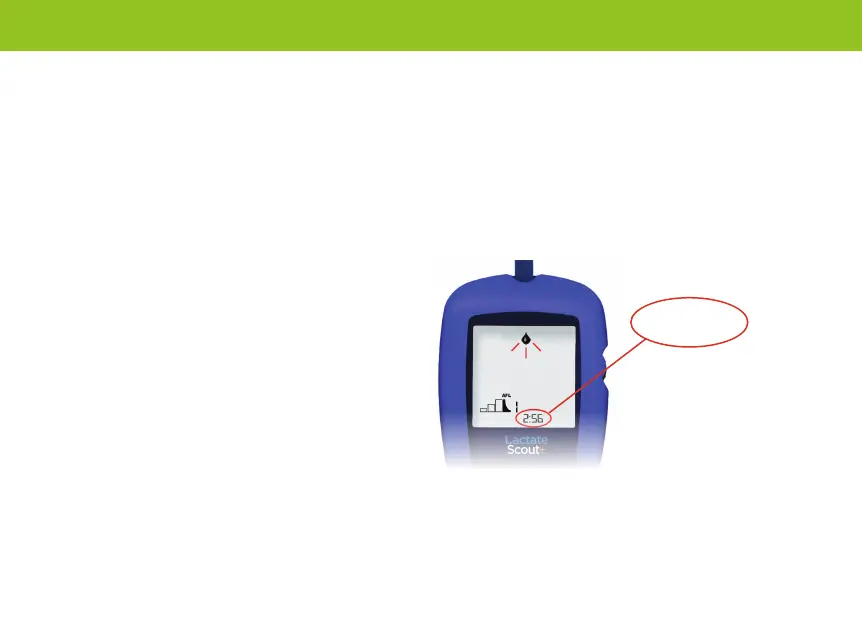
Afterload timer
If you select the test mode “AFL” for an
afterload test, the time in minutes and seconds
elapsed from the last measurement in the step
testphase“LOAD”willappearbelowonthe
display instead of the time. In addition, a brief
signal tone sounds after every minute that
passes. After no more than twenty minutes, the
timer on the display will remain at “20:00” and
will only be reset upon restarting a step test.
The afterload timer will only be activated if one
or more load tests were performed.
Timing functions for step tests
To be able to control and adjust the load
intensity and step length for eld tests
more efciently, the Lactate Scout+ offers
supplemental application possibilities in the
setting mode (see chapter 4).
Withthestopclock“CLOCK”,youcanmonitor
your lap time (maximum of ten minutes per
load step), see page 20.
UsingtheCountdownfunction“COUNT
DOWN”precededbythestepduration“DUR”,
it is possible to set times of up to 10 minutes
and to set a signal as they elapse (page 20).
Display of the expired time following
the last load measurement via the afterload timer
2:56
Performing step tests


 To Next Page