ELAD FDM-DUO User Manual - Rev. 2.3 - 06/2016
© 2016 ELAD S.r.l. All rights reserved. No part of this document may be reproduced, published, used, disclosed or disseminated in any form or
by any means, electronic, photocopying or otherwise, without prior written permission of ELAD S.r.l.
80
7.2.2 USB driver installation in Windows XP
7.2.2.1 First driver installation
To install ELAD FDM-DUO driver, connect FDM-DUO USB RX port to a USB 2.0 socket on PC and power
on the device. Windows XP detects the new hardware and starts the hardware installation wizard. Then,
next steps to install FDM-DUO driver are listed below:
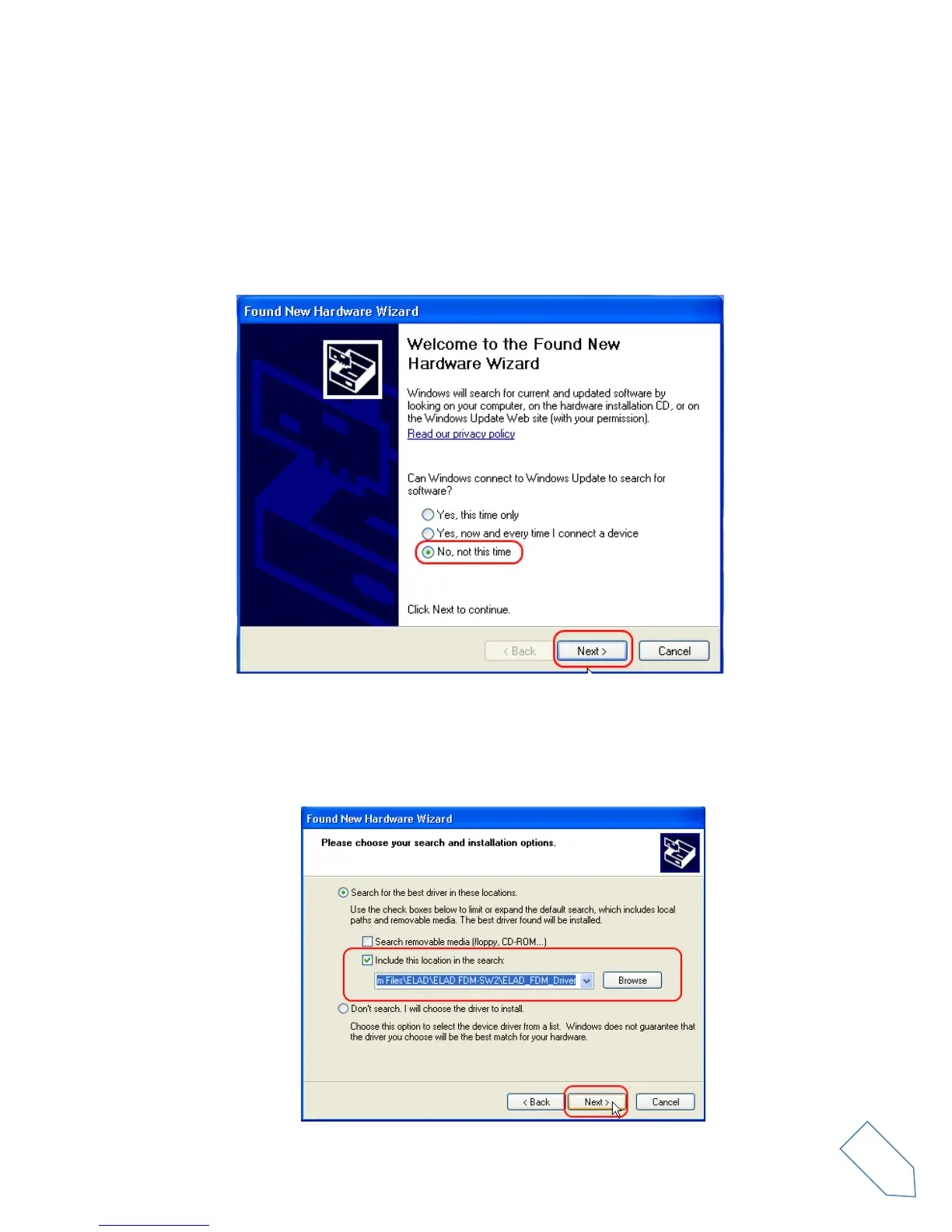
At the first dialog box, select the last option “No, not this time” and “Next”.
Select “Install from a list or specific location (Advanced)” and “Next”.
In the next dialog-box, check the options “Search for the best driver in these location” and “Include this
location in the search” to enable manual driver search. Clicking on “Browse”, select the path where the
driver folder is located: Local Drive (C:) \Programs\ELAD\ELAD FDM-SW2\ELAD_FDM_Driver. Then
click “Next”.


 To Next Page