ELAD FDM-DUO User Manual - Rev. 2.3 - 06/2016
© 2016 ELAD S.r.l. All rights reserved. No part of this document may be reproduced, published, used, disclosed or disseminated in any form or
by any means, electronic, photocopying or otherwise, without prior written permission of ELAD S.r.l.
9
7 - MODE and MENU buttons
Operating mode selection (AM, CW, …). Tune mode activation. “QuickStep” function activation. Access
to the setup menu. See Keys functions for more information about keys use.
8 - VFO and MEM buttons
Basic VFO and memory operations. See Keys functions for more information about keys use.
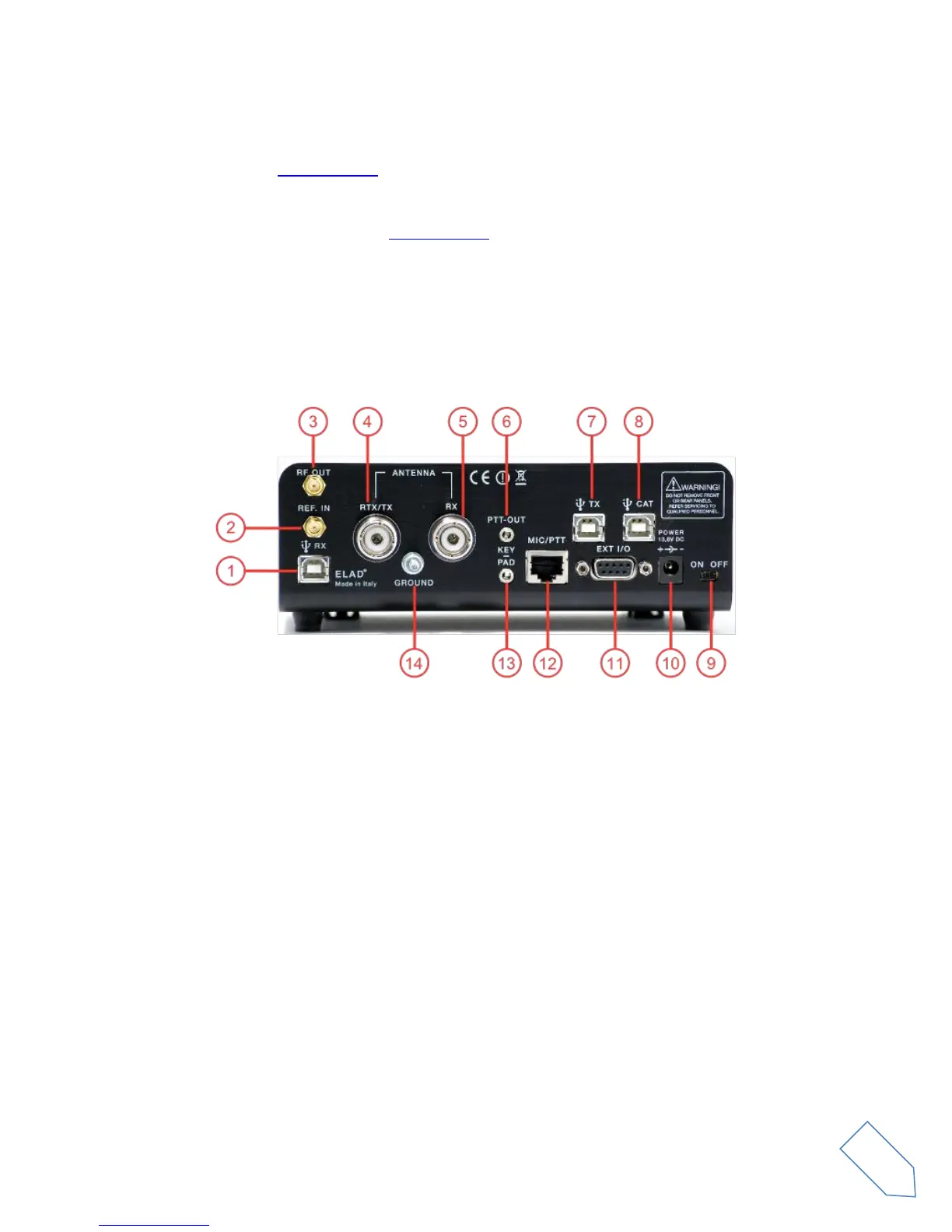
2.2 Rear Panel Description
1 - USB Receiver Data Connector
USB 2.0 port. Connect it to computer to use the SW2 software. Please use the supplied cable.
2 - Frequency Reference Input
SMA 50 Ohm connector. Apply an 10MHz 0dBm signal.
3 - RF Output Connector
SMA 50 Ohm connector. 0dBm transmission signal.
4 - Output/Input Antenna Connector
M-type 50 Ohm connector. Antenna output when using two antenna (TX). Antenna input when using
only one antenna (RTX).
5 - Input Antenna Connector
M-type 50 Ohm connector. Antenna input when using two antenna (RX).


 To Next Page