ELAD FDM-DUO User Manual - Rev. 2.3 - 06/2016
© 2016 ELAD S.r.l. All rights reserved. No part of this document may be reproduced, published, used, disclosed or disseminated in any form or
by any means, electronic, photocopying or otherwise, without prior written permission of ELAD S.r.l.
82
7.2.2.2 Driver installation verify
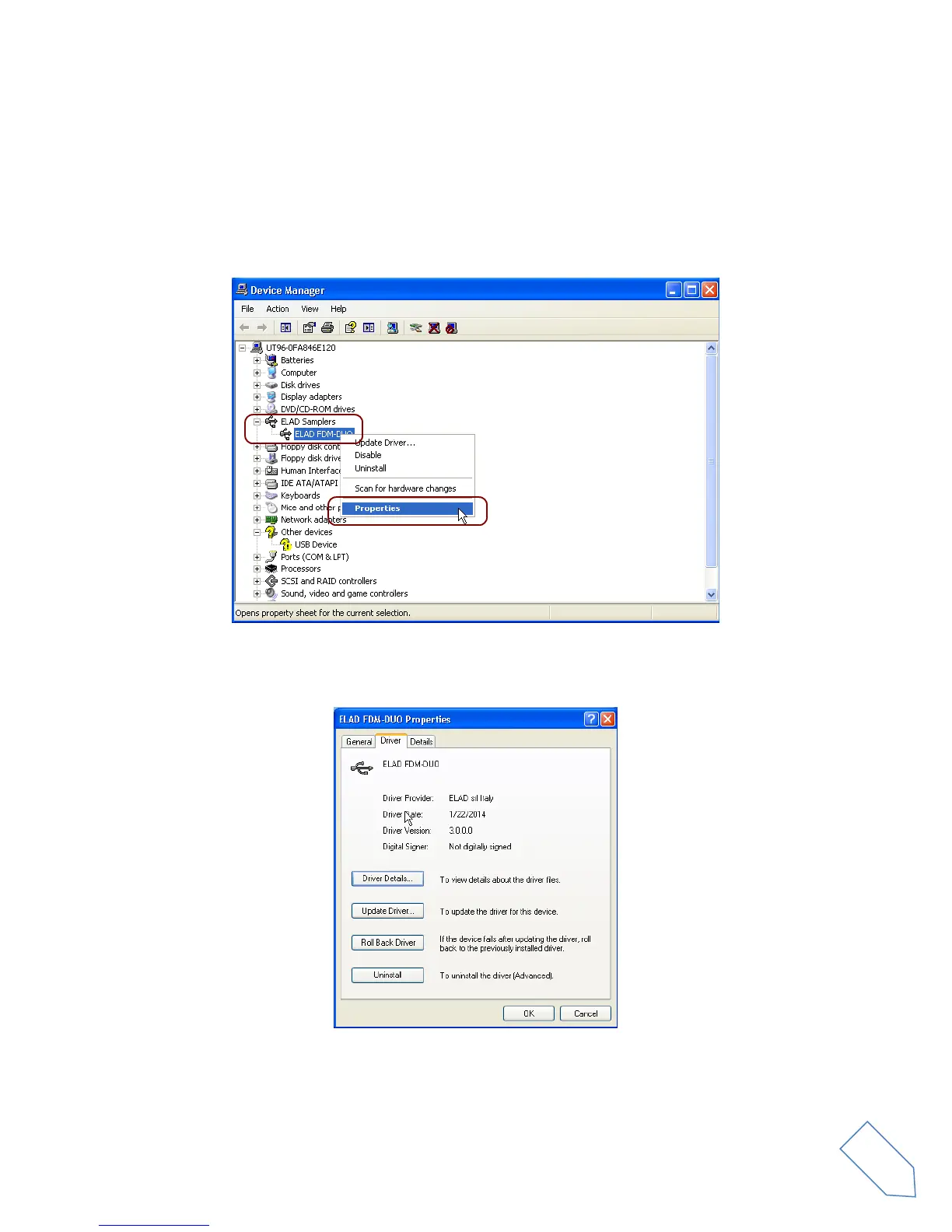
To verify FDM-DUO driver current version, connect the device to USB socket (where the device driver is
already installed) and open Control Panel from Start menu. Click on “System” and select “Device
Manager” under “Hardware” label.
Expanding “ELAD Samplers” node, right click on “ELAD FDM-DUO” and select “Properties”.
When dialog box opens, select “Driver” label: you must read provider name, current driver release date
and current driver version. The old ELAD FDM-DUO driver version is shown in figure below as example.


 To Next Page