D1650/D1651 INSTALLATION MANUAL
ELAN HOME SYSTEMS
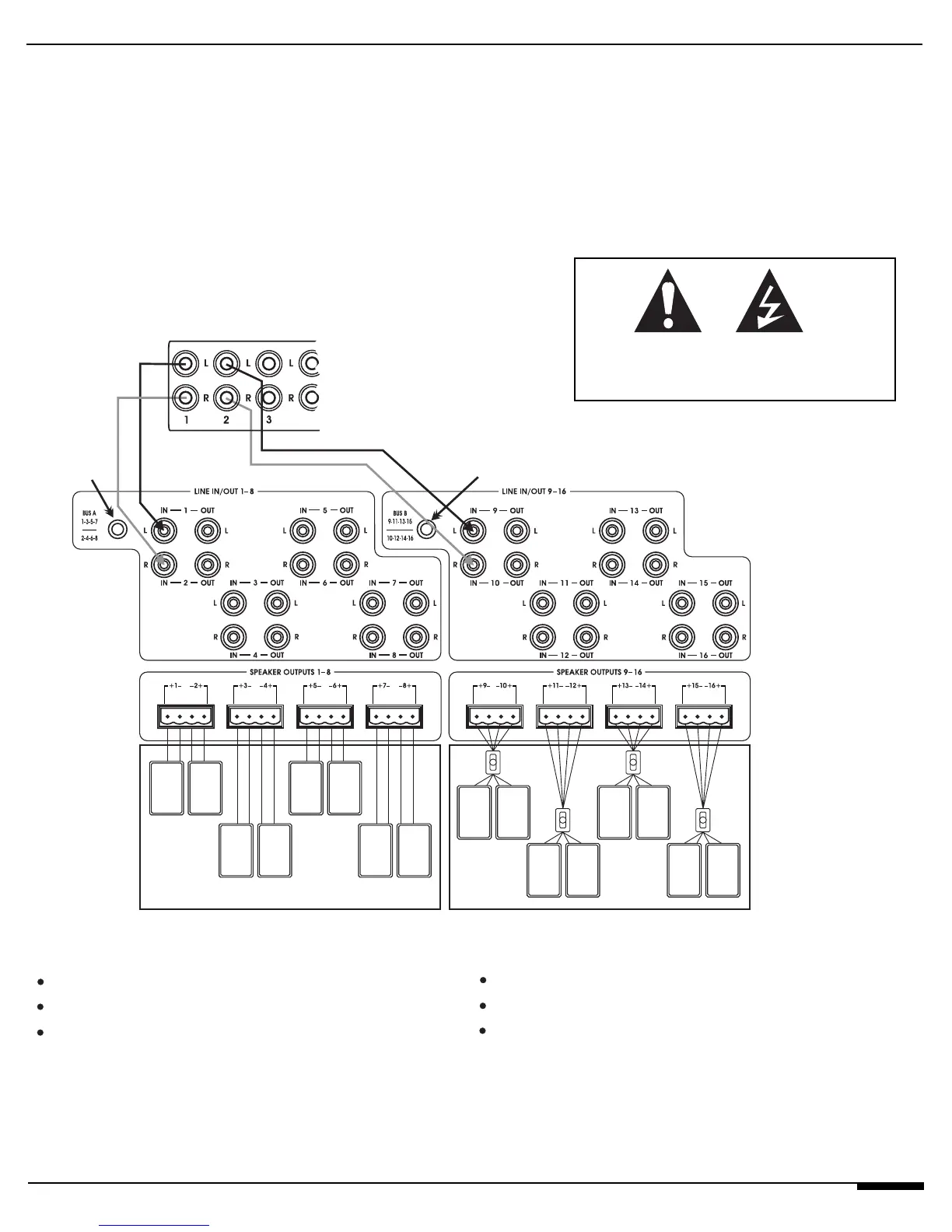
Zone 1 is a Variable Wide Coverage Zone
Zone 1 Output to Line Inputs 1 & 2
Set Zone 1 to VARIABLE on Multi-Zone Controller
Press BUS A Button
Speaker Outputs 1-8 now assigned to Zone 1
All Speakers Volume Ramps Up/Down Together
Zone 2 is a Fixed Wide Coverage Zone
Zone 2 Output to Line Inputs 9 & 10
Set Zone 2 to FIXED on Multi-Zone Controller
Press BUS B Button
Speaker Outputs 9-16 now assigned to Zone 2
Connect Each Pair of Speaker Outputs to a High Power
Volume Control
All Speaker Pairs Volume Ramps Separately w/ High
Power Volume Controls.
© ELAN Home Systems, Inc. 2004 • All rights reserved. 7/04 Page 13
Press
“BUS A”
Press
“BUS B”
FixedVar
ELAN Multi-Room Controller
ZONE OUTPUTS
Bus Modes
The D1650’s unique Bus Mode feature allows multi-
ple amp Inputs to be internally configured to several
different Outputs. This increases the amp’s flexibili-
ty without the use of extraneous RCA patch cables.
Using Bus A, a signal that is sent into Input 1 will
come out Speaker Outputs 3,5, and 7. Signals sent
to Input 2 will be routed to Outputs 4, 6, and 8.
Using Bus B, a signal that is sent into Input 9 will
come out Speaker Outputs 11,13, and 15. Input 10
will be sent to Speaker Outputs 12,14, and 16.
This example shows two “Wide Coverage Zones,”
one using Variable Outputs from an ELAN Multi-
Zone Controller so that all speakers ramp volume
up/down together, the other using the Fixed output
from an ELAN Multi-Zone Controller and High Power
Volume Controls so that each area has independent
volume up/down control.
USE VOLUME CONTROLS RATED
FOR 50 WATTS RMS OR HIGHER!



 To Next Page