User Guide
Product: Evolis
A_Evolis Solution GB elancity
Page
/
Date: 03/01/2018
Confidential document, property of ELANCITY. All copies and transfers are unauthorized without prior consent.
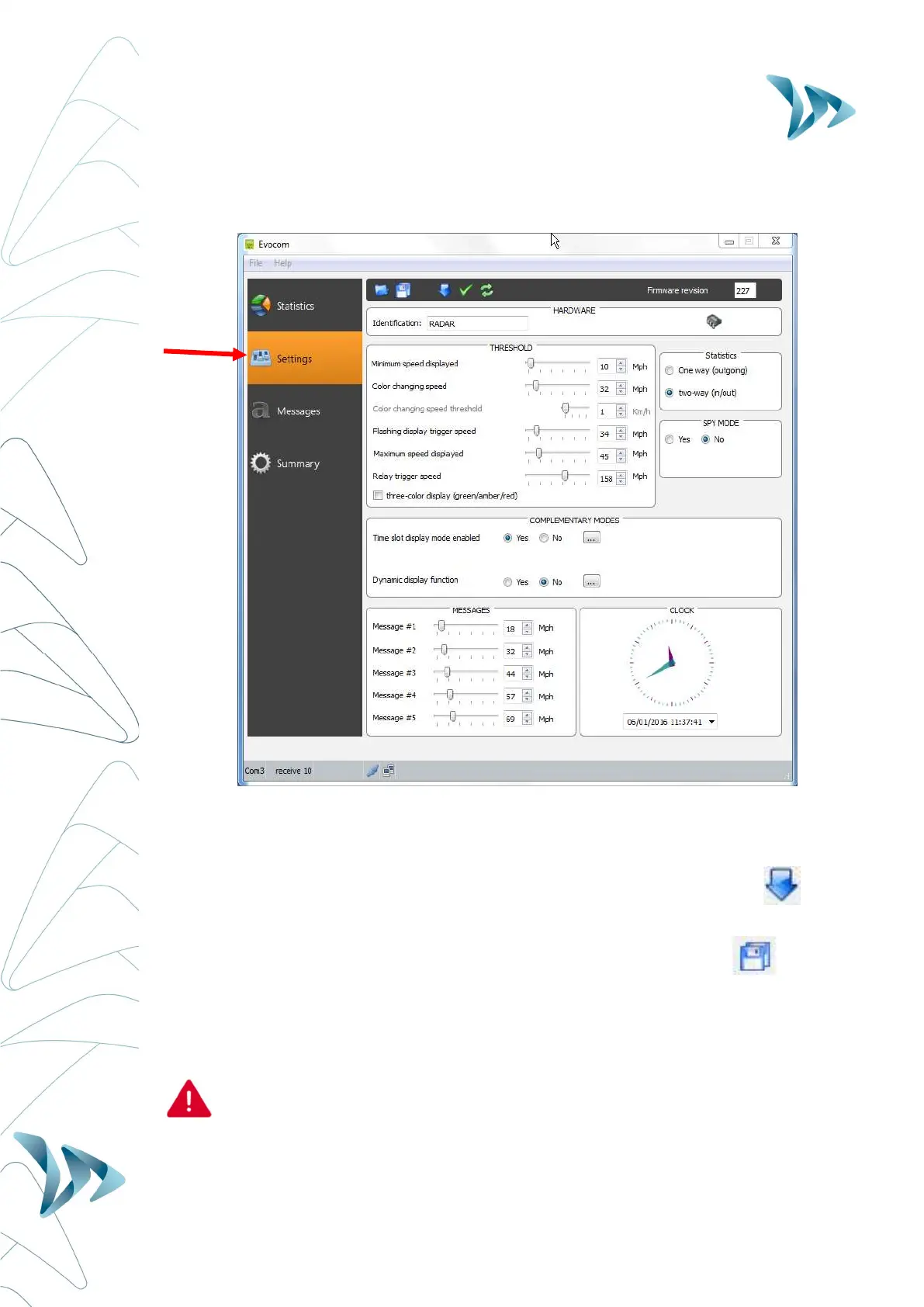
SETTINGS PAGE:
All of the programmable controls and thresholds are displayed on the “SETTINGS” page. The
displayed settings are those currently in the Evolis radar’s memory. To program or modify
these thresholds; select the desired setting(s), and then validate your choice by clicking the
blue arrow icon, which will send this information to the Evolis radar’s memory.
The message "Device configuration done" indicates that the set-up was completed correctly.
To save your new configuration for use at a later date, click the save icon:
‘SP’ : Remember, in order to modify the settings/thresholds via the ‘SETTINGS’ page, the
control dial inside the case of the device must be set to ‘SP’. If the control dial is set to any
other setting, 70mph for example, then the settings you see on this page are NOT active.
Only speed settings can be saved for use as a future configuration. Re-
configured text messages cannot be saved.


 To Next Page