User Guide
Product: Evolis
A_Evolis Solution GB elancity
Page
/
Date: 03/01/2018
Confidential document, property of ELANCITY. All copies and transfers are unauthorized without prior consent.
6.7 DOWNLOADING DATA FROM THE EVOLIS TO A COMPUTER
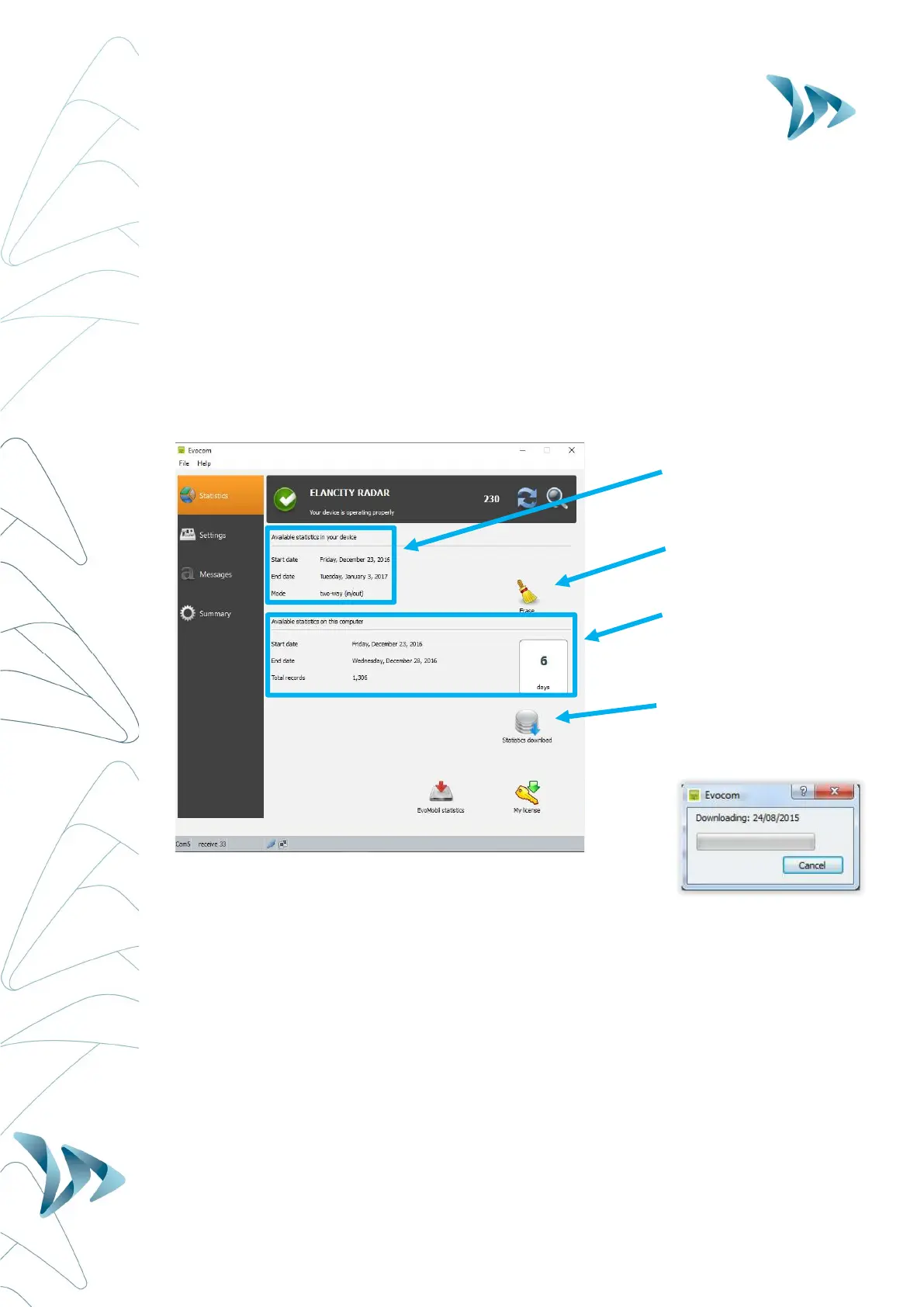
The Evocom home page allows you to download the latest statistics stored within your radar
sign. You will find information that bookmarks the start and end dates of those statistics, as
well as the ones already recorded on your computer.
The software will automatically manage the statistics into a ".db" file. There is no need to for
you to worry about where to save the file; the software will do this for you.
Select "Statistics download" to initiate the transfer of the statistics from the Evolis radar to your
computer. Progress of the transfer will appear in a window on your screen. The transfer may
take several minutes.
Details of the available
statistics stored in the
Evolis
Erase the statistics from the
Evolis’ internal memory.
(Remember to download
them first)
Statistics from this Radar
sign already downloaded
into your computer
Download the available
statistics from the Evolis to
the computer


 To Next Page