3. Modes Of Operation
OK - Now switch the radiator on using the
ON
button. The radiator will come on in
whatever mode it was on before it was switched off.
Pressing
OK MODE
button will change the mode of operation between:
COMFORT ( ) - ECONOMY ( ) - ANTI-FROST ( ) - PRO (User Defined
Programme) - PRO1 - PRO 2 - PRO 3
NOTE:
PRO1/PRO2/PRO3 are pre-set and not configurable. Also, these only appear
when the time has been set.
To configure the PRO mode, see page 12 section 4.
NOTE: please be aware that the described above is NOT VALID for the models
CURVO+iVISTA and PRISMA+iVISTA. These models do NOT have the PRO – PRO1-
PRO2-PRO3 modes of operation.
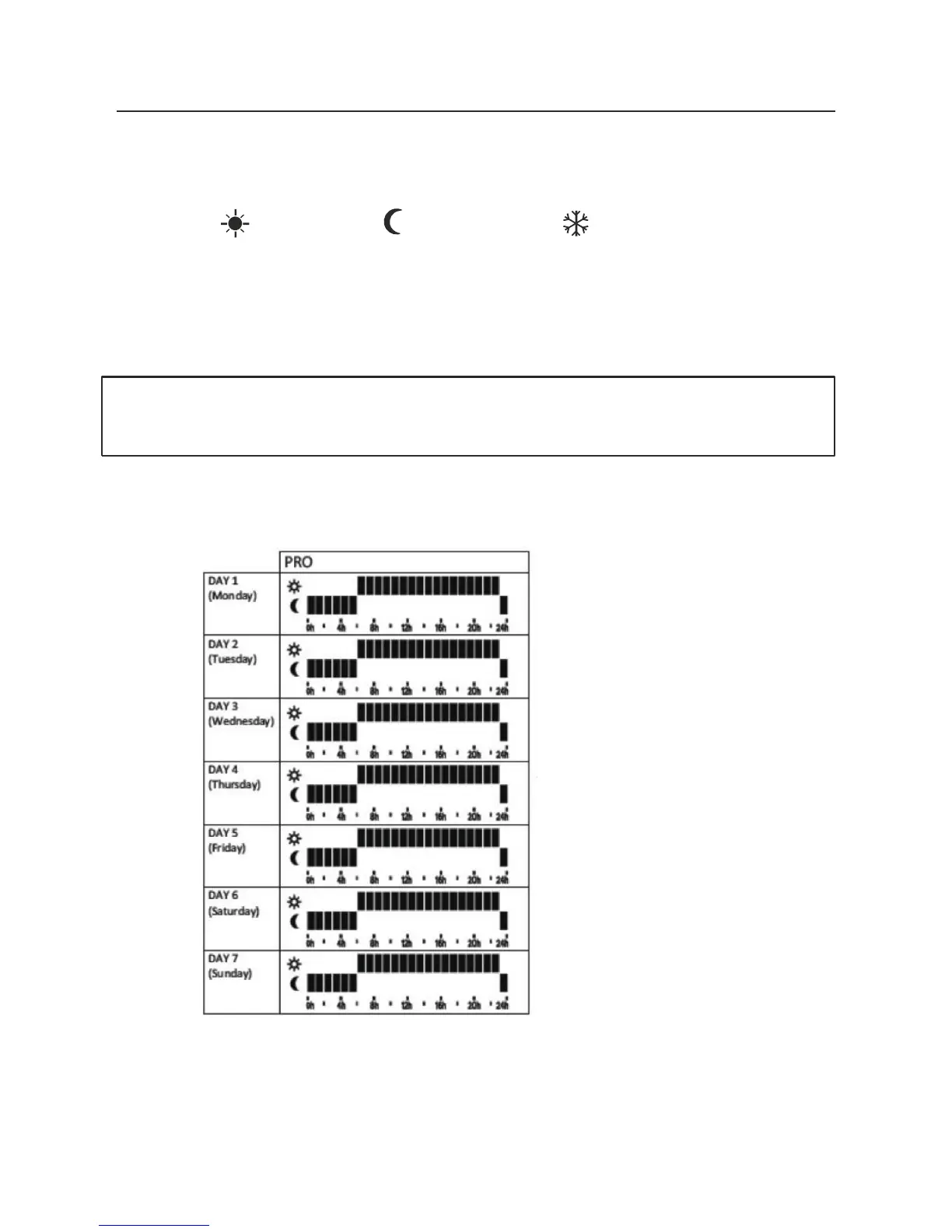
The PRO default programme is:
Note : This program is retrievable by Resetting in factory preset described in Section 9



 To Next Page