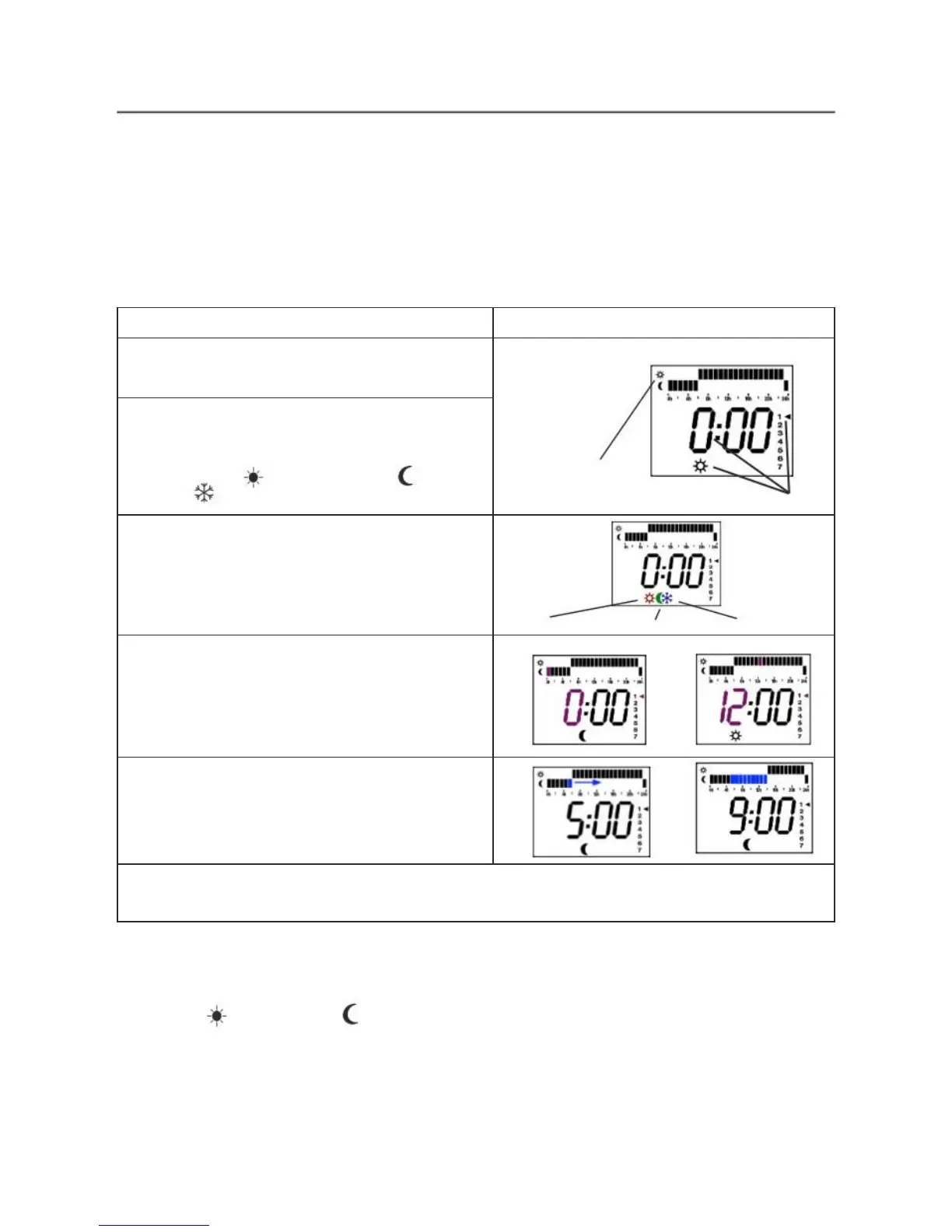
4. Setting Your Own Programme
It is a good idea to write down your desired programme before you start.
(Please note: In programming mode if there is a delay you will be timed out and have to
start again, however it does save what you have entered up to that point).
Write down when you require ECONOMY temperature (e.g. at night or when you are out
at work) and also when you want COMFORT temperature (e.g. on a morning when you
get up and on an evening when you get home from work). (We don’t recommend using
frost in the programming).
a.
Switch the radiator off by pressing the
ON
but-
ton. The time or --:-- will be displayed.
Screen --:-- or hour : minutes and, after long press :
Top: Comfort
Bottom: Economy
Nothing: Antifreeze
FLASHING
b.
Press and HOLD down the
ON
button for
approx. 7 seconds until the screen changes to
what you see opposite.
The bottom sun Symbol may be a moon
or a frost
icon.
Programming always starts at midnight Sunday
night coming into Monday morning.
c.
Select the type of operation of the current selec-
ted hour and day by pressing the
OK
button.
CONFORT --> ECONOMY --> ANTIFREEZE
d.
Select the hours without modification by pres-
sing + & - button (long press to go faster)
Exceed 23:00 to switch to next day at 00:00
e. A utomatically copy / paste forward mode from
current selected hour to next hours with + & - button
pressed together.
Long press + & - buttons to copy / paste repetitively
f.
To quit the setting programming mode, press
ON
button or exceed 23:00 at the last day.
Change the time if required or validate to return to the off position
OK - Now switch the radiator on using the ON button. The radiator will come on in
whatever mode it was on before it was switched off.
Pressing OK MODE button will change the mode of operation between:
COMFORT - ECONOMY
- PRO (User Defined Programme) - PRO1 - PRO 2 - PRO 3
NOTE - PRO1/PRO2/PRO3 are pre-set and not configurable. Also, these only appear when
the time has been set.
Leave on PRO. The screen will flash between PRO and the current mode & temperature for
the time as programmed. This is normal.



 To Next Page