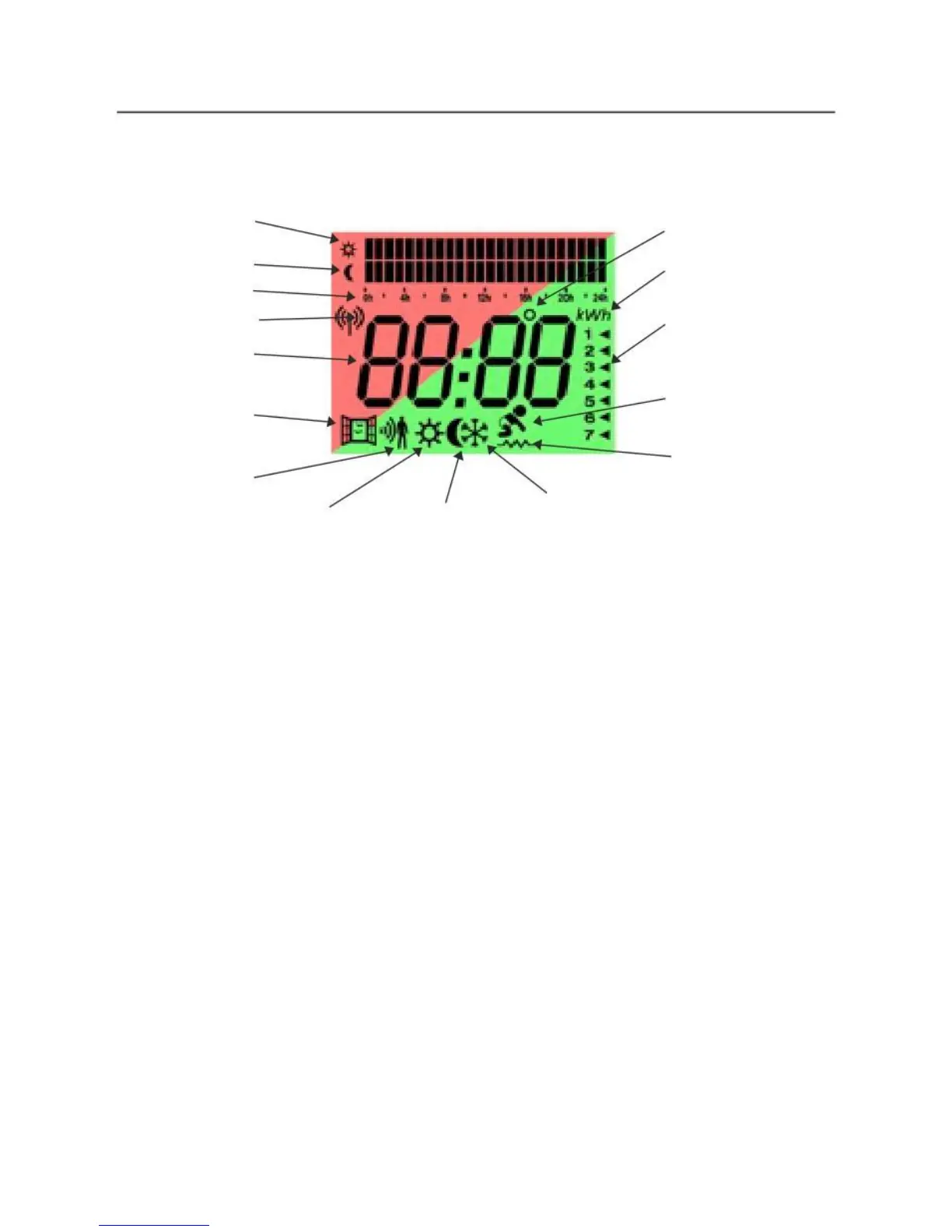
Information on Display and Control Panel
Display
Programming
Comfort
Programming
Economy
Hours of
Programming
Mobile connection (*)
Time & Temperature
Window Opening
Detector Symbol
Motion Sensor
Indicator
Comfort Mode Economy Mode
Control P anel
Indicator degrees
Indicator of Power
Consumed
Days Of The Week
For Programming
Babycare Function
Heating Activated Indicator
Anti-Frost Mode
(*) Only for models Curvo+ iVISTA and
Prisma+iVISTA
+/-:
To change the temperature, change the time, day of week.
OK/Mode:
Press to confirm or terminate the actions, set the mode of operation
(in programming mode) and change the operating mode:
(Comfort/Eco/Anti-frost/Pro/Pro1/Pro2/Pro3)
ON/ OFF /PROG:
Press to turn On or Off (Standby), and also to go into
programming mode.



 To Next Page