18
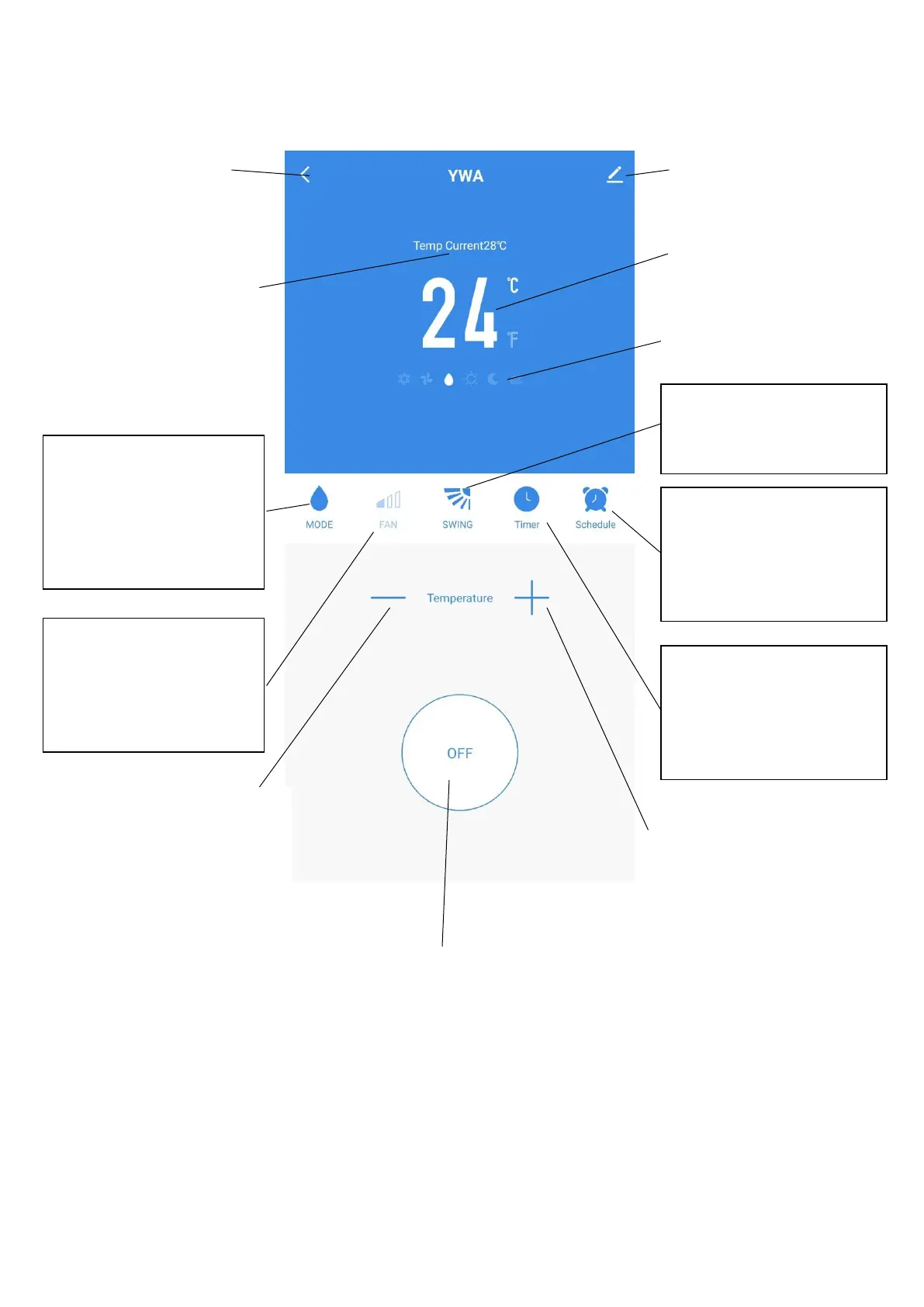
DEVICE SCREEN
The device screen is the main control screen for the air conditioner, providing access to the controls to
amend the functions and settings
*Due to continuous development of the app, the layout and available features may be subject to change.
ON / OFF Button: Use to
turn the unit on or off.
Edit Name: Use to
change the name of the
air conditioner.
Desired Temperature UP
Button: Use to increase the
desired temperature.
Current Room
Temperature: Displays the
current room temperature
Back: Returns to the
Home Screen
Desired Temperature
Down Button: Use to
decrease the desired
temperature
MODE:
Change the operating mode
of the air conditioner
between Cooling, Heating,
Dehumidify and Fan
SPEED:
Use to change the Fan speed
between Low, Medium and
High. Note this cannot be
changed in dehumidify mode.
TIMER:
Use to add an off timer while
the unit is running, or an on
timer while the unit is
turned off
Desired Room
Temperature: Displays the
desired room temperature
Current Mode: Shows the
mode the air conditioner is
currently in.
Desired Temperature UP
Button: Use to increase the
desired temperature.
SWING:
Use to turn the oscillating
swing function on and off.
SCHEDULE:
Use to add a set a scheduled
operation. A number of
these can be combined to
specify automatic operation





 To Next Page