17
CONTROLLING YOUR DEVICE THROUGH THE APP
THE HOME SCREEN
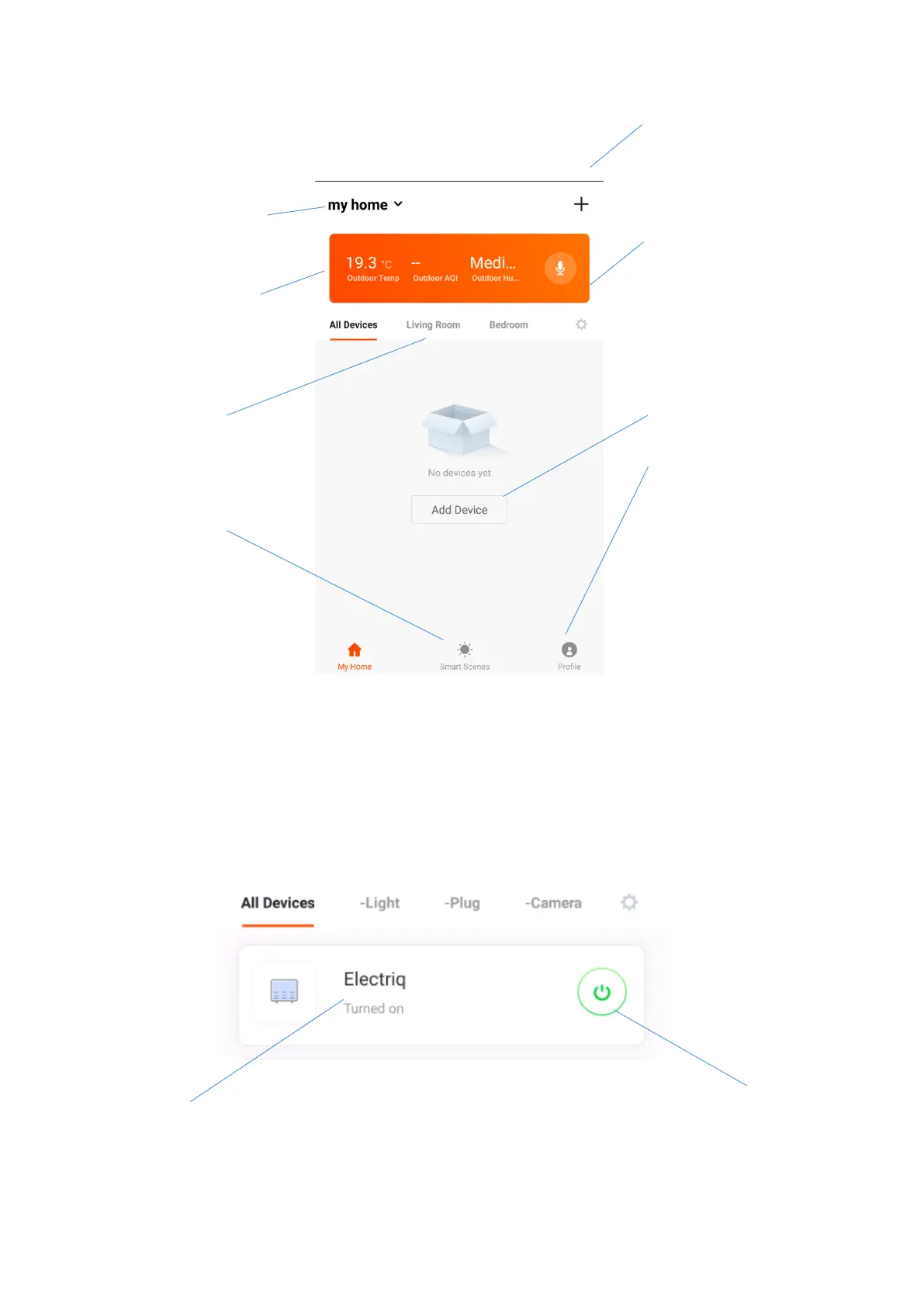
Each device has its own entry on the home screen to allow the user to either quickly turn the unit on or off,
or to enter the device screen to make other changes.
DEVICE SCREEN
Change Home: If you
have a number of units at
different houses, you can
change between them
Add Device: Add a device
to the app, and go through
the setup process.
Environmental
information: Provides
outdoor temperature and
humidity based on the
location details entered
Rooms: Use to view the
units set up within each
room
Smart Scene: Allows you
to program intelligent
behaviour based on the
internal and external
environment
Add Device: Add a device
to the app, and go through
the setup process.
Room Management:
Allows rooms to be added,
removed or renamed.
Profile: Provides the
option for changing
settings, and adding
devices using a QR code
provided by a friend.
ON / OFF Button: Use to
quickly turn the unit on or
off.
Name of Air Conditioner:
Press to enter the Device
Screen





 To Next Page