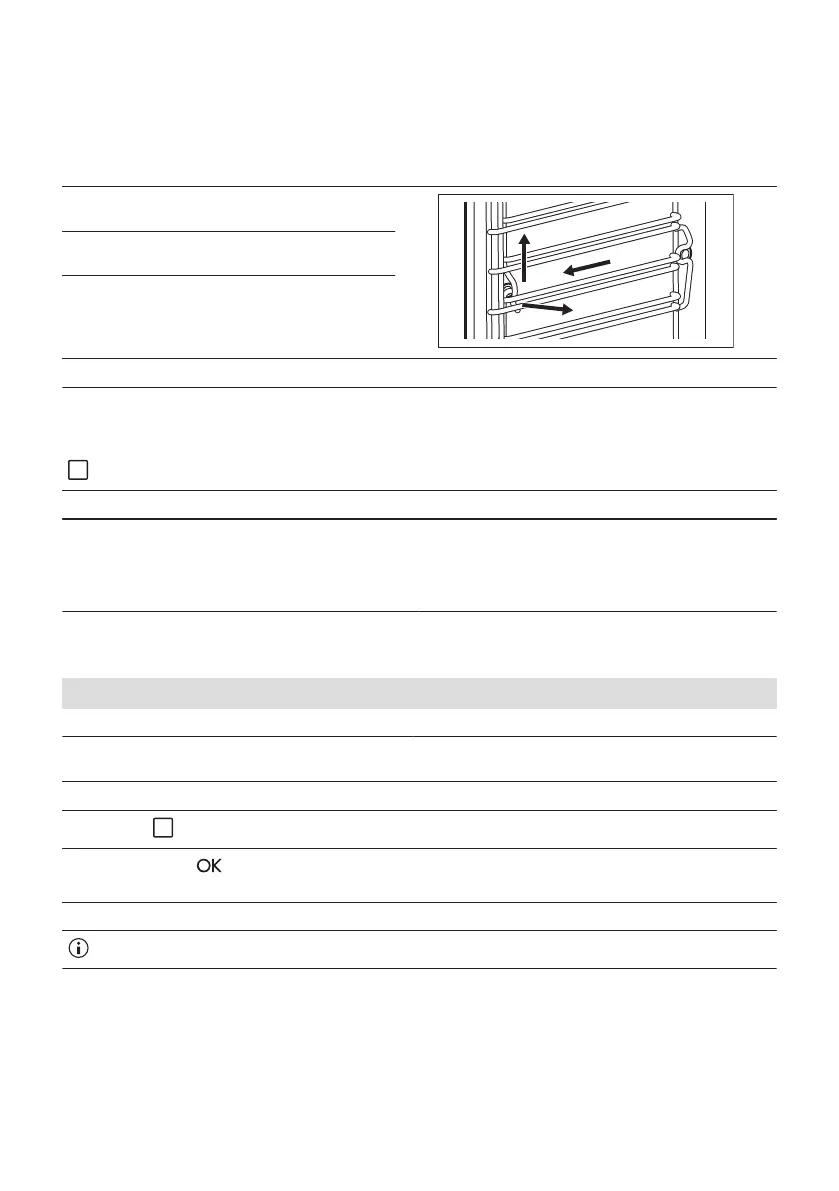
12.2 How to remove: Shelf supports
Remove the shelf supports to clean the oven.
Step 1 Turn off the oven and wait until it is cold.
Step 2 Carefully pull the shelf supports up
and out of the front catch.
Step 3 Pull the front end of the shelf support
away from the side wall.
Step 4 Pull the supports out of the rear
catch.
Install the shelf supports in the opposite sequence.
12.3 Submenu for: Cleaning
- press to enter the submenu.
S1 S2 S3 S4
Tank Emptying
To remove the residual
water from the water draw‐
er after use of the steam
functions.
Steam Cleaning
To clean the oven with
steam.
Descaling
To clean the steam gener‐
ation circuit from limestone
residue.
Rinsing
To rinse and clean the
steam generation circuit
after frequent use of the
steam functions.
12.4 How to use: Tank Emptying - S1
Before you start:
Turn off the oven and wait until it is cold. Remove all accessories.
Step 1 Turn on the oven.
Step 2 Place the deep pan on the first shelf position.
Step 3
- press repeatedly until the display shows S1.
Step 4
Press: .
Duration: 6 min
Step 5 When the function ends, remove the deep pan.
When this function works, the lamp is off.
42 ENGLISH



 To Next Page