71
6204
18
19
6204
6204
21
6580
22
I/O modules
18
19
20
CODE:
10103554
YOUR PASSWORD
0000
ADDRESS I/O BOARD
10.01.00.00
I/O BOARD 1
I/O BOARD 2
I/O BOARD 3
I/O BOARD 4
I/O BOARD 5
Addressing I/O modules
AfterreplacinganI/Omoduleorininstances
where a second module has been added to a
washing machine, the new I/O module must be
addressedinordertoactivateitsfunctionop-
tions.Thefunctionoptionsofthemoduleare
controlledbytheparametersoftwareloadedon
the relevant program device.
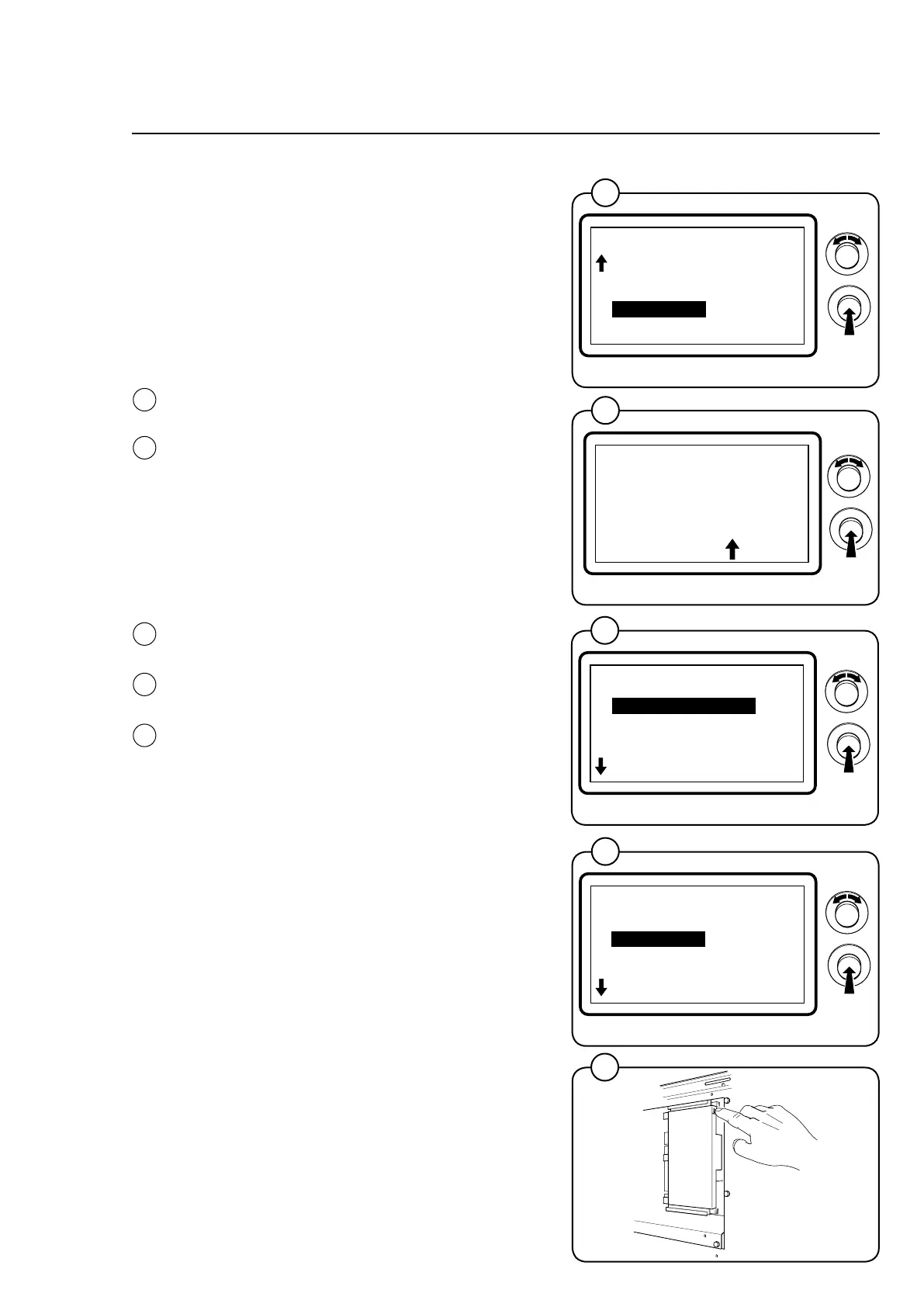
• Engagethemachine'sservicemode.
• HighlighttheI/OADDRESSlineinthemain
menuandpresstheknob.
Thedisplaywillnowshowan8-digitcode.
• Callauthorisedserviceandquotethecode.
Authorisedservicewillthenassignapasscode.
• Enterthecodeyouhavebeengivenand
presstheknob.
TheI/OADDRESSmenuwillappearinthedis-
play.
• SelectwetheranI/Omoduleshallbeaddres-
sed or removed.
• Ifaddressed,highlighttheI/Omoduleand
presstheknob.
• PresstheserviceswitchontheI/Omodule
indicated in the display.
• WheremultipleI/Omodulesaretobeaddres-
sed,repeattheprocedurefortherelevant
modules.
• Exittheserviceprogram.
• Ifremoved,followtheinstructionsonthe
screen and press the service switch on the
I/O module to be removed.
• WheremultipleI/Omodulestoberemoved,
repeattheprocedurefortherelevantmodu-
les.
• Exittheserviceprogram.
21
MAIN MENU
08.00.00.00
RESET TO FACTORY
ACTIVATE WASH PROGR.
QUICK START BUTTONS
I/O ADDRESS
PRICE PROGRAMMING
EXIT
6204
20
22
I/O ADDRESS
10.01.00.00
ADDRESS I/O BOARD
REMOVE I/O BOARD
EXIT



 To Next Page