9
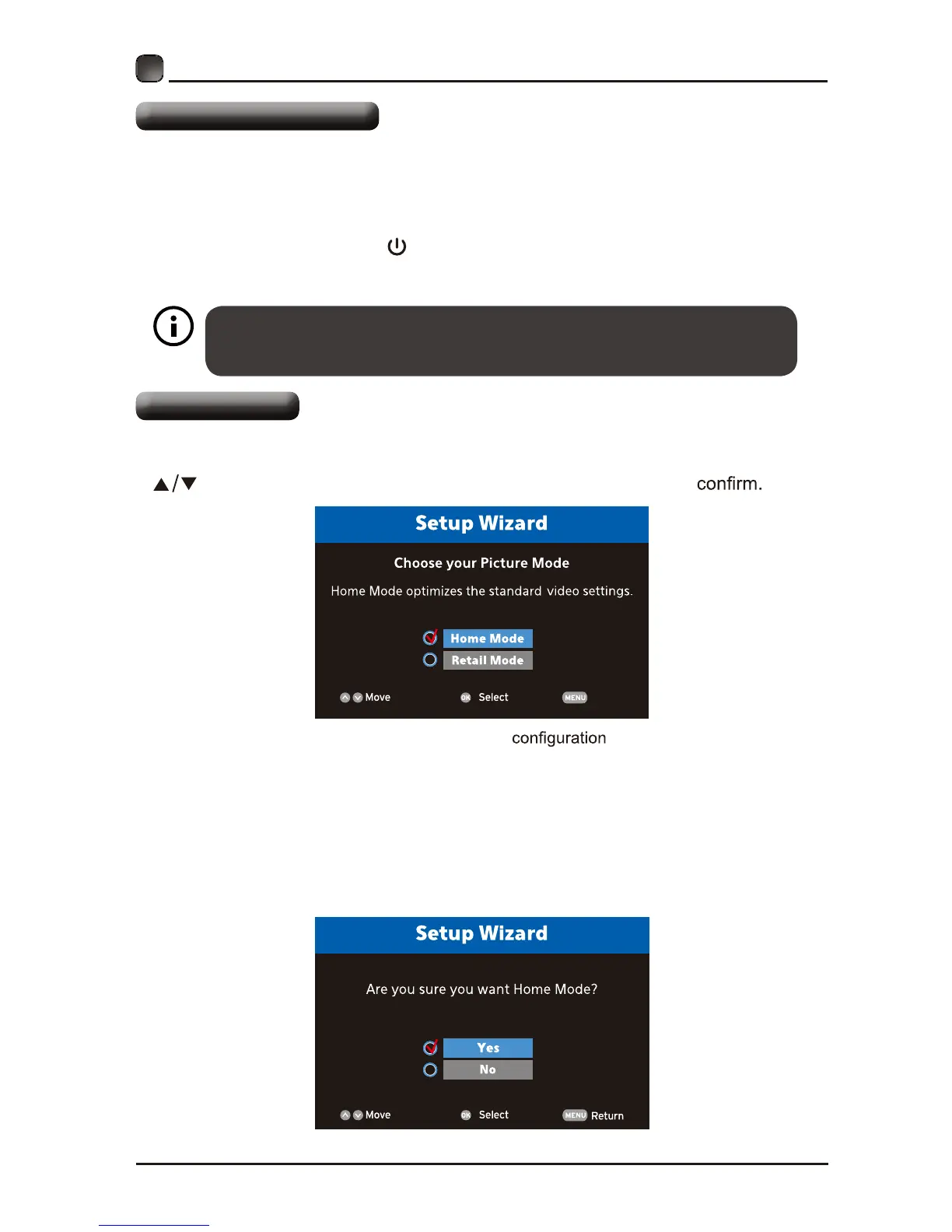
Setup Wizard
CUSTOMIZING TV SETTINGS
Turning On/Off Your TV
• Connect the power cord to the power socket after yo u have completed all the
physical connections. At this stage, the TV will enter Standby Mode and the red
LED indicator will illuminate.
• In Standby Mode, press the
button on the main unit or on the remote control to
turn the TV on. The red LED indicator will turn blue.
The POWER button on the main unit or on the remote control can only
switch the TV into standby. To completely turn off the TV, please disconnect
the power cord from the power socket.
• eht sserP .draziW puteS eht otni og lliw ti ;no VT eht nrut uoy emit tsrif ehT
buttons to select your desired mode and press OK button to
Home Mode is the default as-shipped television and settings.
Home Mode :The picture mode will be Standard if you select this mode.
Retail Mode:Select Retail Mode if you would like your picture to be brighte r.At ti mes this
mode may use more energy to operate the Volume/Sound mode and the Picture Mode.
The On-MODE Power under Home Mode should be less than 143 W.
The SLEEP-MODE Power should be less than 0.5 W.
Exit


 To Next Page