19
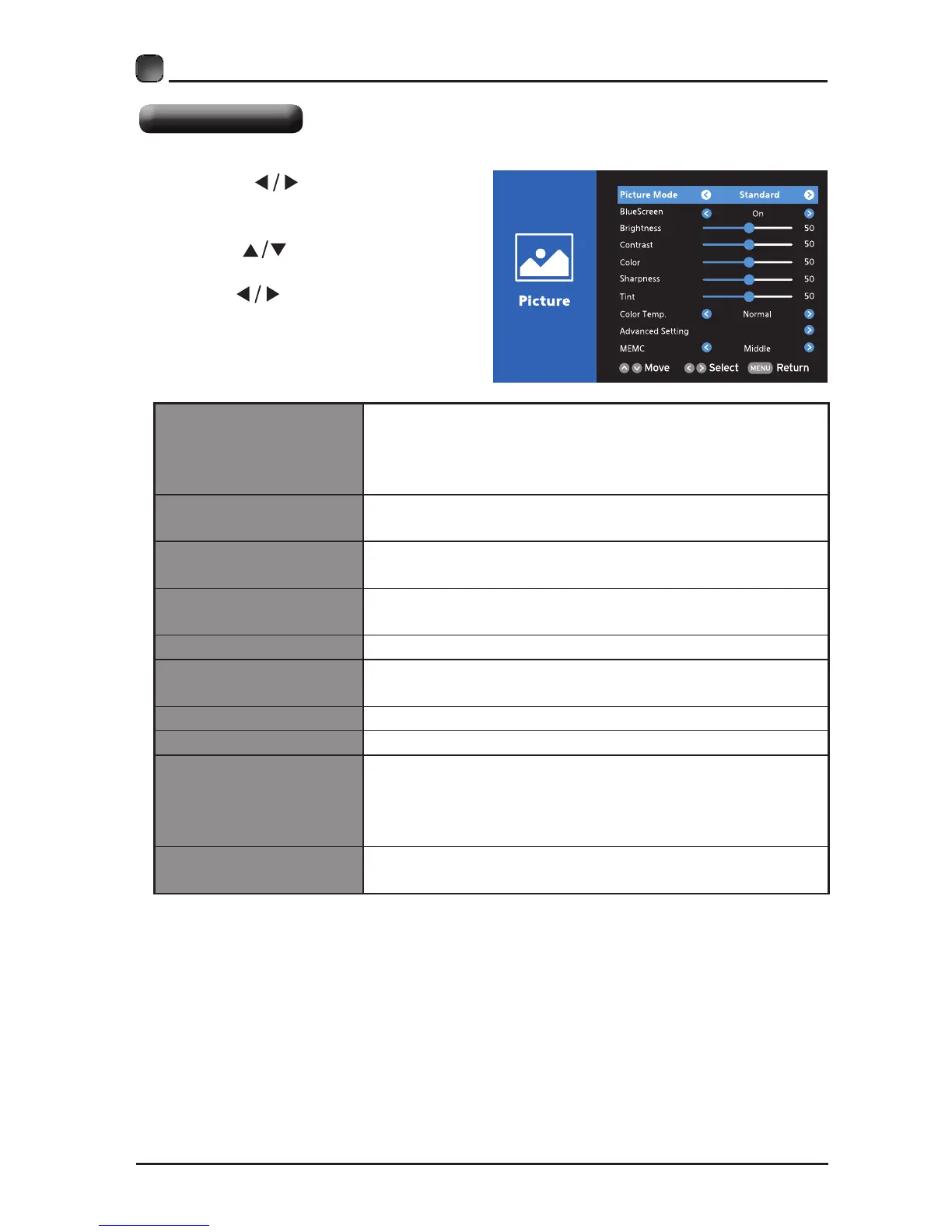
Picture Settings
• Press the
buttons to select
Picture menu and then press the OK
button to enter.
• Press the
buttons to select the
following picture options and then
press the buttons to adjust each
option’s setting.
Picture Mode
Cycle among picture mode: Dynamic/Movie/User/
Standard.
Alternative: you may press the P.MODE button to
select the picture mode directly.
Blue Screen
Allow the blue background to turn On/Off during weak
or no signal conditions.
Brightness
Increase or decrease the amount of white in the
picture. (For User mode)
Contrast
Adjust the difference between light and dark levels in
the pictures. (For User mode)
Color Control the color intensity. (For User mode)
Sharpness
Adjust the level of crispness in the edges between
light and dark areas of the picture. (For User mode)
Tint Adjust the balance between red and green levels.
Color Temp. Cycle among color temperatures: Cool/Normal/Warm.
Advanced Setting
Color Space: To adjust the following settings: Color
Mode, Color, Hue, Saturation, Brightness and Reset.
White Balance: To adjust the settings of white
balance.
MEMC
Cycle among Motion Estimate and Motion
Compensation modes:Middle/High/Off/Low.


 To Next Page