15
System settings
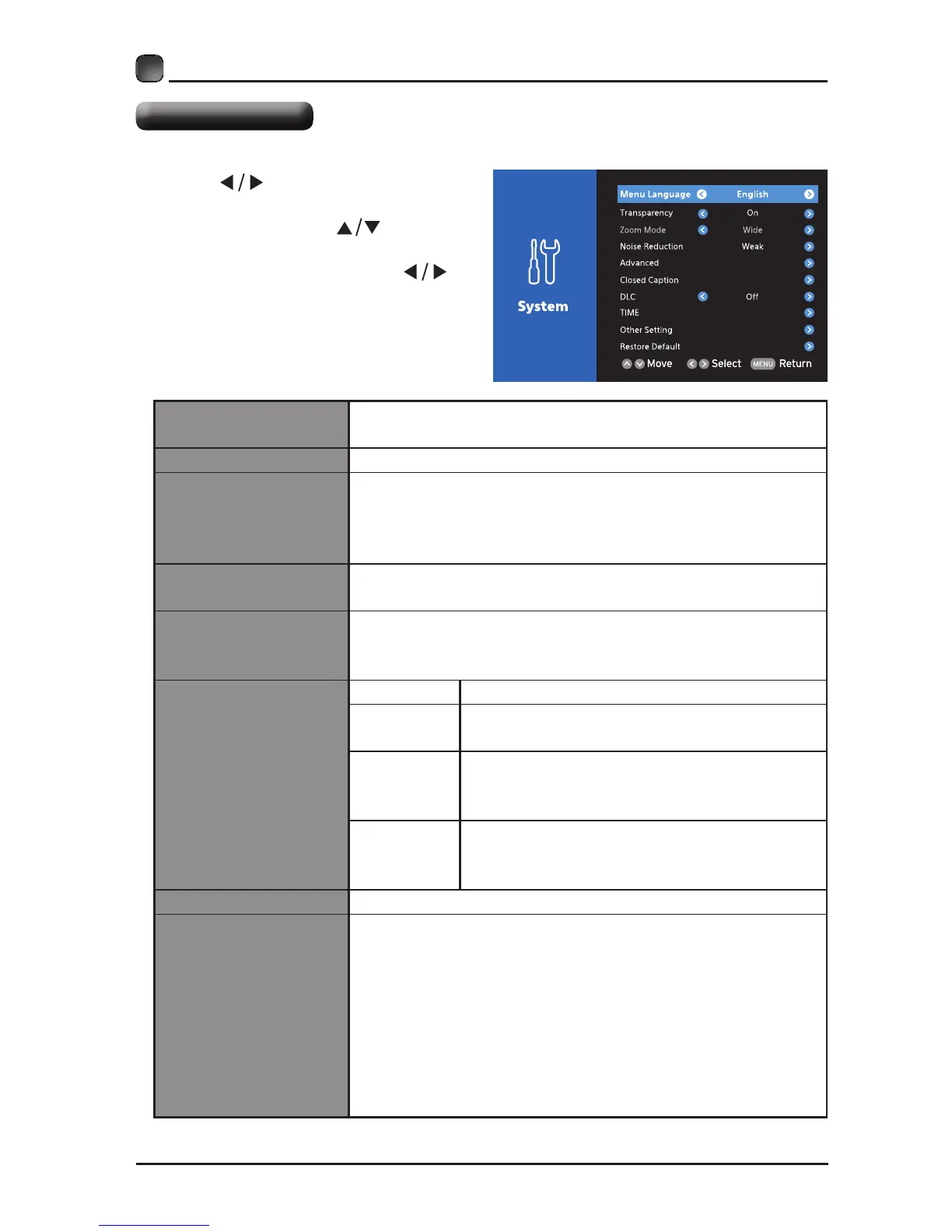
• Press
buttons to select
System menu and then press OK
button to enter. Press buttons
to select the following setting
options and then press
buttons to adjust each option’s
setting.
Menu Language
Select menu language : English, French or Spanish.
The default on-screen menu language is English.
Transparency Select to turn On/Off transparency function.
Zoom Mode
Select zoom mode : Wide/Wide Zoom/Zoom/Standard/
JustScan(HDMI).
Note: Different input source, the zoom mode options
may differ.
Noise Reduction
Reduce the noise level of the connected device: Off/
Weak/Middle/Strong.
Advanced
Adjust advanced option’s setting: Horizontal Pos.,
Vertical Pos., Clock, Phase or Auto. (VGA source mode
only)
Closed Caption
CC Mode Select CC mode : On, Off or CC on Mute.
Basic
Selection
Basic Selection: CC1, CC2, CC3, CC4,
Text1, Text2, Text3, Text4.
Advanced
Selection
Advanced Selection: Service1, Service2,
Service3, Service4, Service5, and
Service6.
Option Options: Mode, Font, Size, Edge Effect,
Edge Color, Text Color, Background Color,
Text Opacity, Background Opacity.
DLC Select to turn On/Off the dynamic luminance control.
Time
Sleep Timer:Select a period of time after which
the TV automatically switches to standby mode:
Off/5/10/…/180/240 min. Alternative: You may press
the SLEEP button repeatedly to select the number of
minutes directly.
Time Zone:SelectaTimeZone:Hawaii/Alaska/Pacic/
Mountain/ Central/ Eastern/ Atlantic/ Newfoundland.
Daylight Saving Time:Select to turn On/Off daylight
saving time.
CUSTOMIZING TV SETTINGS


 To Next Page