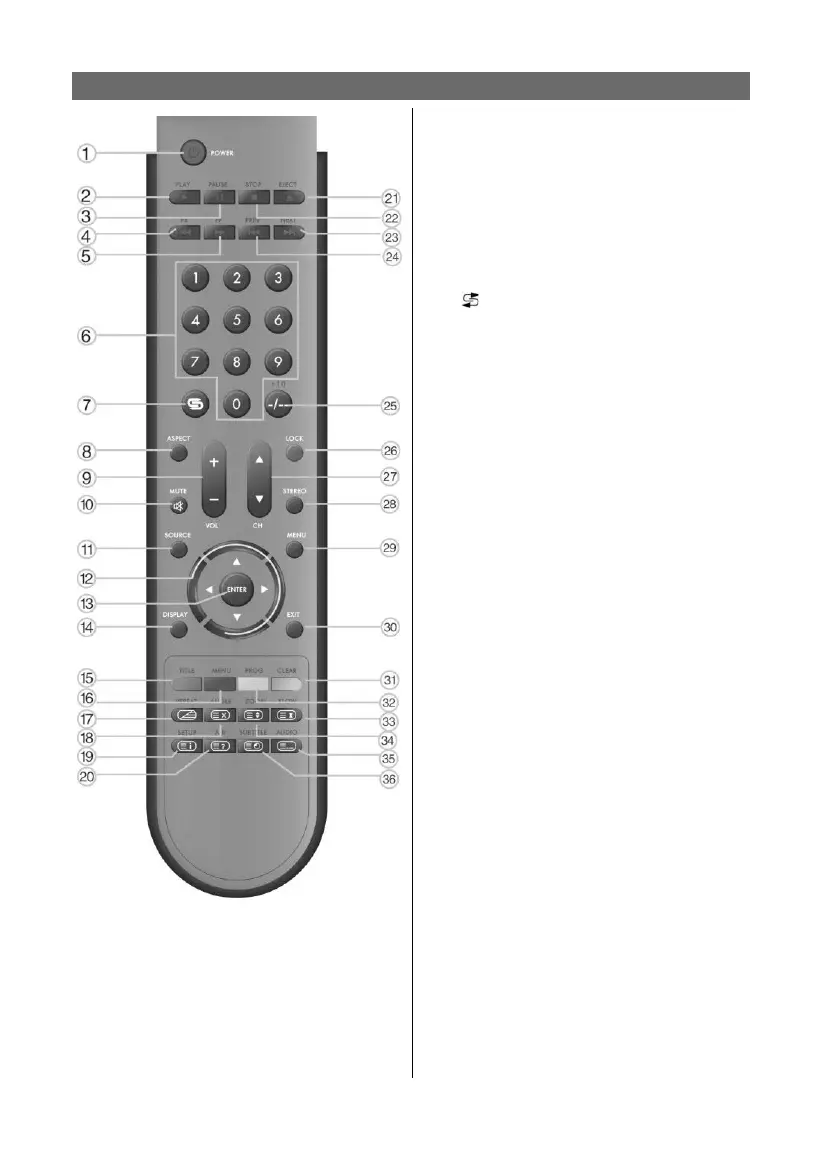
52
REMOTE CONTROL
1. POWER button:
Press to enter or exit standby mode
2. PLAY button:
Press to play a disc when in the DVD
mode.
3. II PAUSE button:
When in DVD mode, press to pause play-
back. Press the ▶PLAY button to resume
normal playback.
4. ◀◀ button:
Press to search backward fast when in
DVD mode.
5. ▶▶ button:
Press to search forward fast when in DVD
mode.
6. 0~9 Number buttons:
Press to select numbers such as TV
channel.
7.
button:
When in TV mode, press to return to the
channel previously viewed.
8. ASPECT button:
This button is not available.
9. VOL+/- button:
Press to increase or decrease the volume.
10. MUTE button:
Press to turn on or off speaker output.
11. SOURCE button:
Press to select the mode such as: TV,
SCART, COMPOSITE, S-VIDEO, COMPO-
NENT, VGA or DVD.
12. Direction buttons (▲▼◄►):
12. Direction buttons (▲▼◄►):
In the setup menu, press the “▲▼” but-
ton to select a desired item and press the
“◄►” button to adjust.
13. ENTER button:
Press to confi rm your selection.
14. DISPLAY button:
Press to display current operational
mode.
15. TITLE button:
When a DVD is playing, press the “TITLE”
button to go to the title menu and display
disc contents.
Under teletext mode, it’s the teletext color
button.
16. MENU button:
Press to enter or exit the disc menu when
in DVD mode.
Under teletext mode, it’s the teletext color
button.
17. REPEAT button:
Press to repeat a chapter, track, title or all
program content when in DVD mode.
Under TV, COMPOSTIE, S-VIDEO or SCART-
CVBS mode, press to display/close the
teletext.



 To Next Page