55
SYSTEM CONNECTIONS
Before you begin:
Gently open the back cover to expose the battery compartment by pressing the tab
(shown).
• Before connections, disassemble the jack cover fi rst.
• Do not connect the power cord until all other connections to this player have been
made.
• Ensure that you observe the color coding of cables when connecting audio and video
devices.
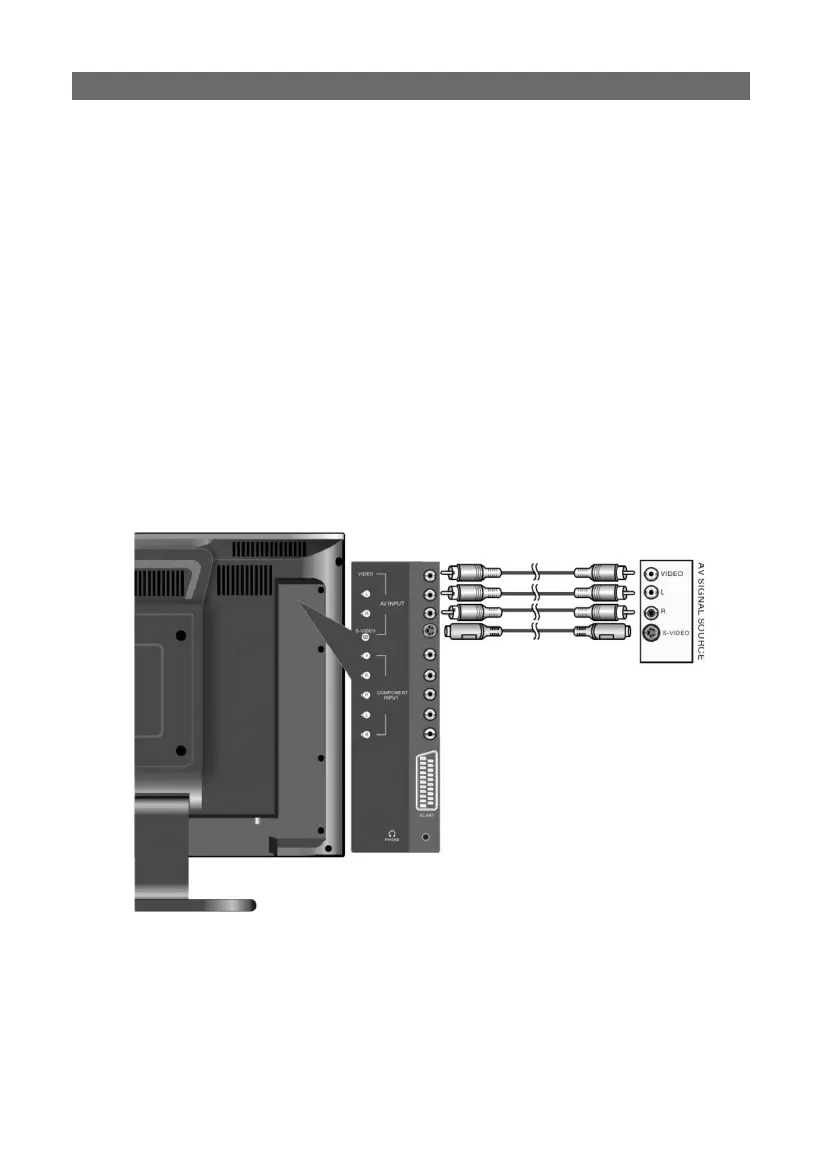
connecting to external A/V sources:
connecting to external A/V sources:
• Use audio-video cables (composite RCA) to connect the A/V input jacks on the rear
panel of the unit to an external AV signal source.
• Use S-VIDEO cable to connect the S-VIDEO input jack on the rear panel of an external
A/V signal source compatible with S-VIDEO output.
• Following connection, turn on the power of the unit and the external A/V signal source;
press the SOURCE button to shift to COMPOSITE or S-VIDEO mode. Your source should
now be displayed.
PLEASE NOTE:
L/R audio input jacks can be used for COMPOSITE and S-VIDEO mode. When using S-
VIDEO input however, improved picture resolution is possible.



 To Next Page