71
The unit support NICAM function under TV mode.
Under NICAM TV broadcast:
Under NICAM TV broadcast:
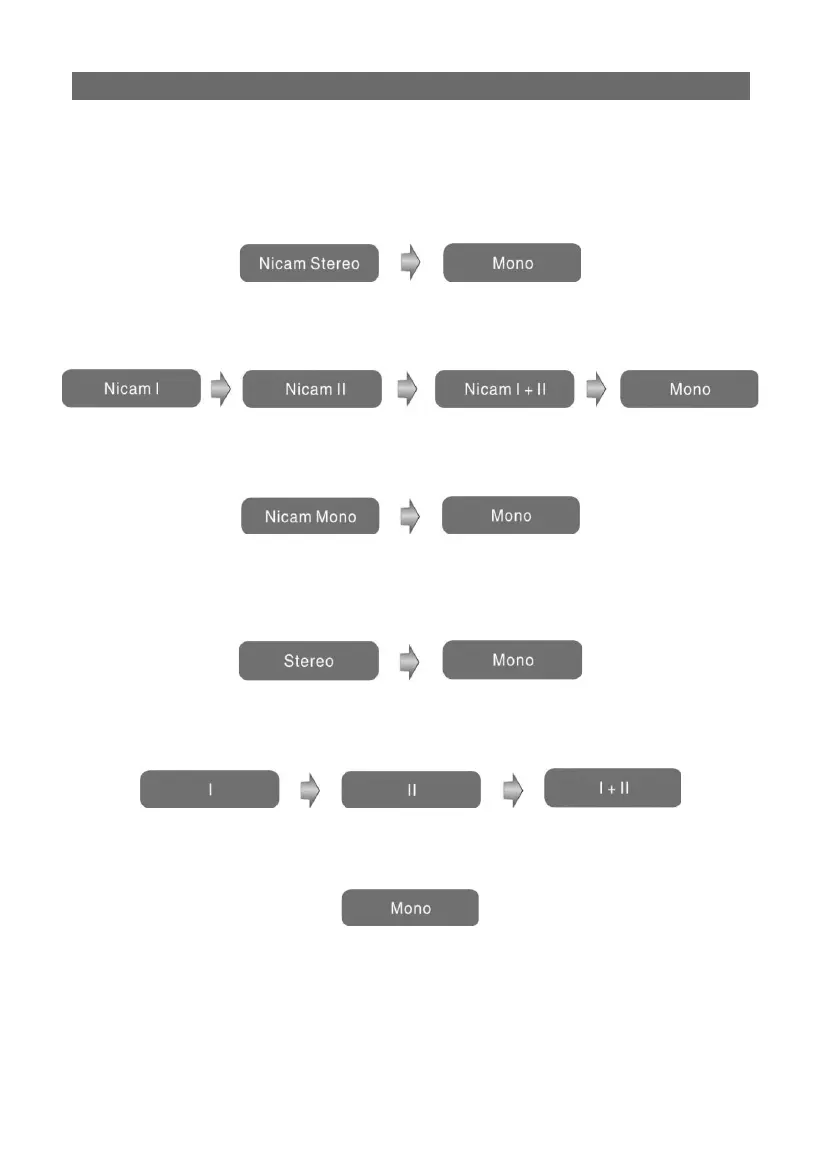
1. When receiving stereo audio signals, press the STEREO button on the remote con-
trol repeatedly to shift the sound tracks between Nicam Stereo and Mono and the screen
will appear corresponding display as shown below:
2. When receiving bilingual audio signals, press the STEREO button on the remote
control repeatedly to shift the sound tracks among Nicam I, Nicam II, Nicam I+II and
Mono and the screen will appear corresponding display as shown below:
3. When receiving mono audio signals, press the STEREO button on the remote con-
trol repeatedly to shift the sound tracks between Nicam Mono and Mono and the screen
will appear corresponding display as shown below:
Under A2 TV broadcast:
1. When receiving stereo audio signals, press the STEREO button on the remote con-
trol repeatedly to shift the sound tracks between Stereo and Mono and the screen will
appear corresponding display as shown below:
2. When receiving bilingual audio signals, press the STEREO button on the remote
control repeatedly to shift the sound tracks among I, II and I+II and the screen will ap-
pear corresponding display as shown below:
3. When receiving mono audio signals, press the STEREO button on the remote con-
trol to display sound track Mono on the screen.
NICAM FUNCTION



 To Next Page