54
REMOTE CONTROL
start using your remote:
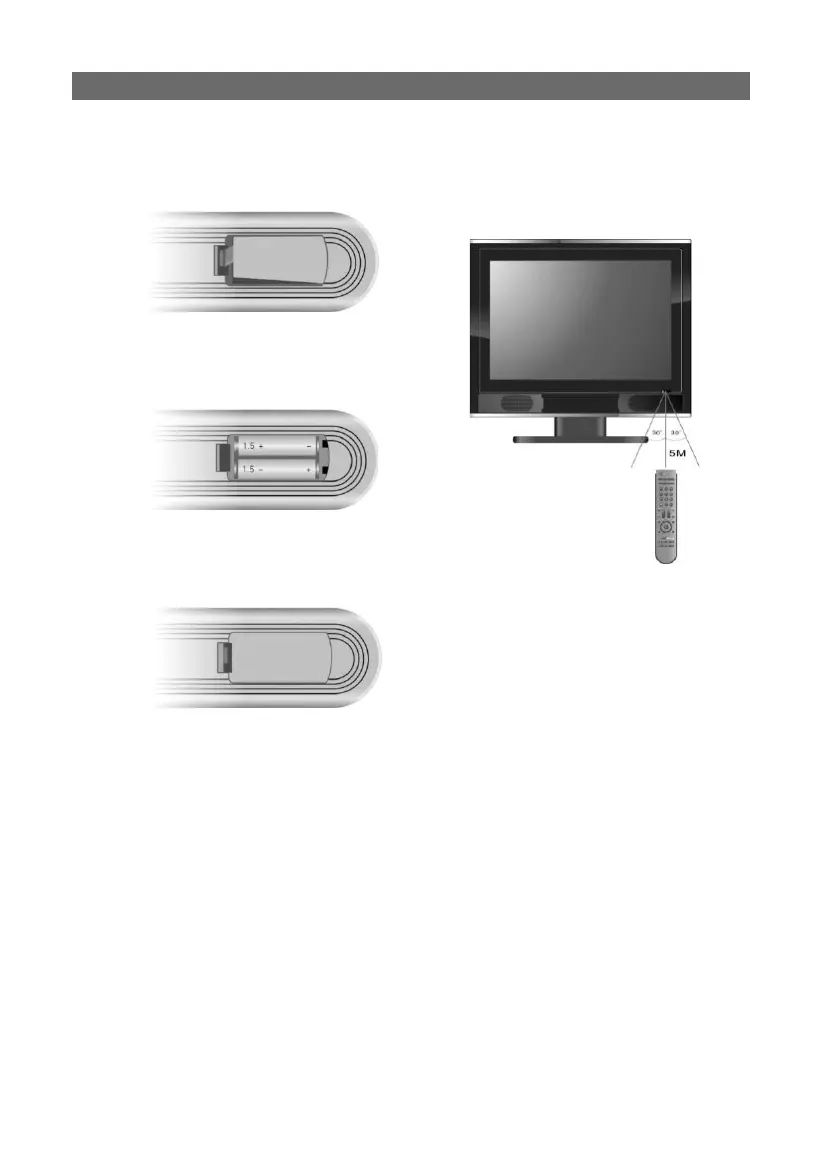
Gently open the back cover to expose the
battery compartment by pressing the tab
(shown).
Insert two batteries (1.5V, size AAA),
making sure the polarity matches the dia-
gram inside the battery compartment.
Gently return the back cover to close; do
not force the door shut or it could break
the tab.
● Under normal conditions the battery
should last for up to six months.
● Please remove batteries when the re-
mote is not in use for extended periods
to prevent damage from battery leakage
or corrosion of electrical terminals.
using your remote control:
using your remote control:
Aim the remote control unit from no
more than approximately 5 meters from
the remote control sensor on the LCDTV/
DVD player, and within a 60 degree arc of
the front of the unit.
PLEASE NOTE:
• Operating distance may vary depending
on the ambient light conditions of your
use location. Please experiment with
various distances and angles depending
on installed location.
• Do not aim bright light directly at the re-
mote control sensor, which can reduce
its effi cacy.
• Do not place objects between the remote
control unit and the remote control sen-
sor, which could block the IR signal.
• Do not use this remote control unit while
simultaneously operating the remote
control unit of other equipment.



 To Next Page