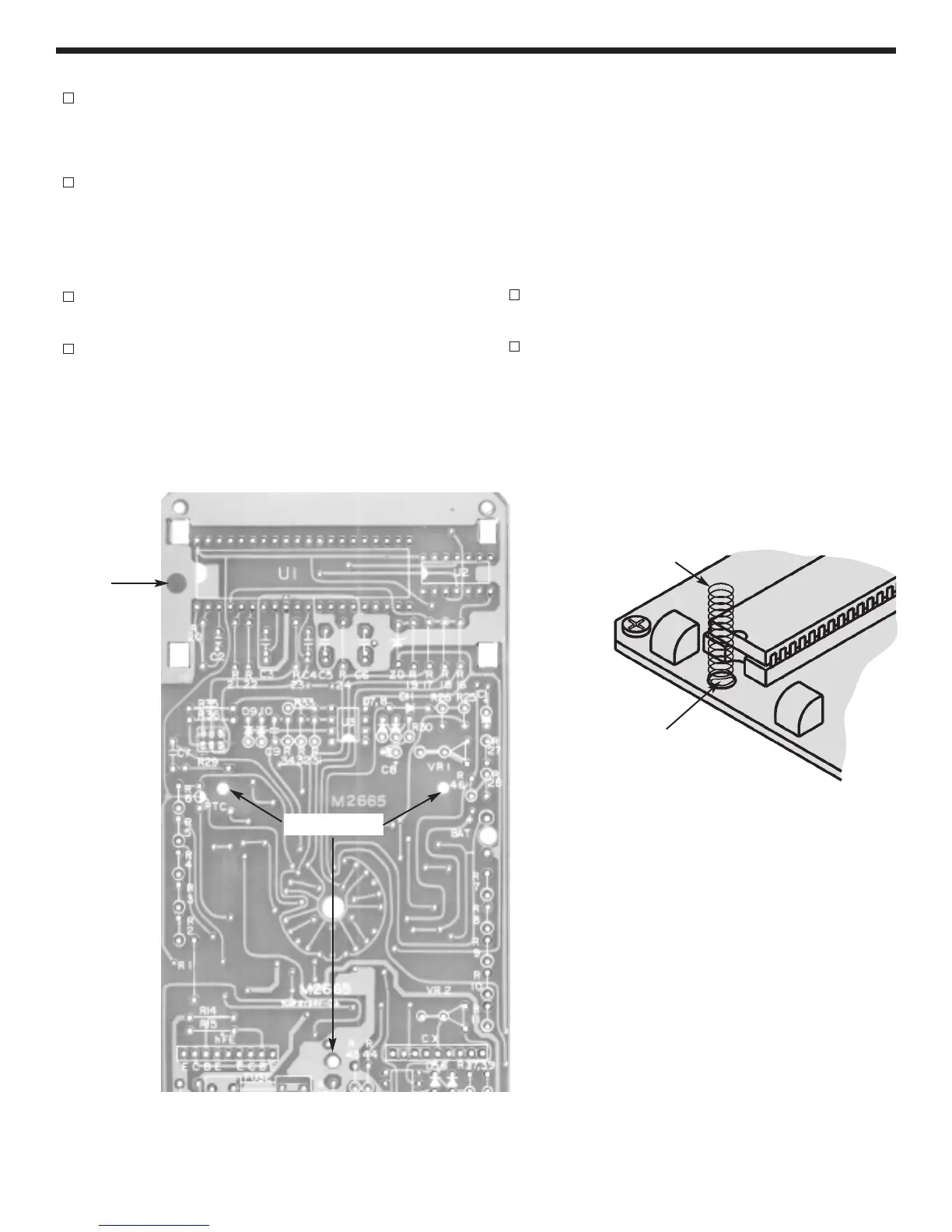
Solder the spring to the PC board as shown in
Figure Ja.
See Figure K for the following steps.
Peel off the protective backing on the top plates
(A) and (B) and stick them to the top case. Peel
off the protective backing on the battery cushion
and stick it onto the bottom case. (These may be
installed on the case already).
Turn the selector knob screw one full turn out as
shown in the figure.
Place the PC board on a standard piece of paper
(8 1/2” x 11”). Insert the two springs into the
holes on the range selector knob. Put grease on
top of the springs and then place a ball bearing
on each spring. Press the top case onto the PC
board. Using both hands, slide your fingers
under the paper. Press your thumbs down on the
top case and then flip the board. Be sure to hold
the PC board to the case firmly or the ball
bearings will fall out. Fasten the PC board to the
top case with three M2.3 x 6 screws in the places
shown in Figure J.
Connect the battery and place it in the cavity of
the top case.
Place the bottom case onto the top case. Hold
the two sections together with two M3 x 12
screws.
-21-
FINAL ASSEMBLY
Spring
Pad
Screw Holes
Figure J
Figure Ja
Solder
Spring



 To Next Page