22
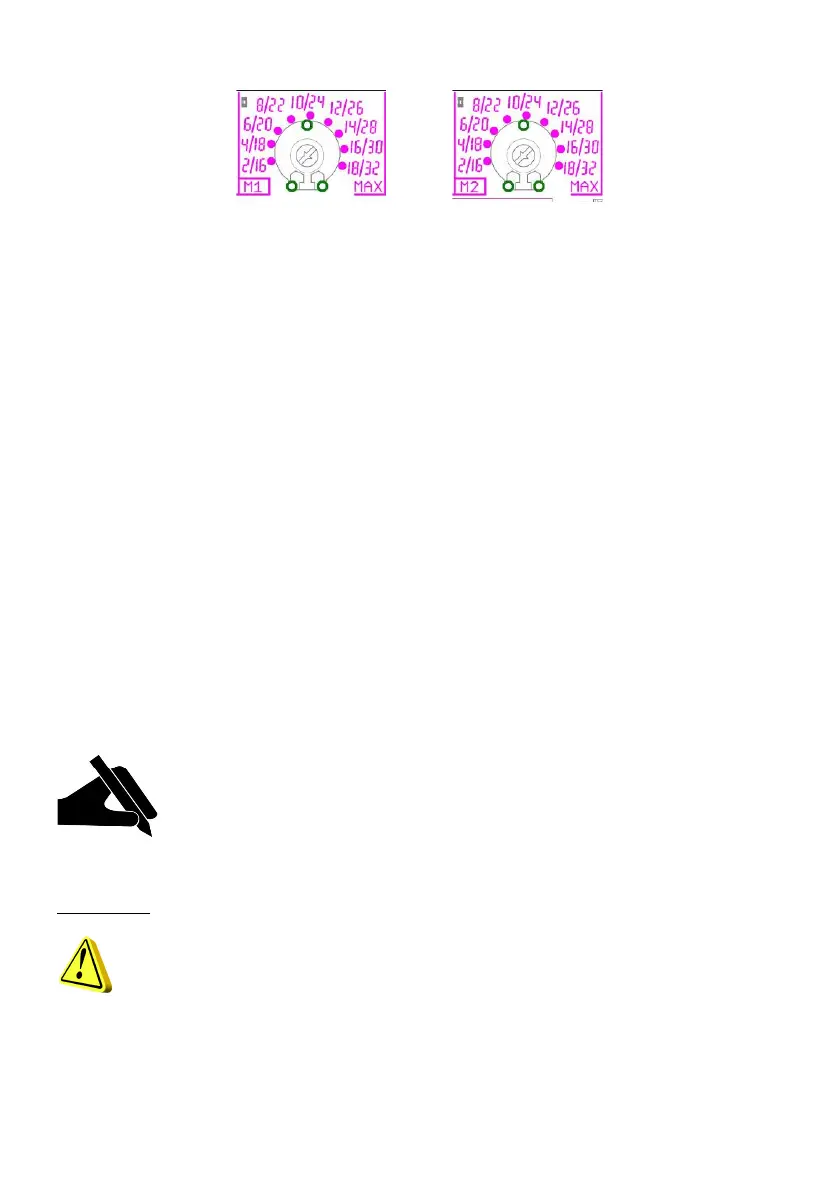
10.3 MAX TRIMMER - Activation on current overload
The "MAX" trimmer enables adjustment of the maximum motor current, over which the system
protection trips due to current overload.
The maximum current can be adjusted in two ways:
- Nominal motor current.
- Assisted calibration.
10.3.1 Nominal motor current.
If the nominal motor current is known, set a value higher by approx. 15%, according to the screen
printing of the board.
10.3.2 Assisted calibration
Press and hold the key “0” of motor 1 during power-up of the panel, and the green led on the “AUT”
key will start to flash.
Start up the motor using the “MAN” key and rotate the trimmer clockwise (starting from min. value),
until the red led for thermal switch turns on.
When lit, the red led indicates that the set current is 15% higher than the current absorbed by the
motor.
N.B.: To calibrate the maximum current, the motor must be started up with water
present.
The current scale is proportional to the power of the control panel:
1 to 18 Ampere or 15 to 32 Ampere.
CAUTIONS!
Always calibrate the trimmer in observance of the maximum current specified on the
electrical panel.
Exceeding the maximum specified threshold will automatically render the warranty null
and void.


 To Next Page