FAP User 5
The events are displayed according to the following priority:
• Zones in alarms (ZA)
• General faults (GF)
• Field faults (FF)
• Exclusion (EX)
• Group of points in alarm (GP)
• Group of zones in alarm (GZ)
• Maintenance (MN)
• Events related to SLAVE control panels (SP)
• Generic events (GE)
By using the keys ∧ and ∨ it is possible to change the type of event displayed (the > symbol on the right selects
the type of the event currently shown on the first two rows).
By using the keys < and > it is possible to go back and forth through the events of the selected type.
The selected event will be displayed at the top, while the most recent alarm event will be displayed at the bottom (if at
least one alarm is present) or nothing will be displayed.
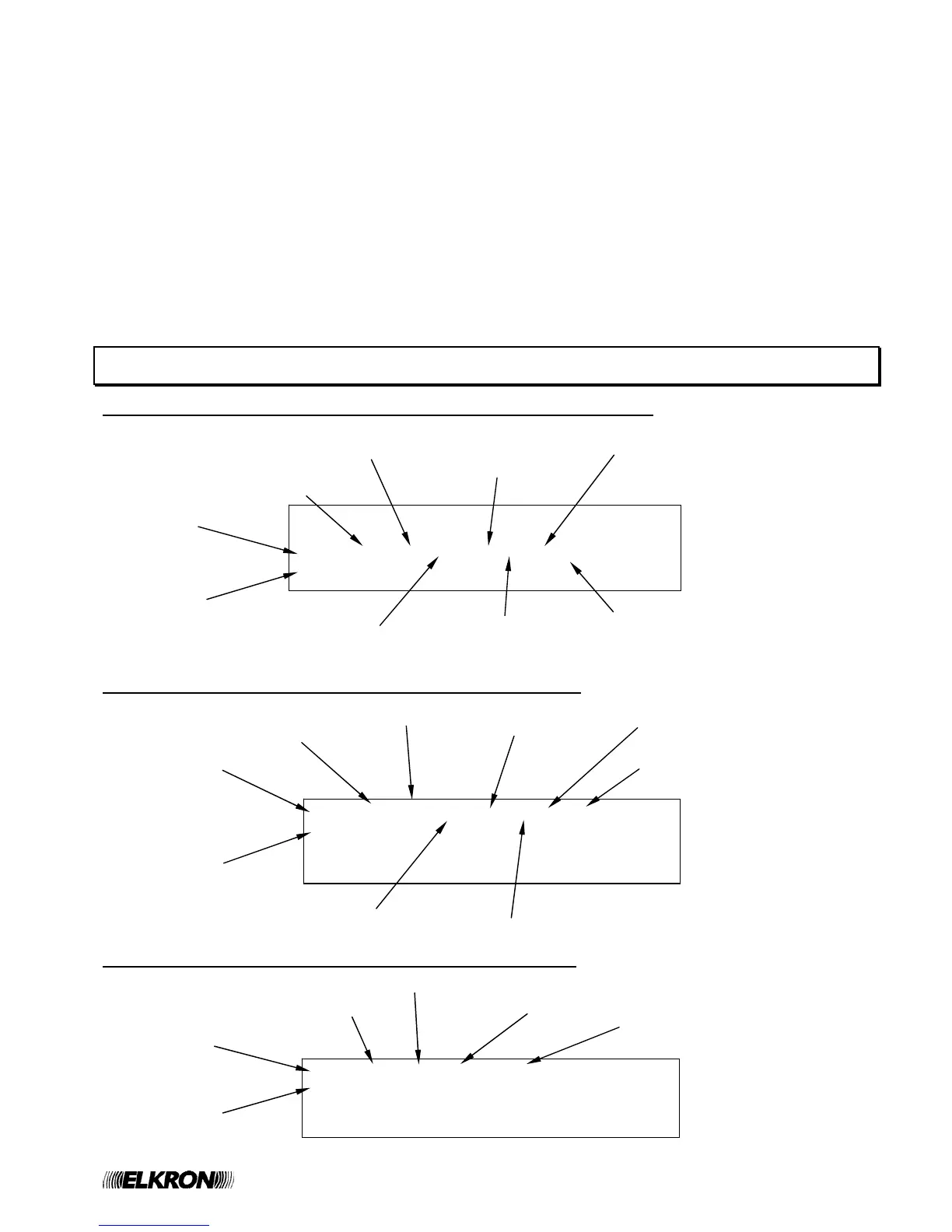
3 ALARM DISPLAY
Display of Zone Alarm generated by detector/pushbutton associated with zone
Display of alarm of group of points generated by an associated point
Display of alarm of group of zones generated by an associated zone
>ZA001
GF000
ALM Z110 D00 C01 P018 TP Q Axyy FF000
KITCHEN DETECTOR EX000
Zone delay
Point name
Alarm event indicator
No. of zone in alarm
Circuit of the point in alarm
Point type
(see appendix)
Point address
Point attributes
(see appendix)
Ax = service information
yy = alarm type (see appendix)
ALM G020 D00 C01 P018 TP Q Ax >GP001
KITCHEN DETECTOR GZ000
MN000
SP000
Point name
Alarm event indicator
Group number
Group delay
Circuit of the point in alarm
Point type (see appendix)
Point address
Point attributes
(see appendix)
Service information
ALM G025 D00 Z033 Ax GP000
BOILER ROOM >GZ001
MN000
SP000
Zone name
Alarm event indicator
Group number
Group delay
Zone in alarm
Service information


 To Next Page