ENGLISH
VARIOUS
FUNCTIONS
AND OPERATIONS
93
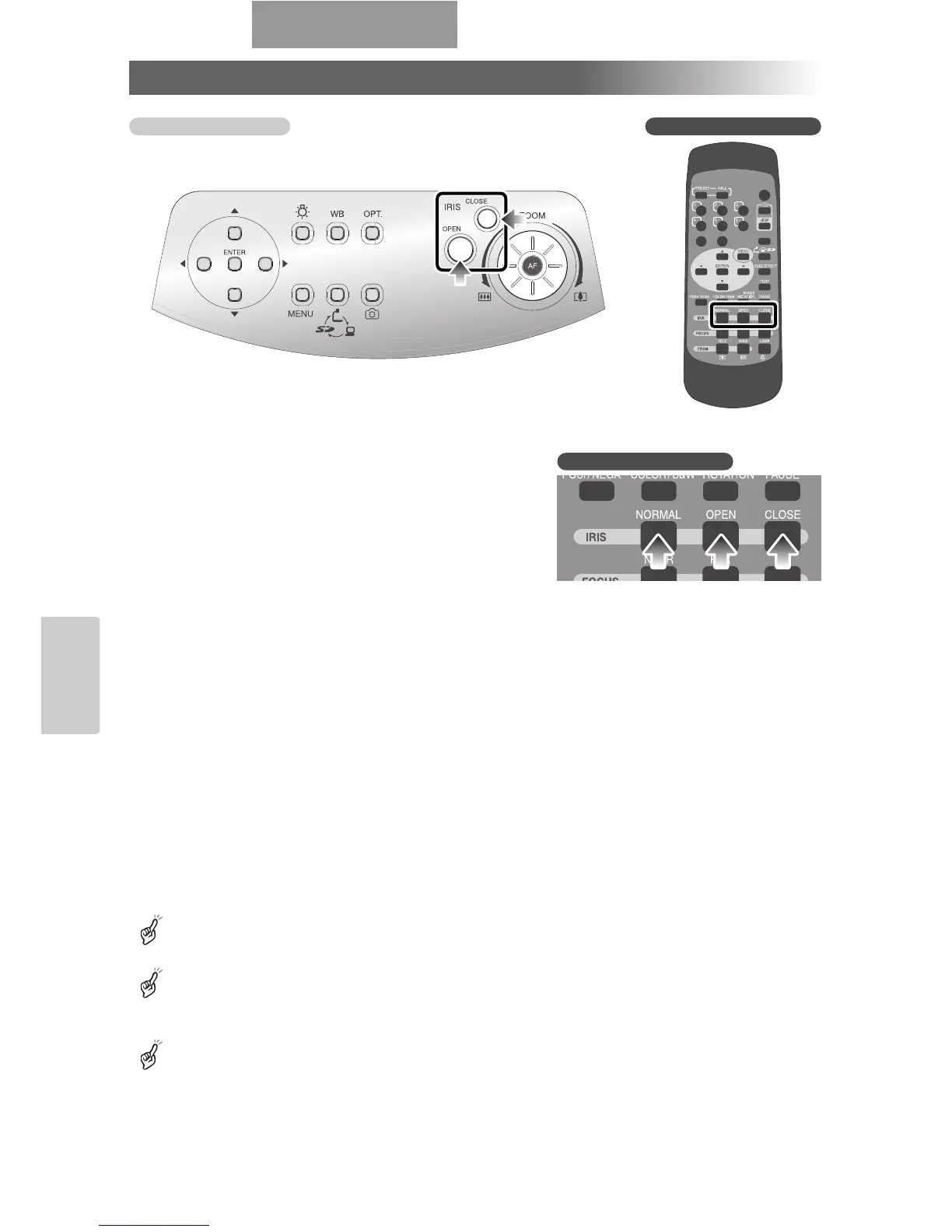
Iris
When the [IRIS
·
OPEN] button or [IRIS
·
CLOSE]
button on the front operating panel or wireless
remote control is pressed, the lens iris is adjusted for
image brightness. This adjustment can be made in
either of the following 2 modes, which are set in [Iris]
on the OSD:
■ Auto Brightness Adjustment
■ ([Iris] is set to [Auto] on the OSD.)
It is so set that the brightness to be tracked
automatically can be adjusted.
When the [OPEN] button and [CLOSE] button on
the front operating panel are pressed together or
[NORMAL] is selected in [IRIS] on the wireless
remote control, the current settings are reset to the
default settings.
■ Manual Brightness Adjustment
■ ([Iris] is set to [Manual] on the OSD.)
It is set so that the brightness can be locked to any
level.
The default setting is [Auto] (Auto Brightness
Adjustment).
In the Manual Brightness Adjustment, the brightness is
locked and the change in the object brightness is not
tracked.
When [Guide] is set to [ON] on the OSD, the setting
contents are displayed on the screen.
Front operating panel Wireless remote control
Wireless remote control



 To Next Page